jQuery (mb)Menu 2.7 (New!)
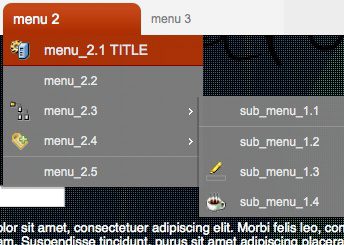
This is a powerful jQuery component to build easily a multilevel tree menu or a contextual menu (right click) in an intuitive way!
You can add as many submenus as you want; if your submenu or menu is not declared in the page, the component’ll get it via ajax calling the template page with the id of the menu you need (the value of “menu” attribute) the ajax page should return a well formatted code as the example below for the menu voices code.
go to the component page for the latest release
Dependencies:
optional: jquery.metadata.plugin
optional: jquery.hoverIntent.plugin
here is the js call:
$(".myMenu").buildMenu(
{
template:"menuVoices.jsp",
additionalData:"",
menuWidth:200,
openOnRight:false,
menuSelector: ".menuContainer",
iconPath:"ico/",
hasImages:true,
fadeInTime:200,
fadeOutTime:100,
adjustLeft:2,
adjustTop:10,
opacity:.95,
shadow:true,
closeOnMouseOut:true,
closeAfter:500,
minZindex:200,
hoverIntent:0
});
or you can call it as contextual menu:
(can’t work in opera due to a security restriction)
$(document).buildContextualMenu(
{
template:"menuVoices.html",
menuWidth:200,
overflow:2,
menuSelector: ".menuContainer",
iconPath:"ico/",
hasImages:false,
fadeInTime:200,
fadeOutTime:100,
adjustLeft:0,
adjustTop:0,
opacity:.99,
shadow:true,
onContextualMenu:function(o,e){}
});
params:
template:
is the ajax page that build this level menu structure ;
If the menu you are calling is not on the page, the component automatically will try to build it calling via Ajax the “template” page, passing the ID of the menu you call in the request (“menuId”).
The temlate page should be a dinamic page (php, jsp, aspx, …) that’ll build the menu from the ID param passed in the request.
If you are a beginner on javascript and coding in general just write your menu code directly on your page; it’s easyer!
additionalData:
are additional data needed to build the menu, by default it send the actual menuline id;
If you need some other params to be passed to the template page to build your menu you can set them here, writing them like: “pippo=1&pluto=false”;
openOnRight:
let the menus open on the right side instead bottom;
openOnClick:
define if the menu is opened by a mouse click or by a mouseover event;
hasImages:
define if the menu voices have images or not on its left;
menuSelector:
is the css class applied to each menu container of this menu context;
closeOnMouseOut:
the menu can be close either onclik on the window or just when your mouse exit the menu
closeAfter:
the time to whait befor close the menu (works just if closeOnMouseOut is set to true)
fadeInTime / fadeOutTime:
those params control the speed of the opening and closing fade effect.
hoverIntent: (New!)
this param sets the delay for the hover event; if set to 0 the hoverIntent function is not used.
To use this feature you have to include the jquery.hoverIntent plug in in your page!
submenuHoverIntent: (New!)
this param sets the delay for the hover event on submenu calls; if set to 0 the hoverIntent function is not used.
To use this feature you have to include the jquery.hoverIntent plug in in your page!
onContextualMenu:
A function invoked once each contextualMenu is called;
the function has either the dom element you clicked on, either the event:
onContextualMenu:function(o,e){
testForContextMenu(o);
},
here is the code for each menu header:
<!-- menu voices --><div class="myMenu"><table class="rootVoices" cellspacing='0' cellpadding='0' border='0'><tr>
<td menu="menu_12" >ajax menu 1</td>
<td menu="menu_2" >menu 2</td>
<td menu="menu_3" >menu 3</td>
</tr></table>
</div>
<!– end menu voices –>
and for each submenu:
<!-- example code --><div id="menu_1" class="menu"><a rel="title" >title menu_1.1</a> <!-- menuvoice title-->
<a href="../mb_carusel/carousel.html" target="_blank" img="image.gif" >menu_1.1 (href)</a> <!-- menuvoice with href-->
<a action="document.title=('menu_1.2')" >menu_1.2</a> <!-- menuvoice with js action-->
<a rel="separator"></a> <!-- menuvoice separator-->
<a action="document.title=('menu_1.3')" disabled=true>menu_1.3</a> <!-- menuvoice disabled-->
<a action="document.title=('menu_1.4')" menu="menu_1" img="image.png">menu_1.4</a><!-- menuvoice with js action, image and submenu-->
</div>How to use it:
header
The menu header shouldn’t necessarely be a table (also an unordered list or what else you want).
to append a menu to each voice of the header you simply add an attribute “menu” to the tag with the ID of the menu you want as value; if the menu already exist in the page it get it otherwise it’ll be called via ajax at the url specified in the “template” attribute.
each menu
Each menu is a div with an ID that represent the content you want to call and a class “menu”; this div contains all the voices of the menu as “a” tag.
Give a look at the code to understand all the possible definition of each voice line!


Love the menu script, so many options and variables to choose from. One question I had as I was playing around with the menu. How would I set it to fadeout after the mouse has exited any of the main menu or sub menus? Right now when you mouse out of of a sub menu, it stays visible until you click on the page or move to another menu that has a sub menu. Thanks again!
Terry Majamaki
22/01/2009 at 2:57 am
Hi Terry,
Right now this is the behavior of the component: it destroy all the opened menu and submenus only when you click outside; I’ll get your suggestion for next release.
thnx,
Matteo
Matteo Bicocchi
22/01/2009 at 5:33 pm
I’ve been testing the menu.
Good work!
I have a question:
Is there a way to modify img size?
Thanks!
Macarse
24/01/2009 at 3:57 am
Hi Macarse,
If you mean the images’ size of each menu line, you can adjust them via css:
.menuContainer td.img img{
width:24px;
}
and this will be applied to every image of the menu.
I’ll add a special css class for this image in the next release so that you can refer more accurately to it via css.
Otherwise If you mean the big one inside the content in the menu line than this get the code you write; in the example I gave is:
<img src="browser.png" style="position:absolute;margin-top:-20px; margin-left:-25px;margin-bottom:10px" ...
and here you can write all the properties you want.
Enjoy the code,
Matteo
Matteo Bicocchi
24/01/2009 at 10:19 am
Matteo: Tahnks for the quick reply!
I have one more issue if you don’t mind.
Here’s an example of my menu.
http://pastebin.com/f3e405c85
Acerca de… should be disabled but it’s not.
It shows it grey but the link is available.
Thanks.
Macarse
24/01/2009 at 3:53 pm
Hi Macarse,
that because you have a href attribute on the tag…
add this at line 268 of my js code:
$(this).removeAttr("href");where is written:
if(isDisabled || isTitle){
$(opener.menuContainer).find("#"+m+"_"+i).bind(mouseOver,function(){
$(document).unbind("click");
if(opener.menuContainer.actualSubmenu){
$(opener.menu).find(".menuDiv").remove();
opener.menuContainer.actualSubmenu=false;
}
}).css("cursor","default");
$(this).removeAttr("href"); //this is the added line!!
}
this prevent the href action on click.
I’ll post this bug fix on next release.
thnx
Matteo
Matteo Bicocchi
24/01/2009 at 7:03 pm
Hi Matteo,
I’m using your menu script, good work! Really easy to use and manipulate!
.
I’ve been trying to resize the blank space between the separator and the others menus without succeding. Is there a way to do it? (i’ve seen the .css and the source and didn’t find it)
Thanks,
Pablo.
pabloks
24/01/2009 at 8:07 pm
Hi pabloks,
the height of the separator should be set by the css:
.menuContainer .separator{
background-color:#999;
height:1px;
}
If you give a look at the js code you’ll find :
if(isSeparator)
line="<div class='separator' style='width:100%; display:inline-block'></div>"
The problem is that IE doesn’t set a height=1px to the Div because it’s empty; if you put a blank image of 1px x 1px inside the div it’ll work.
To solve this issue you can sobstitute the code with:
line="<div class='separator' style='width:100%; display:inline-block'><img src='"+op.options.iconPath+"blank.gif' width='1' height='1'></div>"
Hope this help you,
Matteo
P.S.: I suggest everyone to use Firefox, Chrome, Safari or what else but not IE !!
Matteo Bicocchi
24/01/2009 at 9:47 pm
[...] http://pupunzi.wordpress.com/2009/01/18/mbmenu [...]
jQuery (mb)Menu 1.0.1 « Matteo Bicocchi’s Blog
24/01/2009 at 10:50 pm
Great script, unfortunately when I download the .zip file the css files do not seem to exist in the css folder. Where can I locate these files?
Thanks, Greg
Greg
25/01/2009 at 4:22 am
I update the demo zip.
Now it works,
bye
Matteo
Matteo Bicocchi
25/01/2009 at 9:00 am
Matteo thanks for the fixes, already updated.
Some more stuff I realised:
- Screenshot: http://img443.imageshack.us/my.php?image=mbmenugi3.png
When you highlight a row the mouse change itself to the hand, but only the text makes the link work. If you press over the img or any part of the row, the link will not work.
- (mb)Menu 1.0.1 doesn’t work with opera 9.6 or 10 alpha. It would be nice to make it work with opera since it passes acid3 test with 100/100.
- Your link:
jQuery project page: http://plugins.jquery.com/project/mbMenu goes to http://www.open-lab.com/mb.ideas/index.html#mbMenu
Would you prefer using http://plugins.jquery.com/project/mbMenu for issues?
Thanks for reading!
Macarse
Macarse
25/01/2009 at 7:27 pm
Hi Macarse,
I made some test on Opera 9.63 for mac os x and everything works fine…
The issue about the link problem (you can’t link outside the text) is just a css issue; this menu works fine with js event (“action=”self.location.href=[your url]“), but it works also with href attribute.
In the first case the event listener is on the TD; in the second is just on the text (the dom doesn’t allow an href on other elements then text).
So what I suggest you is to use the first case, but, if you don’t, you can use CSS to make the A tag as long as the TD is:
.menuContainer td.voice a{
display:block;
width:100%;
}
I fix the jquery project page link, thnx.
Yes, if you use jQuery for issue would be nice!
bye,
Matteo
Matteo Bicocchi
25/01/2009 at 8:36 pm
Hi Matteo,
please change line 169 from:
data:”menuId=”+m+op.options.additionalData!=”"?”&”+op.options.additionalData:”",
to:
data:”menuId=”+m+(op.options.additionalData!=”"?”&”+op.options.additionalData:”"),
since the menuId will not be posted. The short-if uses the concated string “menuId=”+m+op.options.additionalData as expression and this is always true.
Thanx Jochen
Jochen Bayer
27/01/2009 at 4:33 pm
Hi Jochen,
Thnx for the bug fix,
I’ve updated the demo zip file
Matteo Bicocchi
27/01/2009 at 6:32 pm
I love the look of your menu. I am new to coding would it be possible to but your menu in to an accordion? (instead of a horizontal menu)
So the menu will work inside the accordion?
Soren Kjems
27/01/2009 at 11:06 pm
Hi Soren,
I’m sorry but I really don’t understand what does you mean by putting the menu into an accordion…, could you give me an example?
By the way, you can instance the menu wherever you want.
bye,
Matteo
Matteo Bicocchi
27/01/2009 at 11:33 pm
I have made a graphic of what I mean. So you have an email I can mail it to?
Best,
Soren
Soren Kjems
28/01/2009 at 12:11 am
Hey Matteo,
Great work on the menu. But I can’t figure out how to make javascript calls work in the menu. E.g.
Help
… where
function openPopup(url, window_name, height, width) {…}
Nothing happens when the menu item is selected. Firefox doesn’t throw an error. I know the “openPopup” function works, but it’s not even being called. How do I make this work?
Thanks!
Mitch
Mitch Stone
28/01/2009 at 5:02 pm
Hi Mitch,
as you can see in the example I published, you should build a menuvoice like that:
<a action=”document.title=(’menu_1.2′)” >menu_name</a> <!– menuvoice with js action–>
So, in your case, you should write:
<a action=”openPopup(params)” >menu_name</a> <!– menuvoice with js action–>
And that should work.
If you whant to use href attr. than you should write:
<a href="javascript: openPopup(params)" >menu_name</a>
Let me Know,
bye,
Matteo
Matteo Bicocchi
28/01/2009 at 5:44 pm
Matteo,
The “href=’javascript:openPopup(…)’” wasn’t working, with or without the “javascript:”. When I switched back to the “action” attribute and removed the “javascript:” it does work.
Thanks!!!
Mitch
Mitch Stone
28/01/2009 at 7:52 pm
Added a feature and solved a bug:
feature:
now there’s a new param: fadeOutTime that controlls the fade effect on close.
the old param fadeTime now is: fadeInTime.
bug:
solved a bag in the case there’s a href with a javascript as url (href=”javascript:…”); now it works!
Matteo Bicocchi
28/01/2009 at 9:16 pm
Too many missing semi-colon…It have my own packer to minify the js file on load and it wont work due to the missing semi-colons.
Chris Lam
31/01/2009 at 8:27 am
did you try the min js file?
I use scriptalizer to minify my scripts.
And it never gave me problems.
Matteo Bicocchi
31/01/2009 at 4:10 pm
I want to use the menu, but leave the contextual menu unmolested. On the MB Ideas Repository you can use the browser’s standard contextual menu when hovering over non-contextual menus, but in the downloadable example you can never use the browser’s contextual menu.
I really don’t want to catch any right-mousebutton events. Any suggestions how I do that?
Ben
04/02/2009 at 11:14 pm
Hi Ben,
Bug fixed! (there was a debug line left in the code)
Two ways:
you download again the zip file
you delete the first code line (document.oncontextmenu = function() { return false };) in the mbMenu.js file.
bye,
Matteo
Matteo Bicocchi
05/02/2009 at 9:30 am
Ciao Matteo,
Congratulations, good work!
I want to hook the context menu into a div, e.g.
…
In the actions for “cm_A” I need to get hold of the name (“div_1″) or some other attribute of the div where the context menu was launched from:
Do this // here I need the “div_1″ attribute
Is there a simple way of doing it?
I cannot hard-wire the link between “div_1″ and “cm_A” b/c more div elements will be added dynamically with names chosen on the fly.
Grazie,
Sebastian
Sebastian
06/02/2009 at 7:58 am
Hi Matteo,
Sorry, I need a preview your message option. The missing code is:
<div name=”div_1″ cmenu=”cm_A”> … </div>
and
<div class=”menu” id=”cm_A”>
… here I need the “div_1″ attribute
</div>
Sebastian
Sebastian
06/02/2009 at 8:05 am
Hi Sebastian,
I’m working on your problem with the contextual menu; you could refer to the dom element that fires the contewxtual menu very simply and you could build your own function referring to the specific element.
Hope this evenig on line,
bye,
Matteo
Matteo Bicocchi
06/02/2009 at 3:18 pm
Hi Matteo,
I’m trying to make a rootMenuSelector with an UL instead of a table, but no success.
Trying to manipulate your demo, I changed
menu 2
menu 3
in
menu 2
menu 3
.
When hovering on the li’s the submenus appear, but far away from the rooMenuSelector position. All works fine if I use the table instead of the Unordered list. Any hint?
Thanks!
Simone
06/02/2009 at 1:41 pm
Hi Simone,
I’ve tested it with unordered list with success…
This evening I’ll publish a new release of the plug-in with many bugfix ad features; I’ll include a demo page with an unordered list root.
bye,
Matteo
Matteo Bicocchi
06/02/2009 at 3:11 pm
Sorry, I realized I had some divs set to 100%width, therefor the submenu was appearing far away, silly me.
Thanks!
Simone
06/02/2009 at 3:20 pm
Hi Matteo,
I try out the menu at the moment and I love it.
But one question: Is it possible to put icons (on the left) and arrows (on the right) for the rootmenu just as well – not only for the submenues?
Thanks!
Rüdiger
Rüdiger
07/02/2009 at 9:41 am
Hi Rüdiger,
Of course is possible;
the root voices are under your own graphic control; using CSS and whatever sturcture you desire.
Bye,
Matteo
Matteo Bicocchi
07/02/2009 at 10:01 am
Hi Matteo,
thank you for the information. It works fine.
I found a problem the menue use in context of jquery.ui and jquery.layout. In this case the menu displays in the background of the panes.
Change the z-index of the class ‘menuDiv’ in css definition fix this problem.
Bye,
Rüdiger
Rüdiger
07/02/2009 at 4:10 pm
Ciao Matteo,
Thanks for the new functionality. The possibility to retrieve the calling structure’s attributes is really great and works fine. I have another issue still (there’s always one):
I want to hook the cmenu into svg elements. In order to have them inline in a html document I need the namespace prefix “svg:”, e.g.
<svg:circle r=”1″ cx=”10″ cy=”10″ cmenu=”cm1″ />
With the ns-prefix the cmenu does not work any longer.
Saluti, Sebastian
Sebastian
09/02/2009 at 8:17 am
Hi Sebastian,
I’m not so prepared on svg behaviours…
Do they listen to the same events of html tags?
It doesn’t seems… can you send me an example of your code?
Or maybe you can wrap your content with a span or a div that has the cmenu event…
bye,
Matteo
Matteo Bicocchi
09/02/2009 at 4:20 pm
Hi Matteo,
Lauching the cmenu from an element with ns-prefix, e.g. svg:circle is not a problem using a normal html file. I am, however, doing clientside xslt and then the elements with ns-prefix or ns declared struggle with the cmenu. No clue why that is. I keep you posted.
-Sebastian
Sebastian
09/02/2009 at 9:22 pm
Ciao Matteo,
I found a solution for the svg problem. On the website http://keith-wood.name/svg.html (great stuff as well) there is a jquery plugin for svg. One has to include “jquery.svg.js” and everything works fine. It has to do with svg as it stands not allowing addClass etc.
-Sebastian
Sebastian
10/02/2009 at 10:57 am
I found that site yesterday looking for a solution to your problem with svg but I didn’t test it jet.
Great! So, adding the jquery.svg.js, (mb)menu works on svg too!
thnx,
Matteo
Matteo Bicocchi
10/02/2009 at 11:51 am
[...] 11. jQuery (mb)Menu 1.5 [...]
Using jQuery to Style Design Elements: 20 Impressive Plugins | DevSnippets
11/02/2009 at 2:57 pm
Maybe i missed it in the docs some where but one root level does not have a sub menu. just a link. it does not keep the same CSS design as the others?
Mike
11/02/2009 at 5:53 pm
Hi Mike,
unfortunately you are right, it’s a bug.
Hope to fix it soon.
thnx,
Matteo
Matteo Bicocchi
11/02/2009 at 7:01 pm
Hi Mike,
I update the plugin; now you can have a root level without submenu that behave as the others. Just set menu=”empty”.
Bye,
Matteo
Matteo Bicocchi
12/02/2009 at 9:54 pm
[...] jQuery (mb)Menu [...]
25 jQuery Plugins for Navigation
16/02/2009 at 11:54 pm
absolutely stunning
great work
looks awesome
thanks a ton
WebDesigner
17/02/2009 at 3:57 pm
Hi,
can you tell me where can I download the latest version of this plugin for jQuery 1.2.6?
Another question: is it possible to fill the contextual menu items dynamically?
I would like also to know why the contextual menu of the demo version is not working.
Thank you very much,
Xavier.
Xavier
18/02/2009 at 4:32 pm
Hi Xavier,
The (mb)menu 1.5.1 works fine also with jQuery 1.2.6.
For the contextualmenu I’ve found any problem… which browser are you using?
There’s a known bug on Opera contextmenu behaviour that prevent any contextmenu event to be catch.
So, as I know, The only browser where the contextual menu doesn’t work is Opera and I can’t do anything.
Let me know,
bye
Matteo
Matteo Bicocchi
18/02/2009 at 7:29 pm
Matteo,
thank you very much for your answer.
The problem I have is that the function I put in the onContextualMenu attribute is never called.
I use IE, Firefox and Chrome.
Another question: do you know if it’s possible to fill de context menu items at runtime?
Thank you very much,
Xavier.
Xavier
19/02/2009 at 5:36 pm
Hello Matteo,
I am using the mbMenu in parallel with UI dialog. The dialogs have the behaviour of always being on top of all the other elements. I have tried to increase the z-index for the menuContainer such that it appears on top of a dialog, but after a number of openings and closings of the dialog the menu is behind the dialog. Is there a possibility of having the same behaviour of the mbMenu as that of the dialogs, i.e. to always be on top of other elements when being launched.
Saluti
-Sebastian
Sebastian
19/02/2009 at 7:54 pm
Hi Sebastian,
there’s a param you can pass called minZindex that set the start zIndex of the menu, than, each time you open it it’s increased by 1 (minZindex++);
The problem is that we don’t know wich is the dialog z-index ad how is it incremented…
You should try to set minZindex to a very high level and see what happens,
bye,
Matteo
Matteo Bicocchi
19/02/2009 at 11:32 pm
Hi Matteo,
I tried to set the minZindex parameter to 100 in the $(document).buildContextualMenu({ … section., but it did not work. I also tried minzindex and minZIndex to no avail. The dialog always wins.
The only way to get the menu on top is to set the z-index of the menuContainer in the css, but then it is not increased and sooner or later the dialog’s z-index (which is increased) is higher.
-Sebastian
Sebastian
20/02/2009 at 10:29 am
100 is the default value I set in the script; you should try 10000.
Can’t you get your dialog z-index value and see how much it increase each time?
let me know,
Matteo
Matteo Bicocchi
20/02/2009 at 11:03 am
Hello
Great plugin. Quick question though – I notice you use a lot of non-standard attributes that prevent xHTML validation – for example, on the anchor tag you use “action”, “menu” and “img” attributes.
Is there any way around this?
thanks
Anthony
Anthony
20/02/2009 at 11:51 am
Hi Anthony,
you are right, custom attribute are not allowed by W3C standards, and that’s a pity!
I would find a way to set specific properties directly in the TAG but in a W3C compliant model; if anyone has an idea!
At the moment it’s not a valid W3C html, sorry.
bye,
Matteo
Matteo Bicocchi
20/02/2009 at 1:41 pm
Hi Matteo,
I set the z-index for menuContainer to 100000000. It is a workaround, but does the trick. Now it takes a very long time for the dialog to get above this. The only issue (which is purely academic) is that with a menu still open a dialog cannot be dragged over the menu, but is dragged under the menu. Ideally, whatever you pick last should win.
-Sebastian
sebastian
20/02/2009 at 1:58 pm
Hi Matteo,
Thanks for the 1.5.3 version. It does, unfortunately, not work with the contextMenu hooked into svg elements. No context menu shows up then.
-Sebastian
sebastian
24/02/2009 at 4:51 pm
Hi Matteo,
What license is this published under? This looks like a really cool menu, but want to know the license before using it.
Thanks.
Fred
Hi Matteo,
26/02/2009 at 5:38 am
Hi Fred,
It’s published under GPL license.
Bye,
Matteo
Matteo Bicocchi
26/02/2009 at 10:57 am
Hello,
A fantastic menu, but I have a little problem.
It’s possible to load a page with a submenu (a direct child from the root) opened from start? Without user intervention. I tried to trigger the click event of the A element but it doesn’t works.
Thanks.
Panta
26/02/2009 at 5:33 pm
Hi Panta,
if you want a menu to be open once you load the page you should give an ID to the menuvoice (the root voice) of the specific menu:
<table class="rootVoices" cellspacing='0' cellpadding='0' border='0'><tr>
<td id="getClick" menu="menu_12" >ajax menu 1</td>
<td menu="menu_2" >menu 2</td>
...
Than you call this function once the page is loaded and the menu is built:
setTimeout(function(){$("#getClick").click();},1000);It works fine, I tested it.
bye,
Matteo
Matteo Bicocchi
26/02/2009 at 6:14 pm
Hey. Great work on the menu. Been trying it out and love it!
Wondering though, I added a hyperlink on the top menus.
ie. menu 2
The hyperlink does not work unfortunately.
Am I missing any parameters anywhere else?
Thanks for your help!
Tom
27/02/2009 at 12:21 pm
Woops. For a clearer example…
<td menu=”menu_2″ ><a href=”/”>menu 2</a></td>
Tom
27/02/2009 at 1:28 pm
Hi Tom,
if you want either open a menu either a link you have to set the url via javascript:
<td menu="menu_2" onclick="self.location.href='http://www.open-lab.com'">menu 2</td>bye,
Matteo
Matteo Bicocchi
27/02/2009 at 2:33 pm
looks good but it’s too hard to understand, you don’t say how to make the context menu show up on a right click on some element.
your “basic” example contains a lot of options which are not sure if needed or not.
it’s like, you need this code to make it work:
$(document).buildContextualMenu(
{
template:”menuVoices.html”, //not sure what menuVoices.html contains
menuWidth:200, //do I have to use this?
overflow:2, //or this?
menuSelector: “.menuContainer”, // and what this does?
iconPath:”ico/”, // do I have to have Icons?
hasImages:false, // I have to declare this?
fadeInTime:200, // can’t you have default values?
fadeOutTime:100, // this too!
adjustLeft:0,
adjustTop:0,
opacity:.99,
shadow:true,
onContextualMenu:function(o,e){} // what this function does?
});
maybe learn a little from the jquery UI documentation.
for example to make a progressbar you need to do this:
$(‘.progressbar’).progressbar();
and to make it your own you just define variables.
I like your menu, but I just can’t implement it because you don’t have any basic examples on how to make it show up when I click or right click on something.
so please if you can do it.
Eric
04/03/2009 at 9:29 am
Hi shedokan,
Most of the parameters have the default value presetted, of course.
It means that you can build contextual menu by writing : $(document).buildContextualMenu();
Anyway reading the params description in this page you can find answares to your questions.
Then you can test the functionality downloading the demo files.
bye,
Matteo
Matteo Bicocchi
04/03/2009 at 5:30 pm
Hi Matteo,
So far I have only worked with Firefox and everything runs nicely.
When I open your demo.html with Internet Explorer (Version 7.0.5730.13) no context menu shows up. The pulldown menu works alright. cmenuDemo.html also works with FF but doesn’t with IE.
Is there anything in the settings for IE that needs adjusting?
The context menu, however, works fine with IE on your demo page (http://www.open-lab.com/mb.ideas/index.html#mbMenu).
-Sebastian
sebastian
04/03/2009 at 12:39 pm
Hi sebastian,
.
on last release I left some extracode that IE didn’t like very much
I update the .zip file here: http://www.open-lab.com/mb.ideas/demo/jquery.mbMenu/jquery.mbMenu.zip
thnx,
Matteo
Matteo Bicocchi
04/03/2009 at 5:22 pm
Hello Matteo,
Thanks for the 1.5.4 version.
Context menu now works fine with IE. There is, however, still the issue with SVG. Prior to 1.5.3, using the svg plugin one could have, e.g.
<svg:circle cmenu=”cm1″ cx=”1″ cy=”1″/>
and the context menu cm1 would show up when clicking on the circle. Since 1.5.3 this does not work anymore.
-Sebastian
Sebastian
04/03/2009 at 7:26 pm
Hi sebastian,
maybe you shoud give me a link to an example; since version 1.0.1 the buildContextualMenu function is not really changed…
bye,
Matteo
Matteo Bicocchi
04/03/2009 at 10:45 pm
Hi Matteo,
The context menu as of version 1.5.4 is working on svg elements!
Apart from the svg plugin one needs to link the context menu into the svg elements using cMenu=”cm1″ rather than cmenu=”cm1″.
The ordinary html elements accept both writings.
Thanks again for 1.5.4.
-Sebastian
Sebastian
05/03/2009 at 9:01 am
Hi Sebastian,
could you send me a short documentation on how to use (mb)menu with svg elements?
including the plugin to use and whatever you have to do.
thnx,
Matteo
Matteo Bicocchi
05/03/2009 at 1:27 pm
Man, I love your work, both design and this menu script. I know your stuff works on Firefox, but it gets killed in IE7. Are you essentially saying “Oh well” to the browser? I don’t really understand how the menu is useful in a professional production environment if it doesn’t play nice with IE.
Your thoughts?
jm
Jason
06/03/2009 at 1:16 am
Hi jm,
I test all my components on Firefox, Safari, Chrome, Opera, IE (6 and 7) and they work fine!
Maybe in IE the result is not so shiny as on the other browsers but all of them work.
Which is your problem on IE7?
Are you using the latest version?
Matteo Bicocchi
06/03/2009 at 9:19 am
[...] jQuery (mb)Menu [...]
20 anvndbara javaskript och jQuery funktioner som gr din webbsida lite lyxigare | Webbrelaterat
06/03/2009 at 1:56 pm
Hi! I am running your example as an iis web site and everything works fine except for the AJAX portion. Do you know how I can make it work? Thanks!!!
yh_rose
09/03/2009 at 8:56 pm
You should give me more details, which problems do you have, how did you build the ajax response page?
the ajax page I incude in the demo is just a html template; you have to incude your own logic…
Can you give me a link to yor demo files?
Matteo Bicocchi
09/03/2009 at 9:12 pm
I am very new to AJAX. I am trying to populate the menu externally with a file.
I set up a web site with all the files in downloaded exmaple you provided and the data file I used is your menuVoices.html in my example.
Thanks again!
yh_rose
09/03/2009 at 10:09 pm
If you want to populate the menu with an ajax call, it has the template param where you should set the path to the page that returns the voices for your menu.
this page is called by the component via ajax once it can’t find the menu associated to a voice in the current page. The ajax call make the request passing the name of the menu you are invoking and, if you need it, also additional data setted in the “additionaldata” param. Of course the template page should be dynamic (.php, jsp, aspx, …) so that you can build your own logic that compose correctly the menu you are invoking.
In my example the page is static and it returns alwais the same menu, but it’s just for demonstration.
If you are not using a dynamic environment, I suggest you to define your menu directly in the page.
bye,
Matteo
Matteo Bicocchi
10/03/2009 at 8:18 pm
Hello,
The demo online looks great, but does not seem to work locally. There are CSS classes missing from the CSS files that are referenced in the code. i.e the “menu” and “containercontent” classes do not appear in the css files… these are needed aren’t they?
THanks
Harold
Harold Chattaway
10/03/2009 at 7:42 pm
It works perfectly…
are you shure you get the right url?
http://www.open-lab.com/mb.ideas/demo/jquery.mbMenu/jquery.mbMenu.zip
Of course is not exactly as the online demo is, but the menu works as it should.
Matteo Bicocchi
10/03/2009 at 7:55 pm
HI Matteo
Thanks for the quick response…
Yes, I have been working with that file..
The css classes referenced I don’t see anywhere…
MyMenu, menu,containerContent are the ones I can’t locate.
I am running the “cmenudemo.html” file. This contains those class references.
Any help would be greatly appreciated.. I am hoping to use this in a demo for a large new development effort at my company.
Thanks!
Harold
Harold Chattaway
10/03/2009 at 9:11 pm
Hi Harold,
In the cmenudemo.html page works just the right click menu (contextual menu), did you try the demo.html where works either the normal menu either the contextual one?
myMenu and menu classes are used by the script to idntify elements and are not necessarily useful for visualization.
You can notice that the menu component is invoked by this call:
$(“.myMenu”).buildMenu({…}) where “myMenu” identify where to find the root voices.
“menu” is the class applied to menu block And I use this class inside the script to refer to them.
Hope this can help you.
Bye,
Matteo
Matteo Bicocchi
11/03/2009 at 11:18 pm
Thank you very much for that amazing, awesome menu!
mariuszt
11/03/2009 at 10:51 pm
[...] 2. jQuery Menu [...]
jQuery plugins | Caty's Blog
12/03/2009 at 3:37 am
Hi Matteo!
I found a little bug (maybe not a bug) in your mbMenu script (version 1.5.4).
When you set the closeOnMouseOut property to true, the menu closes only when the mouseout event fired on the opened submenu. If you dont pull the pointer above the opened submenu, then it stayes opened.
I have fixed this problem.
I have added a variable at line 15: var rootMenu;
I have complemented the mouseOut event at line 105:
$(thisMenu.menuvoice).bind(mouseOut,function(){
rootMenu = setTimeout(function(){$(this).removeMbMenu(thisMenu)},300);
if(!thisMenu.clicked)
$(this).removeClass(“selected”);
$(document).bind(“click”,function(){
$(this).removeMbMenu(thisMenu);
})
}
and the mouseover event at line 94:
clearTimeout(rootMenu);
And I have added a line (clearTimeout(rootMenu);) after line 288.
Now it is working properly. Maybe you should include this in the next version.
Thanks for the script, I like it very much. Nice job!
Zsolt
Sorry for my English
Zsolt Albert
12/03/2009 at 10:38 am
Hi Zsolt,
Great bugfix!
Il fix it and republish as soon as possible.
Thnx again,
Matteo
Matteo Bicocchi
12/03/2009 at 4:04 pm
And I would like to ask your permission to run this modificated code of your mbMenu script.
Zsolt Albert
12/03/2009 at 10:51 am
Of course you have my permission
bye,
Matteo
Matteo Bicocchi
12/03/2009 at 4:05 pm
Hello Matteo
Thanks for your last reply! I had found the correct “demo.html” file to run and now understand the class “menu” which is their as a means to identify an item.
I put this into my new site and the menu’s fly-out from the side like I wish. However, there is just a formatting problem. Each of the menu items that are in the first level menu, are double the height. So the menu items are spaced too far apart and does not look tight as in the demo code. I am referencing the same CSS and js libs as in your demo, so their must be a style sheet collision somewhere in my other referenced CSS’s. Other then that, it is working nicely.
Thanks
Harold
Harold Chattaway
12/03/2009 at 6:44 pm
I found broken page in IE 6
widik
13/03/2009 at 3:04 am
Hello Matteo,
terrific work you have here.
I’m trying to use jquery.ajaxcontent.js to load ajax contents into a DIV from options in the menu as this:
Sobre a Empresa
But, instead of loading onto the DIV, it reloads the intere page.
Can you help?
jaclerigo
13/03/2009 at 3:46 pm
Hi Jaclerigo,
I’m sorry but I can’t understand your problem… could you give me some more indications or a link where I can see what you are trying to do?
bye,
Matteo
Matteo Bicocchi
13/03/2009 at 7:15 pm
Hey Zsolt Albert,
Can you share your solution? I can’t make it work following your instructions. I’m not sure if the script didn’t change since…
Thanks,
Yordan
Yordan Stoev
13/03/2009 at 7:38 pm
Hi Yordan Stoev,
I just publish the 1.6.0 release with the Zsolt Albert suggestions implemented.
Bye,
Matteo
Matteo Bicocchi
13/03/2009 at 9:13 pm
Hello Matteo,
Is there any chance you can license this under MIT as well as GPL, just like jquery itself?
Thanks,
Mike
Mike
13/03/2009 at 9:00 pm
Hi Mike,
I’ve changed the license for (mb)Menu from GPL to MIT.
Bye,
Matteo
Matteo Bicocchi
13/03/2009 at 9:36 pm
Thank you! Great code + great support = great example for the rest of the jQuery community.
Mike
14/03/2009 at 12:05 am
Thanks Matteo,
Great component. Really love it.
Regards
Yordan
Yordan Stoev
14/03/2009 at 5:31 am
Great work! I want to use this right away, but I’m just a lightweight so I’m trying to understand everything… Is there an easy (grade A browser compatible way)to have the sub levels open upwards instead of downwards?
Thanks!
Steve Yakoban
14/03/2009 at 6:11 am
Hi Steve,
Not for the moment; I’ll get this suggestion for next release.
Thnx
Matteo
Matteo Bicocchi
14/03/2009 at 10:04 am
Hello Matteo
It seems demo script locationhas changed. I always receive 404 error
http://www.open-lab.com/mb.ideas/demo/jquery.mbMenu/jquery.mbMenu.zip
Erhan
14/03/2009 at 4:32 pm
Hi Erhan,
now it works:
http://www.open-lab.com/mb.ideas/demo/jquery.mbMenu/jquery.mbMenu.zip
bye,
Matteo
Matteo Bicocchi
14/03/2009 at 5:59 pm
can you please update the documentation? it is unusable for me. i don’t understand what “template” is, or “additionalData”
I assume template is where I build my menu like in your example, but I am not sure since I don’t understand your definition, and I don’t want to build up a whole menu only to not have it work…
thanks
Michael
14/03/2009 at 6:18 pm
Hi Michael,
I tried to explain better the function of all the params you can set to the (mb)Menu;
However, the best way to understand how it works is to experiment by yourself functionalities.
The most of them are intuitive, you have to set true or false depending if you want or not that functionality; for the once concerning Ajax the more complex part is delegate to your own logic in the template page and it depends to your capabilities.
Read now the explanations I wrote in the blog page.
Bye,
Matteo
Matteo Bicocchi
14/03/2009 at 7:44 pm
Hello Matteo,
Is it possible to have the menu close when clicking on the menu header? I’m only able to get it to close (with a mouseclick anyway) by clicking elsewhere on the page, but not on the menu header itself.
Thanks very much!
Mike
17/03/2009 at 4:42 am
Hi Mike,
I update the plug in to version 2.0; now the menu will close even when you click on the root voice that invoked it
bye,
Matteo
Matteo Bicocchi
19/03/2009 at 10:47 pm
Matteo,
Great plug-in! I was previously using YUI menus, and this is so much cleaner and simpler. I have one issue, though: I would like to integrate the hoverIntent plugin, or at least provide a mouseover delay so that users with poor mousing skills don’t inadvertently mouse over another menu item when trying to mouse to a submenu item. I’ve been trying for a few days, but can’t work out how to user hoverIntent (or the jquery.delay pugin, or some other way of delaying the mousever from firing immediately).
Do you have any ideas for doing this?
Regards,
John
John Petrie
19/03/2009 at 12:52 am
Hi John,
I’ve never tried it with hoverIntent;
I’ll get your suggestion for next release.
bye,
Matteo
Matteo Bicocchi
19/03/2009 at 9:02 am
Hi John,
there’s an update of the plugin at version 2.0 with the support for hoverIntent plugin.
bye,
Matteo
Matteo Bicocchi
19/03/2009 at 11:40 pm
[...] 11. jQuery (mb)Menu 1.5 [...]
Using jQuery to Style Design Elements: 20 Impressive Plugins | Feed Reader (Beta)
19/03/2009 at 11:15 am
Matteo,
Fantastic! Thank you so much for your incredible response.
Regards,
John
John Petrie
19/03/2009 at 11:47 pm
Matteo,
I am having a problem getting version 2.0 to work. My menus work fine with 1.5.1, but with either 1.6.0 or 2.0.0, I get a javascript error that there is an unterminated string constant in line 1, and the call to BuildMenu returns an error that the object does not support the property or method.
My menu code is as follows:
/*<![CDATA[*/
$(function(){
$(“.topMenu”).buildMenu(
{
template:”MenuContent.html”,
menuWidth:300,
openOnRight:false,
rootMenuSelector: “.baseTopMenu”,
menuSelector: “.menuContainer”,
iconPath:”ico/”,
hasImages:true,
fadeInTime:100,
fadeOutTime:100,
adjustLeft:2,
minZindex:1000,
opacity:.95,
openOnClick:false,
shadow:true,
closeOnMouseOut:false,
hoverIntent:300
});
}
);
Has anything changed in the way I should be calling MBMenu? Even if I leave out all references to hoverIntent, I still get the errors, except with v1.5.1.
Regards,
John
John Petrie
20/03/2009 at 1:53 am
Okay, I found what the problem is – the download link to v 2.0.0 on the jQuery plugins site is linked to an incomplete file – it finishes at:
if(!$(voice).attr(“action”)){$(opener.menuContainer).find(“#”+m+”_”+i).css(”
Hence the unterminated string constant error in line 1 (there is only 1 line in the minified version, which is the only one provided for download).
Could you re-upload the new version, please?
Thanks!
Regards,
John
John Petrie
20/03/2009 at 4:18 am
(John, try downloading it again. I just did and all files are present and complete. )
Hello Matteo,
Quick question about hiding the menuContainers: they close when you click somewhere else in the page (and now at the top rootVoice), but if I happen to click on a link somewhere else in the page, the menu containers stay open. I’ve added removeMbMenu() to my links’ click functions but that only unselects the menutab and leaves the container open. Is there something I’m missing?
Thanks again!
Mike
Mike
20/03/2009 at 3:31 pm
Hi John,
It sounds stange…
I’ve a demo page with links and it works perfectly; in which browser it happens?
Anyway you can’t use the removeMbMenu() function outside the component environment and there’s no way, at the moment, to know which menu you have to close.
Bye,
Matteo
Matteo Bicocchi
20/03/2009 at 7:09 pm
Do you have any ideas how to force the menu to close in this way? I am trying to build an (X) Close on the Menu but haven’t figured out any way to do this… any ideas?
Jon
15/09/2009 at 6:51 pm
Hello Matteo,
I’ve noticed that the shadow’s height doesn’t always equal the outerHeight of the menu container. For some of my larger containers it seems to be about 25-35px shorter than the container. In my case I’m using the menu over a java applet and the shadow allows the menu container to overlay the applet. But those missing 25px means that the last menu item is not visible. Do you have any suggestions?
By the way, to allow the menu to show up above the applet, I changed the var shadow to always be an iframe regardless of browser type.
Thanks very much,
Mike
Mike
22/03/2009 at 5:41 am
Matteo,
I tried downloading the demo zip file, and the mbmenu files in there are complete, however the download link on the jQuery Plugins page for mbMenu is still incomplete. (The download link is http://plugins.jquery.com/files/mbMenu.min.js_8.txt and that file is 9.32k whreas the file mbMenu.min.js in the demo zip is 13.8k unzipped.)
So, I’ve now got v2.0 working, including hoverIntent. However, now when I mouse over a top level menu item, as well as the submenu appearing, all of the links in the template appear in the body of the page. I’m using IE7, but the same thing happens in Firefox 3. Do I need to change something in my css file now?
Also, the hoverIntent works on the root menu, but doesn’t seem to work on the submenus; that is, when I mouse from the root menu to a submenu, the delay is apparent, but when I mouse from the submenu to a sub-submenu, there doesn’t appear to be a delay. Is this correct?
Thanks.
Regards,
John
John Petrie
23/03/2009 at 1:39 am
Hi John,
The incomplete file in jquery plugin page is undelitable so I can’t remove it from there; but if you download the one at the bottom it’s complete…
The behaviour you are describing doesnt’ happens in my demo files… I think you are missing something; when, in my component code, I make the ajax call to the template page, once the respons is success, I hide the new object in the page calling it by ID : $(“#”+m).hide()… so it sounds strange…
Anyway, if you add a css class .menu{ display: none} it should work.
The hoverIntent is applied only on the root menu if your intent has been detected on the root voice it means you whant to navigate the menu and that has to be reactive otherwise it seems a bug.
bye,
Matteo
Matteo Bicocchi
23/03/2009 at 9:24 am
Thanks, Matteo. Adding .menu{ display: none} to the css worked well to hide the links from the body.
On the hoverIntent issue, I take your point that as currently implemented, it only applies to the root voice, not the submenus, and I can live with that (although I would prefer to be able to apply it to the submenus as well); but I have two rootvoices – one horizontal (the settings for which are in my post of March 20 above), and one vertical, which has similarsettings, including the hoverIntent setting, and the hoverIntent setting only appears to work on the vertical menu.
Can you think of any reason it would not work on both? Could there be something in my css that would confuse things?
Thanks for your patience.
Regards,
John
John Petrie
24/03/2009 at 10:08 pm
Hi John,
I tried to replicate your behaviour in my demo file applying hoverIntent to both horizontal and vertical menu and it works fine…
I don’t know why in your case it doesn’t work…
For the hoverIntent applied to the submenu call, I update the release at 2.2 with this feature implemented.
bye,
Matteo
Matteo Bicocchi
24/03/2009 at 11:38 pm
Thanks, Matteo, that’s terrific. However, I find that the demo doesn’t fully work properly (for hoverIntent) in IE7.
To demonstrate: if you mouse over menu 2 in the lower left vertical menu, then mouse diagonally down to menu_2.4 in the submenu, passing the mouse over menu 3, menu_2.4 is selected.
On the top menu, if you click on menu 2, then mouse diagonally down to menu_2.4 in the submenu, passing the mouse over menu 3, menu 3 is selected, rather than menu_2.4.
I hope that makes my issue a little clearer?
Thanks again for your excellent plugin.
Regards,
John
John Petrie
25/03/2009 at 12:51 am
i’m trying to put an icon in the button in rootVoices
like that
ajax menu 12
menu 2
menu 3
menu 4 empty
but it doesn’t seem to work, can you help me with this issue?
Zlati P
30/03/2009 at 7:09 am
damn it parse the html …
i mean class=”rootVoice {menu: ‘menu_2′, img: ‘icon_13.png’}”
Zlati P
30/03/2009 at 7:10 am
Hi Zlati,
That because the rootvoices are drown by you in the html, so you can set the icon by yourself in the way you want.
Rootvoices axcepted param is just the menu it has to open.
Bye,
Matteo
Matteo Bicocchi
30/03/2009 at 8:16 am
Hi Matteo,
great menu! It works fine in FF and also in IE, but…
If you have a longer page that contains some table with +100 rows, then the performance of menu goes down (long response time).
Any idea, what to set to make the menu “more flexible” in IE?
Thanks.
Jan
Jan
31/03/2009 at 11:17 am
Hi Jan,
That is a known IE bug with complex tables structure and jquery…
It slows down drammatically… no solution, I’m sorry.
Matteo Bicocchi
31/03/2009 at 4:57 pm
I really like how you have set up your menu plug in for jQuery, the only two suggestions that I would make that seem useful for others using this plug in is to create a property for the menu for a delay on clearing the menu. So when you mouse over the menu quickly meaning to click on something else, the menu wont open. The second thing is that generating a menu every time you hover over it means waiting when you have large multilevel lists, it seems like it would be more efficient to have each menu stored after it is created (or on page load begin creating and storing menu objects using the menu id as it’s key. This will save users the wait time that exists when you have a lot of items on your menu bar. Besides my suggestions, I think it looks really good and is very useful. – I have already implemented the openAfter property and functionality and am currently working on storing the menu objects. Let me know if you want me to send you the code.)
Mike
07/04/2009 at 11:51 pm
Hi Mike,
Please send me your implemented code.
Anyway for the first issue I implemented the jquery.hoverIntent.js that prevent the opening till you stop a little on the menu; isn’t that what you where meaning?
I like the idea of storing menu to prevent each time the rebuilding…
you can send it at matteo (at) open-lab (dot) com,
thnx,
Matteo
Matteo Bicocchi
08/04/2009 at 9:59 am
hi, again, I just discovered that the menu doesn’t work at all under IE 6 and IE 7
do you know somethink about that issue, and can it be fixed?
Zlati P
11/04/2009 at 6:38 pm
Hi Zlati,
Tested with IE 7 right now and it works perfectly…
No idea which is your problem.
Bye,
Matteo
Matteo Bicocchi
13/04/2009 at 4:32 pm
Matteo,
When submenuHoverIntent is set to zero, menus work fine in IE7, but when set to anything else, submenus do not display at all. Works perfectly in Firefox, however. Problem appears to be in line 590 – “if ($.browser.msie)” appears to fail for some reason. (Don’t know why – it works everywhere else.)
Regards,
John
John Petrie
13/04/2009 at 11:45 pm
Matteo,
Okay, the problem is in lines 590 and 597 – “event” should be replaced with “e” (the parameter in the function). Therefore, the two lines should read:
590: if ($.browser.msie) mouseX = e.clientX + document.body.scrollLeft;
597: if ($.browser.msie) mouseY = e.clientY + document.body.scrollTop;
Now works fine in IE7!
Regards,
John
John Petrie
14/04/2009 at 1:03 am
Thnx John,
I’ll fix it.
bye,
Matteo
Matteo Bicocchi
14/04/2009 at 7:41 am
Matteo, I just like to give you props for your work. It’s a very nice jQuery plugin.
Thanks,
Liviu
Liviu
14/04/2009 at 8:55 am
Thnx you Liviu,
bye,
Matteo
Matteo Bicocchi
14/04/2009 at 9:02 am
[...] 7. jQuery (mb)Menu 1.5 [...]
10 Impressive Techniques to Spice up your WordPress Theme | DevSnippets
14/04/2009 at 12:22 pm
Matteo, I found a bug related with browser window scroll.
I run demo.html in IE 7. Then reduced browser window to ~420px and scrolled to bottom. The clicked link “Contextual menu 1″ and menu shown off screen.
Vadim
17/04/2009 at 6:11 am
Matteo,
Very nice work. I noticed that there is memory leak when using AJAX menus. The menus are added to the DOM after they are built and not removed. This might be what you want in many cases for performance, but I had many truly dynamic menus, so I needed to remove them when the menu was closed to avoid memory leaks.
Since the child menus are added to the body and not as children of the parent menu this required a “hack” on my part. I use a consistent naming convention on menus. Then, on the removeMbMenu method, I remove ALL divs that match that name (example below):
if (fade) {
(op.rootMenu).fadeOut(op.options.fadeOutTime,
function() {
$(this).remove()
if (op.id.indexOf(‘menuRoot’) > -1) {
$(“div[id*=applMenu_]“).remove();
}
})
} else {
$(op.rootMenu).remove()
if (op.id.indexOf(‘menuRoot’) > -1) {
$(“div[id*=applMenu_]“).remove();
}
}
The purpose of the check for menuRoot is that I also have static menus on the same page that I don’t want to remove and force reload of each time. There are certainly better ways to accomplish this, but this is my hack for the time-being.
Nathan
21/04/2009 at 9:50 pm
Hi there,
Somehow MSIE and FF does notshow the same
FF looks perfect, but MSIE shows a white area below the menu till mouse is on and then off. The white area is the same everytime the page is reloaded.
Any suggestions?
Senol Sonek
23/04/2009 at 9:09 pm
Hi Senol,
as I can see from the code of your site page you are declaring the div of the menues content just under the root menu; try to declear all the divs of the menuvoices just before the closure of the body tag… IE is a really bugged browser!!
bye,
Matteo
Matteo Bicocchi
23/04/2009 at 9:23 pm
Fixed, thank you, and we all agree with IE’s being a bugged browser, don’t we?
Senol Sonek
24/04/2009 at 7:30 am
[...] jQuery (mb)Menu 2.0 [...]
15 Excellent jQuery Navigation Techniques and Solutions | Web Design Ledger
01/05/2009 at 6:39 am
[...] jQuery (mb)Menu 2.0 [...]
15 Excellent jQuery Navigation Techniques and Solutions - Basit - Live Your Life with Inspiration
01/05/2009 at 1:34 pm
[...] jQuery (mb)Menu 2.0 [...]
Fabian Link » 15 Excelentes técnicas y soluciones de navegacón con jQuery
02/05/2009 at 10:17 pm
[...] jQuery (mb)Menu 2.0 [...]
15 Adet Mükemmel jQuery Navigasyon Teknikleri ve Çözümleri |
05/05/2009 at 1:20 pm
[...] 7. jQuery (mb)Menu 1.5 [...]
10 Impressive Techniques to Spice up your WordPress Theme | Design-Tut+
05/05/2009 at 5:59 pm
I like it!
thanks
برنامه نویسی
07/05/2009 at 8:45 pm
[...] jQuery (mb)Menu 2.0 [...]
15 Excellent jQuery Navigation Techniques and Solutions « Internet Turnkey Websites
08/05/2009 at 12:09 am
i used jportfolio for making portfolio.but the result i want it in the tab form so if anybody can help me i will be very pleased to u
ratheesh
11/05/2009 at 11:22 am
Is this menu working fine with the last release of jQuery 1.3x ?
Have you try to use the menu in a shadowbox ? Will the menu automatically detect when there is not enough space on right and then move the sub menu accordingly ?
Grumelo
11/05/2009 at 3:22 pm
Hi Grumelo,
mbMenu works fine with latest jQuery framework; I never tried with shadowbox but it should work fine; It automatically detect if it has enough space on the right and on the bottom and it movesaccordingly.
bye,
Matteo
Matteo Bicocchi
12/05/2009 at 8:35 am
I was using jdMenu but the author seems to never answer questions or fix his menu. I now have to switch for the second time in my project to another menu script.
The biggest issue I have is with then there is not enough space on right. Detecting the border of the window is easy but what about a container like Shadowbox.
How can I say to your script that it has to use the border of Shadowbox and not the window viewport? Is it possible?
I have a nice screenshot that show the problem how can I send it to you?
Before migrating to your menu I’d like to show you what I need and if your feedback is positive then I can migrate.
Grumelo
13/05/2009 at 12:32 pm
Hi Matteo,
Can the following behaviour be easily fixed on the mbMenu demo page ()?:
- click ‘menu 3′ root voice in the horizontal (top) menu bar to reveal menu container
- click ‘menu_3.1′ menu item
- immediately afterwards, move cursor, but ensure that it stays within the bounds of the menu container as it fades
- ‘menu_3′ remains highlighted.
I came across this in mbMenu 1.6 when initialising menu with prolonged menu fade behaviour:
closeOnMouseOut:true
closeAfter:1000
Thanks,
Chris
Chris
14/05/2009 at 12:12 pm
Hi Chris,
did you try with the latest version?
Which browser are you using?
I try to replicate your behaviour insuccessfully…
bye,
Matteo
Matteo Bicocchi
14/05/2009 at 7:52 pm
Hello Matteo,
Thank you so much for this great component! The only thing I’m trying to figure out now is that if there is a way to do the following…
I would like to have it so that if you come to a certain page (which I can identify with a css class on the body tag) that the menu appears with one of the tabs highlighted (this part I can do by adding a “selected” class in jquery) AND to display by default the .menuContainer for that tab… basically as if you had already moused over that tab. Does that make sense?
Basically this page should have the corresponding sub menu already opened when you get to the page.
Any help on this would be greatly appreciated. Thank you so much!
happy banta
14/05/2009 at 10:06 pm
Hi happy Banta,
if you want a menu to be open once you load the page you should give an ID to the menuvoice (the root voice) of the specific menu:
<table class="rootVoices" cellspacing='0' cellpadding='0' border='0'><tr>
<td id="getClick" menu="menu_12" >ajax menu 1</td>
<td menu="menu_2" >menu 2</td>
Than you call this function to open your submenu once the page is loaded:
setTimeout(function(){$("#getClick").click();},1000);It works fine, I tested it.
Matteo Bicocchi
14/05/2009 at 10:43 pm
Thank you so much!!
happy banta
15/05/2009 at 12:32 am
Hi Matteo,
Unfortunately, I haven’t tried using the latest version yet, but I have noticed that I can replicate the behaviour within your online demo page (which seems to use a more current version of mbMenu), while viewing in Firefox 3.05 & Safari 3.2.3 for Windows XP. Versions of IE seem ok.
Best,
Chris
Chris
15/05/2009 at 1:26 am
Hi Chris,
in the truth the online version is not the latest you get downloading the component so it could be possible that has the same behaviour as you have on your page…
Try downloading the last 2.3 version ad let me know if your problem persist.
Bye,
Matteo
Matteo Bicocchi
15/05/2009 at 4:58 pm
[...] Pupunzi MBmenu | Demo [...]
30 Javascript Menu Plugins and Scripts « Online Free Application Software Tips Tools Wallpapers
18/05/2009 at 3:06 pm
I’ve been testing the menu.
Good work!
I have problem with function :
onContextualMenu:function(){ //params: o,e
//testForContextMenu(o)
}
function testForContextMenu(el){
if (!el) el= $.mbMenu.lastContextMenuEl;
alert(“the ID of the element is: “+$(el).attr(“id”));
}
I can not know the menu item clicked in menu contexuel
and what is the parameter o
edit or new …
Thanks!
ouchemhou
19/05/2009 at 5:45 pm
Hi ouchemhou,
The o param is exactly the element you clicked on that has a contaxtualmenu listener.
So there are two ways to get the element you clicked on:
1. there’s a global variable: $.mbMenu.lastContextMenuEl that returns the element
2. or you can access to the element invoking a function oncontextualmenu and passing the “o” parameter that is resolved as the element you clicked on.
In the first case you can get on each functions of your menu, for example, the id of the element you clicked on by:
var elID=$($.mbMenu.lastContextMenuEl).attr("id");In the second case you can set your own variable referring to the element you clicked on just like I did in the example:
var actualCMenuID="";function getContextualMenuElement(el){
if (!el) el= $.mbMenu.lastContextMenuEl;
actualCMenuID=$(el).attr(”id”);
}
and than invoke this function onContextualMenu:
onContextualMenu:function(o,e){getContextualMenuElement(o)
}
Hope this helps you,
Matteo
Matteo Bicocchi
19/05/2009 at 6:04 pm
Thank you very much for the quick response
ande excuse me because I have not solved my problem
this is my code :
$(document).ready( function(){
$(document).buildContextualMenu(
{
menuWidth:220,
overflow:2,
menuSelector: “.menuContainer”,
iconPath:”images/icoMenuContextuel/”,
hasImages:true,
fadeInTime:0,
fadeOutTime:0,
adjustLeft:0,
adjustTop:0,
opacity:.99,
closeOnMouseOut:false,
shadow:true,
onContextualMenu:function(o,e){
}
});
}
);
function testForContextMenu(el){
if (!el) el= $.mbMenu.lastContextMenuEl;
alert(” the ID of the element is : ” + $(el).attr(“id”) + ” action ” );
}
$(“#mainmenu #rowsMainmenu li”).addClass(“cmVoice {cMenu:’niveau1′}”);
Edit
Delete
I can know the ID of the object by clicking the right button is
:
el = $. mbMenu.lastContextMenuEl;
alert ( “the ID of the element is:” + $ (el). attr ( “id”));
but I can not know what is the element clicked by the left button Edit or Deleted
ouchemhou
20/05/2009 at 10:39 am
Thank you very much for this quick response
ande excuse me because I have not solved my problem
this is my code :
$(document).ready( function(){
$(document).buildContextualMenu(
{
menuWidth:220,
overflow:2,
menuSelector: “.menuContainer”,
iconPath:”images/icoMenuContextuel/”,
hasImages:true,
fadeInTime:0,
fadeOutTime:0,
adjustLeft:0,
adjustTop:0,
opacity:.99,
closeOnMouseOut:false,
shadow:true,
onContextualMenu:function(o,e){
}
});
}
);
function testForContextMenu(el){
if (!el) el= $.mbMenu.lastContextMenuEl;
alert(” the ID of the element is : ” + $(el).attr(“id”) + ” action ” );
}
$(“#mainmenu #rowsMainmenu li”).addClass(“cmVoice {cMenu:’niveau1′}”);
Edit
Delete
I can know the ID of the object by clicking the right button is
:
el = $. mbMenu.lastContextMenuEl;
alert ( “the ID of the element is:” + $ (el). attr ( “id”));
but I can not know what is the element clicked by the left button Edit or Deleted
ouchemhou_6
20/05/2009 at 11:18 am
Hi ouchemho,
You don’t need to know which contextualmenu voice you clicked on; you should just set the action for the behaviour on each voice, that’s all.
Here is an example for your cmenu element:
<div id="niveau1" class="menu">
<a class="{action: 'alert(\'editing: \'+$($.mbMenu.lastContextMenuEl)).attr(\'id\')'}" >Edit</a>
<a class="{action: 'alert(\'deleting: \'+$($.mbMenu.lastContextMenuEl)).attr(\'id\')'}" >Delete</a>
</div>
Bye,
Matteo
Matteo Bicocchi
20/05/2009 at 6:20 pm
Thank you very very much Matteo Bicocchi
ouchemhou_3
20/05/2009 at 6:39 pm
hello Matteo,
it is an excellent menu , and work very well in left direction languages , but I have problem for display the menu in right direction language sites such as Arabic sites that menu place in the right of the page and align is rtl .
if it is possible for You please help me for this problem
Thanks a lot
hassan golab
21/05/2009 at 11:28 am
Hi Hassan,
can you send me a page with an example?
bye,
Matteo
Matteo Bicocchi
21/05/2009 at 4:05 pm
hello Matteo
Thank you very very much for this quick response
I add a option for direction than can be ‘ltr’ or ‘rtl’
by default it is ‘ltr’
but It’s perfect if you add this option yourself and code performance would be very high
I want to replace menu of this page
http://www.kntu.ac.ir/Default.aspx?alias=www.kntu.ac.ir/kntufa
with your excellent menu
thanks again
hassan golab
23/05/2009 at 7:35 am
Terrific menu. I was looking for something basic but compatible with all major browsers and instead I found something advanced and compatible with all major browsers.
Thank you.
Mark
25/05/2009 at 8:16 pm
Hi Matteo
Good work! , thank you very much for this excellent menu.
I have a question about the file styleswitch.js :
Is it necessary to include this file or no , and what is its role
thanks
mustapha
26/05/2009 at 9:44 am
Hi mustapha,
no, that just for demo page; let you change the css file on the fly.
bye,
Matteo
Matteo Bicocchi
26/05/2009 at 2:08 pm
[...] 14. jQuery (mb)Menu 2.3 [...]
36 Eye-Catching Jquery Navigation Menus | 1stwebdesigner - Love In Design
28/05/2009 at 5:58 am
[...] 14. jQuery (mb)菜单 2.3 [...]
36个引人注目的导航菜单(上) | ⊹⊱⋛⋋ISong榮耀ζ組織™⋋⋛⊱⊹
29/05/2009 at 6:48 am
Hi,
I am using the ajax template version of the menu, and when I click on it, it displays in text on the page the contents of the menu behind whatever code I have onscreen, and even after I close the menu the text doesn’t go away, how do I get rid of this text?
paul
29/05/2009 at 5:21 pm
I followed the most simplistic example and this menu doesn’t seem to work in IE 8 or FF.
Brian Gullo
31/05/2009 at 2:16 am
When implementing your demo code
This did nothing:
class=”rootVoice {menu: ‘menu_2′}”
It wasn’t until i explicitly set the attribute:
menu=”menu_2″
That is started to do something.
Brian Gullo
31/05/2009 at 2:23 am
Hi Brian,
I think that you did’t include the metadata js in your page, that’s why class=”rootVoice {menu: ‘menu_2′}” doesn’t work.
bye,
Matteo
Matteo Bicocchi
02/06/2009 at 4:20 pm
Hi Matteo
I’m very impressed by your component!
I have a question on the dynamic callback via the voices.
I have a menu item for a user to login but after they have logged I would like the menu to be built again as the choices on the menu will have changed.
Is there a property or way I cal tell the menu to do the ajax call again for a specific menu or even the entire menu?
Thanks
Dean
Dean Crawford
31/05/2009 at 1:46 pm
Hi Dean,
The best think to solve your problem is to change o the fly the menu you are calling.
for example:
if you have a rootvoice that call menu_12:
<td id="menu_12" class="rootVoice {menu: 'menu_12'}" >ajax menu 12</td>you could have a function that change the menu lake this:
$("#menu_12").attr("menu","menu_13");that should work for you.
Bye,
Matteo
Matteo Bicocchi
02/06/2009 at 4:27 pm
[...] jQuery (mb)Menu 2.0 [...]
15 Excellent jQuery Navigation Techniques and Solutions
01/06/2009 at 3:22 pm
[...] jQuery (mb)Menu 2.0 [...]
Reincarnationlab Blog » Blog Archive » 15 Excellent jQuery Navigation Techniques
02/06/2009 at 4:07 pm
Hi Matteo,
you did a nice Job with the Menu, but I have a Problem, with getting draggable to work on the leaves of the menu.
I tried to select the links over the divs with $(‘#menu13′).children(‘a’).draggable(); but I can’t drag them.
Any Idea?
Bye,
Sebastian
Sebastian
02/06/2009 at 7:38 pm
Hi Sebastian,
Sorry but I can’t understand why are you trying to make each menu voice draggable…
first: are you sure that once you invoke the function you have the “a” elements on your page?
than: I think that there’s a conflict on event actions: the UI draggable function works when you click on an element but this event is catch also by my script for the action and then to close the menu… so I think that this will never work.
Anyway without your code I can’t help you…
Bye,
Matteo
Matteo Bicocchi
03/06/2009 at 8:55 am
First: Yes, the links get the ui-draggable class.
Second: My Code:
jQuery(‘#menu’).load(‘backend/init.php?site=menu’, {user: user}, function() { // Load the menu
//Succesful
jQuery(‘#menu’).children(‘div’).children(‘a’).draggable({helper: ‘clone’, revert: ‘invalid’, stack: {group: ‘*’, min: 1000}, start: function() { // Invoke the draggable
alert(‘foo’); // Test to debug
}});
jQuery(‘#menu’).buildMenu({ // Build menu
opacity: 0.8,
closeOnMouseOut: true,
openOnClick: false,
closeAfter: 1000,
hoverIntent: 200,
fadeInTime: 500,
minZindex: 9996,
openOnRight: true,
hasImages: true
});
});
If there’s no way, getting it to work with normal clicks: might it work, if the menu only reacts on doubleclicks?
Bye,
Sebastian
Sebastian
03/06/2009 at 9:12 am
Hi Matteo,
It seems I can not change the width of the opening menus and submenus. I saw a 150px line in .js file, changing that did not help, I saw a 120px line in .css file, that did not help either.
We have space btw the links and the arrow on the right and want to crop it a bit. What are we missing?
Senol Sonek
03/06/2009 at 8:19 am
Hi Senol,
there’s a param that you should pass to the menu js call: menuWidth; changing its value will change the width of the menu.
Bye,
Matteo
Matteo Bicocchi
03/06/2009 at 5:49 pm
I see it on line 21in file mbMenu.js, and did change it several times before I wrote to you, but still no change. The file reads 75, but what I see is still 150 px.
Senol Sonek
03/06/2009 at 6:13 pm
[...] mbMenu [...]
le migliori 30 jquery | Web Design
04/06/2009 at 2:58 pm
[...] jQuery (mb)Menu 2.0 [...]
15 Excellent jQuery Navigation Techniques and Solutions | Blog YODspica Ltd
05/06/2009 at 6:56 pm
Hi Matteo
Very impressive work!
I have a problem with adding a long-ish list of menu items (say 25+ items). The menu div scrolls off the top of the browser and I can’t scroll up and access those items. This is a problem with FF, IE and Chrome.
I have tried absolute positioning and other changes to the CSS but can’t get the div to display below the top of the browser. It works fine with a shorter number of items but as I am generating this dynamically, I can’t guarantee the list of items.
Any help would be appreciated.
Thanks
Q
Q
08/06/2009 at 2:59 pm
Hi Q,
It scrolls off the top of the page because it has an autodetect position controll that if is off the bottom or the right of the pageit slide up or left to kip it visible; of course if it’s longer than the page that is not usefull, but it’s equally strange to have a menu longer than the page… can’t you better structure it? I an change the script as to verify if the menu height is more than the page height means that it should not try to reposition…
Anywhay it sounds me strange…
Bye,
Matteo
Matteo Bicocchi
08/06/2009 at 5:36 pm
Hi Q,
I upgrade the mbMenu to version 2.5 solving your issue;
go and download it.
Bye,
Matteo
Matteo Bicocchi
08/06/2009 at 6:01 pm
That was quick
Thanks a lot, it works!
Q
08/06/2009 at 10:10 pm
Hello Matteo,
Thank you for sharing your work. You have created a nice set of ui extensions.
While incorporating your libs to my sites, I found that even after v2.3 there where some problems with context menu positioning on pages with long content (my application has a tall table — several screens high — with a context menu action attached to each table row).
To make it work, these are the changes I made to your code:
Lines 551 & 552: (note: $(window) instead of $(“body”))
var actualX=$(where.find(“.menuDiv:first”)).offset().left- $(window).scrollLeft();
var actualY=$(where.find(“.menuDiv:first”)).offset().top- $(window).scrollTop();
NOTE: This change corrects the vertical positioning of the menu for items below the first screenful of rows.
Line 561: (removed ‘*2′ from first term)
l-=((op.options.menuWidth)-(op.options.submenuLeft));
NOTE: This change corrects horizontal positioning for a context menu that does not fit to the right of the cursor (before it would put it one menuwidth to the left of the cursor). Try narrowing your window and you will see the effect.
Line 566: (note the ‘+1′)
l-=($(this.menuContainer).offset().left+mw)-ww + 1;
NOTE: This change prevents the horizontal scrollbar from appearing if a menu is flush with the right hand border of the window.
Line 571: (note ‘+10′ instead of ‘+30′)
t-=((actualY+mh)-wh)+10;
Note: I did this because if the context menu is attache to the bottom-most row of the screen, the menu appeared as if attached to the next row up, and it didn’t look quite right.
There’ś probably a better way to make these changes in your code, but these where the fixes I could make in the short time I had to play with it. In any case, thereś still some problems with horizontal positioning of menus in extreme cases (very small window, etc…), but I didn’t think they were too important to warrant a fix.
I hope these fixes are useful, and again, thanks for sharing your code.
cheers,
– e.fay
Gene Fay
08/06/2009 at 7:45 pm
Thanks a lot Gene,
I get your changes for next release.
Bye,
Matteo
Matteo Bicocchi
08/06/2009 at 9:30 pm
Hello and thank you for this menu.
I’m using it above an applet window. It works fine in IE (with an iframe shim) and FF. In Chrome, Opera and Safari the menu drops down behind the applet window. Do you know if there’s a fix for that?
Thanks again,
Mike B
mike
09/06/2009 at 4:28 pm
Hi Mike,
if it was an swf embedded the solution could have been to set the wmode property to transparent; I don’t know if the java applet object has the same property…
bye,
Matteo
Matteo Bicocchi
09/06/2009 at 9:59 pm
Hi there, I’ve the same problem with an embedded youtube video, but only in IE7 and IE8, maybe IE6.
What can be the solution. I tried to play with CSS, with Z-indexes of the embedded flash object, but it seems nothing helps me.
The page is: http://www.kora_en.siteset.hu
Andoro
25/09/2009 at 6:29 pm
Hi Andoro,
your site seams to be down now, but I think the problem could be solved adding a param to your embed : wmode=”transparent”; usually a flash object is on the top of everything withot this param.
Bye,
Matteo
Matteo Bicocchi
25/09/2009 at 7:40 pm
Hello!
THX for your very quick reply, yes the site was down.
Now is up and the problem is still there.
The menu goes under the youtube video..
This happens ONLY in IE7 and IE8, the site doesn’t supports IE6, but your menu works
Thank you for your help!
Andoro
01/10/2009 at 10:50 pm
Hi Matteo Bicocchi,
I have a list ul containing li,
and I did $(“#mainmenu ul li”).addClass(“cmVoice {cMenu:’niveau1′}”);
to add the context menu for each li, your script will automatically add an id to this li,
This menu will allow the user to add rows and lists with the function append()
so, the problem is that the new li inherit properties like his brothers as :
$(“#mainmenu ul li”).addClass(“cmVoice {cMenu:’niveau1′}”);
and it has no id,
I want this li has an id and herit properties like his brothers
without reloading the page,
I think that is the function buildMenu that does this
thisMenu.id = !this.id ? “menu_”+Math.floor (Math.random () * 1000): this.id;
mustapha
11/06/2009 at 4:45 pm
Hi Mustapha,
you can intialize the mbMenu function on each li you add on the fly without reload the page; your function in the contextual menu should do that after appending the li…
Bye,
Matteo
Matteo Bicocchi
11/06/2009 at 6:10 pm
thanks Matteo,
I have done
$(document).ready( function(){
$(document).buildContextualMenu(
{
menuWidth:220,
overflow:2,
menuSelector: “.menuContainer”,
iconPath:”images/icoMenuContextuel/”,
hasImages:true,
fadeInTime:0,
fadeOutTime:0,
adjustLeft:0,
adjustTop:0,
opacity:1,
closeOnMouseOut:false
});
}
and
$(“#mainmenu ul li”).addClass(“cmVoice {cMenu:’niveau1′}”);
mustapha
11/06/2009 at 6:15 pm
thanks Matteo,
I have done
$(document).ready( function(){
$(document).buildContextualMenu(
{
menuWidth:220,
overflow:2,
menuSelector: “.menuContainer”,
iconPath:”images/icoMenuContextuel/”,
hasImages:true,
fadeInTime:0,
fadeOutTime:0,
adjustLeft:0,
adjustTop:0,
opacity:1,
closeOnMouseOut:false
});
}
and
$(“#mainmenu ul li”).addClass(“cmVoice {cMenu:’niveau1′}”);
and for adding a li
if(action==0)
{
if($(lien).attr(“id”)==’mainmenu’){
$(“#mainmenu #rowsMainmenu”).append(“ Produits“);
$(“#mainmenu #rowsMainmenu li:not(.cmVoice)”).addClass(“cmVoice {cMenu:’niveau1′}”);
$(document).buildContextualMenu(
{
menuWidth:220,
overflow:2,
menuSelector: “.menuContainer”,
iconPath:”images/icoMenuContextuel/”,
hasImages:true,
fadeInTime:0,
fadeOutTime:0,
adjustLeft:0,
adjustTop:0,
opacity:1,
closeOnMouseOut:false
});
}
}
it works well, but the menu context it is slowed
thank you very much
mustapha
11/06/2009 at 6:41 pm
Hi Matteo, brilliant menu by the way. Just one bug that I’m hoping you might be able to help me with. There’s a promlem with dropdowns in IE6 only, whereby they appear above the menu. This is apparently a known bug in IE6 and i’ve read articles about a fix using an iframe just below the menu and some javascript but i’ve had truble getting this to work. Have you encountered this problem before, if yes, do you have a fix?
Much appreciated, Mike
Mike
12/06/2009 at 10:45 am
Hi Mike,
it sounds like you turn off he shadow param in the buildMenu function, because, in the case of IE6 the shadow is an iframe just to solve your issue…
If the shadow is turned on than the shown menu has an iframe behind.
Hope this solve your problem,
Bye,
Matteo
Matteo Bicocchi
12/06/2009 at 6:12 pm
Hello great work!!
I have one question though
I want to put a login form in a menu
So, i did it. However, when you click in the textfield to start typing the menu goes away….if you have any way to do it i would appreciate it very much
Thank you
Thodoris
12/06/2009 at 11:05 am
Hi Thodoris,
try changing line 445 of the mbMenu.js file
from : if(isDisabled || isTitle){
to: if(isDisabled || isTitle || isText){
bye,
Matteo
Matteo Bicocchi
12/06/2009 at 6:21 pm
[...] jQuery (mb) Menu 2.5 [...]
Bookmark Post: jQuery, Wordpress, and sub-menus « hugbug files
12/06/2009 at 3:52 pm
Very nice!
Thanks for sharing this wonderful plugin, Matteo.
Is there a way to add a checkbox or a radio button to the menu children?
rados
15/06/2009 at 5:35 pm
Hi Rados,
yes, there’s the way;
did you download the latest release?
If you have the latest you can finde an example pulling down the menu 3 of the horzntal menu voices on the top.
Your menu voice declaration in the HTML code should looks like:
<a rel="text" ><img src="images/browser.png" alt="img" style="position:absolute;margin-top:-20px; margin-left:-25px;margin-bottom:10px"/><br/>
<input type="text" name="tuoTesto" value="you can have input inside" />
<input type="button" name="tuoTesto" value="submit" />
<br>
<br/>immagini che vuoi ed altro testo che ti pare Lorem ipsum dolor sit amet, consectetuer adipiscing elit. Morbi felis leo, consequat et, lacinia a, facilisis sit amet,<br/><br/>
</a>
bye,
Matteo
Matteo Bicocchi
15/06/2009 at 5:54 pm
Yes, I needed the new release. Now I am able to add checkboxes to my menus. So, if I have multiple checkboxes and the user wants to select more than one, how can I make the menu not close after the first selection?
Thanks.
rados
16/06/2009 at 2:27 pm
hi
i am using your menu. it is all working fine, except two problems :
sometimes , rarelly , but sometimes , i can see the menu links displayed as normal text bellow the menu ( i can see them 1 or 2 seconds before they disappear into the menu properly ).
other problem is that sometimes the menu display shadows, sometimes they dont.
the menu i am using is version 2.6 , with jquery 1.3.2 and in a ruby on rails env.
thanks
yagami
16/06/2009 at 6:10 pm
Hi Yagami,
the first problem could be resolved by defining on the css a display:none property for the class .menu (or whatever class you set to the div containing the menu voices).
the second … I really don’t know why it’s happening… does it happens also on my demo page? on which browser?
Bye,
Matteo
Matteo Bicocchi
16/06/2009 at 8:48 pm
hi.. sorry for late response.
first problem is gone , it fixed it.
the shadow problem is happening on firefox , latest versions ( 3.0 and 3.5 ).
it happens completly at random , i mean , the same menu can have shadows, i switch to another menu and then come back to the first menu and shadows gone. if i do it again, shadows may or may not appear.
i just disabled shadows , but it would be cool to have then , they are a nice effect.
thanks
yagami
02/07/2009 at 6:25 pm
[...] 14. jQuery (mb)Menu 2.3 [...]
36 Eye-Catching Jquery Navigation Menus | Inseven Designs
16/06/2009 at 8:23 pm
[...] and now I can add it through the SwitchStylesheet script. Dropdown menus are always useful and its one of those things I have wanted to add for a long time. MarkItUp just looks so nice and is just waiting to get [...]
JQuery inspiration | Mortfiles Revised
22/06/2009 at 5:33 pm
Hello,
I first wanted to say what a great job you did with the (mb)Menu. I just wanted to know/leave feedback that I think it would be really cool if the css had a style to show the tabs for all the unselected menue’s. Just to clean up the look.
Keep up the great work!
Skellington
23/06/2009 at 5:31 pm
Thnx Skellington,
You can modify the CSS as you want and make your own style, adding the tabs to unselected menues and whatever you want else.
Bye,
matteo
Matteo Bicocchi
23/06/2009 at 8:51 pm
[...] jQuery (mb)Menu 2.6 – Matteo Bicocchi [...]
In the Woods - Multi-level Menus with jQuery and CSS
24/06/2009 at 3:54 pm
[...] 14. jQuery (mb)Menu 2.3 [...]
35个夺人眼球的jquery菜单下载 | 设计狂
25/06/2009 at 4:17 pm
[...] JQuery (mb)menu [...]
Digest 06/09: Javascript, JQuery | Boas práticas de Desenvolvimento com Padrões Web
25/06/2009 at 4:59 pm
Hello. I’m new to JQuery so I may be making a rookie mistake here. I am trying to add more divs to the menuVoices.html file. The divs show up fine in the menu but it is also printing these divs to the screen in standard text format below other divs I have on the page. Thanks for any help you can provide.
tinge_ric
25/06/2009 at 6:05 pm
Ignore my previous comment. I saw the solution a post or two before I submitted. Sorry for not seeing it sooner.
tinge_ric
25/06/2009 at 6:08 pm
[...] jQuery (mb)Menu 2.6 – Matteo Bicocchi [...]
Multi-level Drop Down Menus | Themeflash
26/06/2009 at 7:41 am
[...] jQuery (mb)Menu 2.6 – Matteo Bicocchi [...]
Multi-level Drop Down Menus | Make Money Group
26/06/2009 at 2:17 pm
[...] 14. jQuery (mb)Menu 2.3 [...]
35个夺人眼球的jquery菜单下 | 路可-WEB前端开发
27/06/2009 at 7:24 am
Hi Matteo,
This is an excellent menu scripts and have been using it. However, there is a small problem under safari (works on ie, firefox, google chrome, opera) and it is to do when you centre your page.
For example create a div element that holds the body content, centre it in the page. What you find is that the menus that pop out (vertical) works fine in all other browsers excluding safari). In safari it fails to take into the account of the page center and no offset is included. So popouts are totally off.
I would be greatful if you could suggest a tweak or something to address this problem?
Thank you very much,
Kenn
Kenn
03/07/2009 at 1:59 am
Hi Kenn,
Which version of mbMenu are you using?
And which version of Safari?
I don’t have this problem with safari for Mac, did’n try on win.
Did you try the demo1.html file in the latest zip file?.. there’s a very similar example that works fine on Safari 4.0.1
Bye,
Matteo
Matteo Bicocchi
03/07/2009 at 8:31 am
Hi Matteo,
I downloaded the latest version and tweaked up demo1.html. My setup is a little different:
1) body CSS should have text-align: center
2) Add a surrounding div block which has width of div, auto margins and text-align: left.
This means the content of the page will centre no matter how the window resizes.
demo1.html seems to have an absolute position for the menus and I removed this and works fine in all browsers including safari (I am using 4 public beta 528.16)
So far your demo looks good and works. I am guessing it is due to the code:
containment:”wrapper”
The older script I have problems with the above setup only on Safari. I will migrate to the newer mbMenu and see if this problem goes away (I am guessing it should as the “containment” item looks to do the trick)?
Is this a newer feature in the new code?
Thanks,
Kenn
Kenn
05/07/2009 at 10:42 pm
Hi Matteo,
You got great stuff here. Thank you.
I am using the 2.6 version for context pop up menu on a gallery of small thumb images and it works great. However, there is a difference between FF and IE.
On FF, the context menu pops up next to the cursor which is correct as expected. On IE, for the top rows, it works fine as in FF. For the rows at the bottom, the context menu pops up is correct in the X direction, but the Y direction is somewhere in the middle of the page.
I modified the demo to show the same behavior, eg, the context menu pops up at the wrong Y position. What I did was to enlarge the text in the “containerContent” so that the browser has to put up a vertical scroll bar, then add the same contextual menus as the one before the container text at the end of the page. The contextual menu shows up correctly at the top, but wrongly in the Y position at the bottom. I suspect that this has something to do with scrolling the page.
Thanks.
tom
Tom Nguyen
10/07/2009 at 8:15 pm
Hi Matteo,
is it possible to give diferent color to each menu option?
Like Menu 1.1 blue, Menu 1.2 Cyan, Menu 1.3 Green, etc.?
Thanks for the excelent work.
Regards,
Joao Clerigo
Joao Clerigo
14/07/2009 at 4:45 pm
Hi Joao,
no, at the moment you can’t set different styles for each submenu;
I’ll improve this feature in next relaeases.
Bye,
Matteo
Matteo Bicocchi
15/07/2009 at 11:00 am
Ok, thanks.
Joao Clerigo
15/07/2009 at 3:24 pm
Hi Matteo,
I have a problem with Internet Explorer version 6.0.28. When I run your menu under ssl clicking on a menu causes IE to show the annoying message about “both secure and non secure elements”. The problem does not occur with IE7, but unfortunately the older version is still widely in use.
-Sebastian
Sebastian
15/07/2009 at 7:08 am
Hi Sebastian,
I really don’t know how to fix your issue for IE 6…
Maybe it’s due to the ajax call?…; are you calling your menues via ajax?
I think I’ll not spend time to solve IE6 issue, first because it’s really a bugged browser, second because it’s going to die in few months.
I’m sorry,
bye,
Matteo
Matteo Bicocchi
15/07/2009 at 10:57 am
Hi Matteo,
The IE6 problem under ssl is solved. In mbMenu.js on line 298/299 there is a statement
if(msie6)
shadow = $(“<iframe class=’menuShadow’></iframe>”).hide();
In order to work under ssl with IE6 it should be
if(msie6)
shadow = $(“<iframe class=’menuShadow’ src=’javascript:false’ ></iframe>”).hide();
As it is a dedicated ie6 statement it might be worth changing. Otherwise the finding might be helpful for someone in the community.
-Sebastian
Sebastian
20/07/2009 at 7:31 pm
Hi Matteo,
First off, I wanted to thank you for writing mbMenu.
I am attempting to call the JQuery plugin Flexselect from within mbMenu and am having no luck.
George Washington
John Adams
Thomas Jefferson
What advice would you have regarding mbMenu and plugins like Flexselect?
Thanks for your time in advance.
CJ
23/07/2009 at 6:47 pm
When using the AJAX menu loading (via “template”), it’s great that it doesn’t load it more than once (basically caching the menu information).
Is there a way to make a specific menu *not* be cached this way and make it always ask the server for a new copy? I figure just detaching the DIV or otherwise destroying it when the menu is closed each time. Is this possible?
Dusty Wilson
23/07/2009 at 7:16 pm
By the way, I don’t want it to be a global setting. Most of the menus I want to keep cached this way. But only one of my menus I need to not be cached. I’d like to be able to do that without having to use separate “buildMenu” instances.
Dusty Wilson
23/07/2009 at 7:20 pm
Sorry for so many repeat posts. It would be really cool if it could expire after a period of time instead of being destroyed right away. I could make a workaround to do that on my own without modifying the mbMenu.js, but having a proper way to do that (with setTimeout probably) would be great.
Thanks for the awesome menu.
Dusty Wilson
23/07/2009 at 7:23 pm
I have a solution for this. Here is my example Perl code:
#########################
#!/usr/bin/perl
use CGI qw(:cgi-lib);
my $params = Vars;
my $menu = $params->{menuId};
my $val = int(rand() * 100000);
print “Content-type: text/html\n\n”;
print <<HTML;
clearTimeout(menu_timeout_$menu);
var menu_timeout_$menu = setTimeout(‘\$(“#$menu”).remove()’, 1000);
$menu – $val
${menu}_$val
HTML
#########################
If you want a menu to expire (so it re-fetches from the server), send that “” section. Change “1000″ to whatever number you want. If you don’t want it to expire, just don’t send the “” section and it’ll never expire.
Dusty Wilson
23/07/2009 at 7:48 pm
Hmm. It stripped my tags. Here’s another try at it:
##################
#!/usr/bin/perl
use CGI qw(:cgi-lib);
my $params = Vars;
my $menu = $params->{menuId};
my $val = int(rand() * 100000);
print “Content-type: text/html\n\n”;
print <<HTML;
<script>
clearTimeout(menu_timeout_$menu);
var menu_timeout_$menu = setTimeout(‘\$(“#$menu”).remove()’, 1000);
</script>
<div id=”$menu” class=”menu”>
<a rel=”title”>$menu – $val</a>
<a action=”document.title=(‘${menu}_$val’)” menu=”${menu}_$val” img=”24-book-blue-check.png”>${menu}_$val</a>
</div>
HTML
##################
Dusty Wilson
23/07/2009 at 8:09 pm
Hi Matteo,
I am attempting to call the JQuery plugin Flexselect from within mbMenu without any luck.
‘*’ = ‘
*a rel=”text”>
*form>
*select class=”flexselect”>
*option value=” “>*/option>
*option value=”a”>This*/option>
*option value=”b”>That*/option>
*option value=”c”>The Other*/option>
*/select>
*/form>
*/a>
*/div>
What advice would you have regarding mbMenu and the ability to properly invoke plugins like Flexselect?
Thanks for your time in advance.
CJ
27/07/2009 at 6:10 pm
[...] Link: jQuery (mb)Menu 2.6.1 (New!) « Matteo Bicocchi’s Blog [...]
jQuery (mb)Menu 2.6.1 (New!) « Matteo Bicocchi’s Blog
03/08/2009 at 11:19 pm
Hello,
I really like you’re menu program. It was easy to get up and running. I had one question. I use images for my menu bar. These images have a hover state. Is it possible to have mbMenu to use these hover images without updating the plugin?
Simon
Simon
10/08/2009 at 3:43 pm
Hi Simon,
the best thing is to work with css:
Once you roll over a root voice, my script add a “selected” class to the element; so you have a normal state for your element (.rootVoices td.rootVoice) and a selected state (.rootVoices td.rootVoice.selected);
You can manage your image as background of your element and than change it on the .select class.
Of course you have to clean the classes set in the demo file…
Ex:
.rootVoices td.rootVoice.voice1 {background: ur(image1default.png)}
.rootVoices td.rootVoice.voice1.selected {background: ur(image1Selected.png)}
the html code should be something like:
…
<td class="rootVoice voice1 {menu: ‘menu_12′}" >ajax menu 12</td>
…
Hope this can help you,
Matteo
Matteo Bicocchi
10/08/2009 at 7:57 pm
Hi Matteo,
Thanks for the awesome plugin. It looks and works great. However, I had to make one change to make it work on IE 7 (XHTML Strict & Transitional):
Line 583: Change document.body.scrollLeft to document.documentElement.scrollLeft.
Line 590: Change document.body.scrollTop to document.documentElement.scrollTop.
Context menu would not display correctly when page is scrolled without this fix.
Dileep
12/08/2009 at 7:46 pm
Hi Dileep,
thnx for the bugfix!
bye,
Matteo
Matteo Bicocchi
12/08/2009 at 7:52 pm
Hallo,
thanks for this awesome plugin!
Is it possible to disable the menu-rendering-function for special tags oder divs?
I want to use normal Links in the submenus like you use it with an input-form oder an image. Do I have to put it into the “a rel=’text’“-Area oder can I use my own DIVs?
I can not find the right line of code. The links should appear like normal text elements or list elements.
Greets from germany
claudio
14/08/2009 at 12:53 pm
Hi Claudio,
If you want to put custom code you have to use the “a rel=’text’“ attribute and inside the a tag you can put your code; at the moment the component gets all the A TAG to build the menu voices.
Bye,
Matteo
Matteo Bicocchi
16/08/2009 at 7:27 pm
Hi Matteo;
We are using this menu as a tree menu.
I am trying to attach an onclick or an action event, on “a” tags that are in our menu divs, via javascript as shown below
togi.MyObject.prototype.attachAction= function(menuId){
var a = document.getElementById(menuId);
var myobject = this;
// I have tried onclick as well
a.action= function() {
myobject.doSomething();
};
}
This is not working. The action function that is assigned to the links action never gets called when I click on the link in the menu dialog.
I have created a page where I was just playing around with your menu, and it seems only functions in the global namespace are supported for the functions that are assigned to the action attribute.
I was wondering what would be your suggestions.
Thanks
Togi
Togi
18/08/2009 at 4:25 am
Hi Togi,
why don’t you use jquery to change the “action” attribute of your “a” tag?
for ex.:
$(“#[myMenuID]“).find(“a”).eq(3).attr(“action”,”doSomething()”);
I don’t try this solution but it should work…
bye,
Matteo
Matteo Bicocchi
18/08/2009 at 7:49 pm
Yeap, the solution that you are providing works, but it does not help me with my specific problem.
We are doing object oriented javascript programming, and we end up having multiple instances of the same javascript class.
So what I want to do is I want to call a method with in the instance of my javascript object where I am attaching to the action attribute.
That is why I am making “this” equal to myobject, and with in the function I am trying to call myboject.dosomething.
var myobject = this;
a.action= function() {
myobject.doSomething();
}};
Thanks
Togi
Togi
19/08/2009 at 12:56 pm
[...] Demo Visit [...]
11 menu and navigation jquery plugins you don’t want to miss « TutsValley
24/08/2009 at 1:51 am
[...] Demo Visit [...]
11 list for great menu and navigation jquery plugins | denbagus blog
25/08/2009 at 4:21 am
[...] Demo Visit [...]
Geniar Software Blog » Blog Archive » Coolest Menu and Navigation Jquery Plugins
25/08/2009 at 9:47 pm
Hi Matteo,
Great plugin, thanks for the code.
I am new to jquery/js stuff, I normally only work in php, I am probably being fairly blond and stupid but cant get a normal link to work in the root menu.
This is what I am trying to do:
Menu 1
Menu 3
Title Menu 1
Contact
Everything works ok except for the “Home” a link in the root menu, clicking it does nothing, right click and selecting open link works, how do I get that to work by clicking it? I dynamically create everything using php. I just want a simple link as in the dropdown menus, no fancy js stuff if possible.
What am I missing?
Jeff Surgeson
26/08/2009 at 3:59 pm
Hi Matteo,
Great plugin, thanks for the code.
I am new to jquery/js stuff, I normally only work in php, I am probably being fairly blond and stupid but cant get a normal link to work in the root menu.
This is what I am trying to do:
Menu 1
Menu 3
Title Menu 1
Contact
Everything works ok except for the “Home” a link in the root menu, clicking it does nothing, right click and selecting open link works, how do I get that to work by clicking it? I dynamically create everything using php. I just want a simple link as in the dropdown menus, no fancy js stuff if possible.
What am I missing?
Jeff Surgeson
26/08/2009 at 5:30 pm
Hi Jeff,
In the demo.html file you downloaded there’s a root voice tha is a direct link; the code is:
<td class="rootVoice {menu: 'empty'}" onclick="window.open('http://www.open-lab.com','ww');">menu 4 empty</td>Hope this can help you,
bye,
Matteo
Matteo Bicocchi
26/08/2009 at 5:55 pm
Hi Matteo
Thanks, yes I saw that, just cant work out how to tie that into my framework. (Solarphp)
My action links are dynamically generated via php, so I need to do something like this, to create my action links:
action('href', 'text_link'); ?>
Dont know how to use a onclick event to do that.
I also cant get my code to show up, I used
but it did not work in my first post.Jeff Surgeson
26/08/2009 at 6:39 pm
Hey!
I don’t know how this work.
I would like if you click on an image that then calls the menu.
Sorry for bad english.
I’m from Germany.
ICQ: 213-728-729
MSN: mahrt617@hotmail.com
Alex
03/09/2009 at 5:03 pm
Hi Alex,
The best way to obtain what you are looking for is to set the image as background via css.
if you take a look at menu.css you have two classes for root voices:
.rootVoices td.rootVoice and .rootVoices td.selected
if you set an ID to each root voices you can manage each image by ID:
.rootVoices td#ID1.rootVoice {
background: url("image1") no-repeat center center;
}
.rootVoices td#ID1.selected{
background: url("image1selected") no-repeat center center;
}
in that case you should set the width and the height of your root voice to contain the background.
You can also put an image directly inside your root voice and clear the two css classes to get the right display.
Bye,
Matteo
Matteo Bicocchi
03/09/2009 at 5:23 pm
I’m not sure but it doesn’t work.
Please help me!
> Pastebin > http://pastebin.com/f4fd5166b
> Pastebin CSS > http://pastebin.com/ffac4f8a
Alex
04/09/2009 at 12:19 pm
[...] 20. jQuery (mb)Menu 2.7 [...]
38 jQuery And CSS Drop Down Multi Level Menu Solutions | Graphic and Web Design Blog - Inspiration, Resources and Tools
05/09/2009 at 8:50 pm
[...] 20. jQuery (mb)Menu 2.7 [...]
38 jQuery And CSS Drop Down Multi Level Menu Solutions | Graphic … | TheUnical Technologies Blog
06/09/2009 at 11:12 am
[...] Superfish v1.4.8 – jQuery menu plugin by Joel Birch JavaScript Dropdown Menu with Multi Levels jQuery (mb)Menu 2.7 Menumatic Smooth Navigational Menu (v1.31) jQuery File Tree Longed-For Multi-Level Drop-Down Menu [...]
jQueryとCSSによる多階層ドロップダウンメユーの処理法38 | yuxu's notebook
07/09/2009 at 2:59 am
[...] 20. jQuery (mb)Menu 2.7 [...]
38 jQuery And CSS Drop Down Multi Level Menu Solutions | huibit05.com
07/09/2009 at 4:48 am
Hello, I have been working with this menu for several months and its great, but recently I changed the menu to load from ajax using the menuVoices.html page and it stopped working on the server. It works perfectly on my local computer, and I tested it on mac and PC, and it works great, but when I upload it to the server, nothing. Here is my domain http://www.kernpublichealth.com, I would really appreciate it if you could look around a little and see if I did something obviously wrong. Thanks…
Paul
08/09/2009 at 4:16 pm
nevermind, i uploaded to a different server, and it seems to just be a server problem, thanks
Paul
08/09/2009 at 5:08 pm
[...] http://pupunzi.wordpress.com/2009/01/18/mbmenu/ [...]
Como hacer un menú con jQuery y mbMenu: demo, ejemplo y info « ericcurswebs.wordpress.com
10/09/2009 at 8:39 am
It is very useful to use Jquery and here you provide excellent information.
nomi
14/09/2009 at 11:24 am
[...] the ajax page should return a well formatted code as the example below for the menu voices code. Web Site Demo Download AKPC_IDS += "134,";Popularity: unranked [?] Share and [...]
jQUery mbMenu Plugin | jQuery Wisdom
15/09/2009 at 6:19 pm
[...] un menu du effetto con jquery >> [...]
Android Donut, social video, Dabbleboard e spoon, slideshow, menu | lo stanzino di EngiMedia
17/09/2009 at 2:39 am
Hi all,
This control works very well under firefox however under IE I cna get the menu items rounded corners.
Am I missing something?
Cheers
Rick
Rick
17/09/2009 at 7:32 am
Hi Rick,
this because IE doesn’t support border-radius css class; if you want to customize the look&fell to have round corners on IE too just work on css.
Bye,
Matteo
Matteo Bicocchi
17/09/2009 at 8:13 am
[...] 20. jQuery (mb)Menu 2.7 [...]
Colección de menús multinivel desarrollados con jQuery y Mootools | Recursos para desarrollo y diseño web - AlmacenPlantillasWeb Blog
25/09/2009 at 4:55 am
Hi all,
My 2 cents on ‘mbmenu’
This has be so far the best jquery menu-builder i have come across. Thanks Matteo!
However, I faced an issue while integrating it. I wanted my own version of drop-down shadow rather than mbmenu making it for me (shadow:false). I modified the code and used a png rectangular image (with transparent shadows on 3 sides) as background for the drop-down. Here’re my observation that I wanted to share:
1. I tried all sort ‘pngfix’es but was not able to do away with the Black edges that IE displayed instead of transparent borders.
2. The only solution for me was to remove the line [opacity:op.options.opacity,] from the mbmenu.js file (setting opacity:1 doesn’t help) and setting FadeIN and Out time to 0.
If someone can suggest me if there’s an easier way to fix this, w/o changing the above settings, do let me know.
Thanks again for the wonderful plug-in.
Rosh.
Rosh
28/09/2009 at 6:25 am
Hi Rosh,
IE has a partial support to png; if you don’t apply opacity it works fine, otherwise it doesn’t… That is the same problem I have with mb.ContainerPlus. The best solution would be adding shadow via CSS : box-shadow properties; but IE has no support for CSS 3 and no support for HTML 5…
I really hate IE … My filosofy, at the moment, is that if we developers want to go on in innovation we should care about cross browser functionalities but not about interfaces; if people are using IE that means they doesn’t pay attention on it… and if we spend hour and hour finding worksaround IE and Microsoft would never works on this.
The solution you adopted is the only possible one if you want to add shadow with a png file. That’s why I’m using a div; mayby there’s another whay you can adopt… there’s a jquery plugin that makes blured shadow effect: jquery.dropshadow.js. You can try implement it on mbMenu.js.
Bye,
Matteo
Matteo Bicocchi
28/09/2009 at 8:17 am
Hi Matteo, thanks for the tips. And thanks again for a wonderful menu system.
Good Bye,
Rosh
Rosh
11/10/2009 at 4:11 pm
Hi,
I’m trying to get your menu working with an “Empty” menu item (i.e. one which has no submenu). Although the menu item appears correctly and functions correctly, it doesn’t blur on mouse out. It looks like the onmouseout event which fires the removeMbMenu is throwing an exception in mbMenu.js line 566 when traced with FireBug. Any chance you could fix this in your next version. My example can be seen at http://www.socialanimal.com/temp/demo/
Thanks
Al
Al Priest
03/10/2009 at 5:13 pm
Hi Al,
in my demo there’s an empty rootvoice (menu 4 empty) and it has not this behavior… maybe there’s something wrong in your code…
Anyway I’ll give a look.
Bye,
Matteo
Matteo Bicocchi
03/10/2009 at 10:24 pm
Hi Matteo,
In your example you have openOnClick:true whilst on mine it is set to false. When it’s set to true, if you click on a menu item which has a header, and then mouse over the ‘empty’ item, you can see the problem as I describe.
Thanks
Al
Al Priest
14/10/2009 at 8:02 pm
Hello Matteo – This menu system is great!
I was hoping you could help me out though – I have an application that requires the popup menus to open ABOVE the root menu insted of below. Is this possibile to easily implement in mbMenu?
I would consider myself very new at this, so any advice would be fantastic!
Thanks!
Mark
Mark W
05/10/2009 at 9:52 pm
Hi Mark,
mb-menu has a notion of containment; by default the containment is “window”, but you can change it via options; if you set a containment where the root voices are at bottom you should get your menu open on top… but maybe only the first level because if the submenu has space they open on bottom.
Bye,
matteo
Matteo Bicocchi
06/10/2009 at 5:35 pm
[...] Grid Plugin: http://www.trirand.com/blog/ Data Tables: http://www.datatables.net/ Menu: http://pupunzi.open-lab.com/2009/01/18/mbmenu/ Max Length with countdown: http://www.anon-design.se/demo/maxlength-jquery Drag Sort: [...]
Interessante jQuery Plugins » «| ¢¢ð |»
15/10/2009 at 11:18 am
Suggestion: would you like to be the first one to provide a non-broken hierarchical menu system for the web? Then have a look at how a decent OS (e.g. Apple’s System 1.0 or Mac OS X, maybe *even* Windows does it right, which would mean Linux does as well) handles the mouse moving in a straight line from a menu item to the third of fourth item of it’s submenu, crossing other menu items but not immediately closing the submenu.
The lack of this behaviour makes every web-based hierarchical menu in existence unusable. There’s an opportunity here.
Ölbaum
22/10/2009 at 8:41 am
HI Ölbaum,
mb.menu has the “submenuHoverIntent” property that let you decide how long the mouse has to stop over a menu voice befor opening its submenu; by default is set to 0 but you can pass another value in milliseconds; that prevents the opening of each submenu once you cross several submenuvoices. For that behavior you have to include the jQuery.hoverIntent.js plugin on your page.
If you want, here is the link to the mb.menu DOC on google code: http://code.google.com/p/mbideasproject/wiki/mbmenu
Bye,
Matteo
Matteo Bicocchi
22/10/2009 at 9:52 pm
Thanky for ist. I like it!
Jannis Gerlinger
02/11/2009 at 1:23 pm
Hi! Thx for awesome script. Could you help me please with my problem please. I solved it and almost saved , but Dreamweaver bugged and closed down ;(. I don’t remember what I have doing, but it was something like adding line on 268 line in previous problem and add classes and id’s to style-switcher caller. I’m so tired solving this problem please help. Here is the switcher http://net.tutsplus.com/javascript-ajax/jquery-style-switcher/ . It’s his caller $(‘div.menuContainer a,div.menuContainer’).styleSwitcher(); . What’s wrong? Why when I click on menuContainer it’s just move to page and no dynamic action. I only remember that I made working head part by editing caller to this $(‘td.a’).styleSwitcher(); and of course adding to head td this Day . Please help.
Crone
10/11/2009 at 10:01 pm
Hi Crone,
as I can understand you would like to switch stylesheet by clicking on a voice of my menu…
But I don’t understand what you are trying to do with:
$(‘div.menuContainer a,div.menuContainer’).styleSwitcher();you should just set “style-switcher.php?style=night” as href of the menu voice that should change your style and follow the instruction for the php code given with the Style-Switcher Example…
If it doesn’t work it could depend on your server application environment and configuration… I don’t know how to help you there…
May I suggest you to use this simpler plugin http://www.kelvinluck.com/assets/jquery/styleswitch/?
Bye,
Matteo
Matteo Bicocchi
10/11/2009 at 10:46 pm
Please visit http://crones-website.info/test2/. There I described my problem.
Crone
11/11/2009 at 1:23 pm
Hi Crone,
that happens because the “a” inside the menu are dinamically created once you click on the root voice and therefor not initialized by the $(‘a’).styleSwitcher(); function.
You wold need a callback method applied once the submenu is opened where to initialize your “a” tag with the script styleswitcher inside it… but there isn’t actually…
To solve your issue add after kine 583 of mbMenu.js:
$('a').styleSwitcher();That should work…
Bye,
Matteo
Matteo Bicocchi
11/11/2009 at 1:51 pm
OMG!!!!! It’s work!!!!!!!! Thx so much! Matteo Bicocchi you are God of jQuery and web design!!!!!!!!!!!!
Crone
11/11/2009 at 2:03 pm
Great plugin.
I have a lot of javascript on the page and mbmenu waits
until all javasript are loaded. Is there any posibility to run mbmenu immediatly after only mbmenu.js file is loaded?
Than you
Brano
Brano
12/11/2009 at 3:11 pm
Hi Brano,
That depends on how calls you have on document load… you could try to put the init function directly on the bottom of the js so that once the js is incuded it shoot the init function…
keep in mind that mb.menu components needs anyway that all the dom of your page is loaded to work.
Bye,
Matteo
Matteo Bicocchi
12/11/2009 at 3:59 pm
Hi Matteo,
thank you for answer.
When script start without waiting for onload event it works, but only in FF. If I run menu by onmosuse over event before onload event IE return error
“HTML Parsing Error: Unable to modify the parent container element before the child element is closed (KB927917)”. Is there any posibility to solve this problem?
Code:
…..
$(“.myMenu”).buildMenu(
{
template:”http://192.168.0.9:8000/sub-menu/”,
additionalData:”",
menuWidth:150,
openOnRight:false,
openOnClick:false,
menuSelector: “.menuContainer”,
containment:”wrapper”,
iconPath:”ico/”,
hasImages:false,
fadeInTime:0,
fadeOutTime:200,
adjustLeft:2,
minZindex:”auto”,
adjustTop:10,
opacity:.95,
shadow:true,
closeOnMouseOut:true,
closeAfter:1000
});
Brano
19/11/2009 at 1:42 pm
Hi,
Good work. This was the only reasonable code for a context menu I found. Thanks!
The only problem I had was that buildContextualMenu does not build a menu when invoked on (a query of) the element containing the cMenu attribute itself. This is often useful for dynamically added elements. The cause is the following assignment in your code:
cMenuEls= $(this).find(“[cMenu]“)
which I changed with:
cMenuEls= $(this).find(“[cMenu]“).add($(this).filter(“[cMenu]“));
The problem is that find only searches for the attribute in subelements of $(this).
Hope this is a useful and correct fix.
Cheers!
Johan
18/11/2009 at 7:10 pm
Thnx Johan,
I’ll implement it on next release.
Bye,
Matteo
Matteo Bicocchi
18/11/2009 at 8:31 pm
Matteo,
I’m trying to use this menu as a context menu for a file tree, so it needs to know the current file so that it can work out what options to show and also be aware of current state for copy operations.
I tried to use the additionalData but it looks like that only evaluates when you build the page. How do I make it work for dynamic data/Context from the web page.
Dan
23/11/2009 at 10:04 pm
Hi Dan,
there’s a global variable setted to the $.menu object that returns the last contextualmenu element you clicked on:
$.mbMenu.lastContextMenuEl.Try this function applied onContextualMenu callback:
//this function get the id of the element that fires the context menu.
function testForContextMenu(el){
if (!el) el= $.mbMenu.lastContextMenuEl;
alert("the ID of the element is: "+$(el).attr("id"));
}
Bye,
Matteo
Matteo Bicocchi
23/11/2009 at 10:25 pm
Matteo,
Thanks for the prompt response but that’s not what I’m looking for. Let me explain the scenario some more.
I have a file tree element that I have bound a context menu to. This menu has a bunch of operations, e.g. Copy, New Directory, Delete.
I have two variables on my page, currentSelectedFile and currentCopyOp. As I navigate around the tree, they get updated accordingly.
When I right click on one of the items in the file tree, I want the menu to call my ajax page and pass those variables to the ajax page so it can determine what menu items to show ( E.g. only show Delete if it’s allowed).
I guess what I am looking for is some way to hook a function in that can be called as part of the Ajax menu call, so that it can get the current front end state before doing the actual Ajax call, e.g. additionalDataFunction: function(){
return “something=”+someValue+”&another=”+anotherValue;
}
Thanks,
Dan
Dan
23/11/2009 at 10:37 pm
I have an issue when I have 2 instances of the menu on the same page. Sometimes (randomly) when clicking between menus, the drop down from one menu appears in the other. It seems like somehow they are conflicting. I’ve made sure that both menus have unique Ids and all of that, but not sure why this would happen. Any ideas?
Ian
24/11/2009 at 4:36 pm
Hi Ian,
do you have your page published somewhere?
or can you send me your code?
bye,
Matteo
Matteo Bicocchi
24/11/2009 at 6:47 pm
Has anyone ran into issues where the menus get stuck open? I’m not sure what is causing this. I’m using Firefox 3.5.5. Also one thing I have noticed is that if you have two menus on the same page, and they overlap each other, it can cause issues with the closeOnMouseOut option.
For example, let’s say you have “menu 1″ and “menu 2″… if I open the “menu 1″ dropdown and then hover my mouse over “menu 2″ the “menu 1″ dropdown will not close as expected using the closeOnMouseOut option.
Aaron
24/11/2009 at 4:59 pm
Hi Aaron,
I’ve never run into this issue… can I see your page somewhere?
bye,
Matteo
Matteo Bicocchi
24/11/2009 at 6:49 pm
Hi Matteo,
You can see this right on your demo page.
http://pupunzi.com/mb.components/mb._menu/demo/demo.html
Try this… click the vertical menu option “ajax menu 12″. Then, while the menu is open, quickly move your mouse over to the horizontal menu bar. You will notice the vertical menu drop-down does not automatically close.
Aaron
24/11/2009 at 10:03 pm
Hi there!
This is a great script, and easy to use, the others telled all the advantage of this script.
Do you plan to built in a positioning?
Now we have a page, and there is a top and a bottom menu.
Can i tell to script somehow, show the menues at the top of an element?
Now i see only this:
openOnRight: true / false
Thank you
karacsi_maci
01/12/2009 at 3:59 pm
Hi Karacsi,
This is a feature I’ve to implement for next release… At the moment it opens only below the element.
Bye,
Matteo
Matteo Bicocchi
01/12/2009 at 6:59 pm
Is there any option to move a little rigther( relative to menuvoices) menucontainers(dropdown menu tree)?
Crone
27/12/2009 at 7:42 pm
This is an excellent plugin we’re thinking of using for our main nav menu.
It is now integrated but we’re having one last problem. We have a few lonnnnnng submenu lines, and on IE6/7 the longer submenus lines are cropped short. No problem on Chrome, FF, IE8. It appears that on IE6/7 the submenus pop up fixed to the same width as the root menu, whereas on Chrome/IE8/FF the submenu expands to the longest line in the submenu.
All the lines are the same construct (nothing fancy yet).
Any ideas?
Thanks for your help.
T West
09/01/2010 at 2:19 pm
Hi Terry,
This is a bug That’ll be fixed in next release; just change those lines in mbMenu.js file:
lines 494 to 496 from:
$(this.menuContainer).css({
width:op.options.menuWidth
});
to:
$(this.menuContainer).css({
minWidth:op.options.menuWidth
});
This should fix the problem for IE7, don’t know for IE6 (but I don’t think so, IE6 doesn’t support min-width CSS property).
Bye,
Matteo
Matteo Bicocchi
10/01/2010 at 11:00 am
Ciao Matteo, ho un piccolo problema con mbMenu….ho inserito un input text + un bottone in una submenu e vorrei nascondere il submenu un volta che si clicca il bottone, come posso fare
Grazie e complimenti
Dave2K
14/01/2010 at 6:05 am
Ciao Davide,
per chiudere il menu attualmente aperto puoi usare questo metodo:
$.fn.removeMbMenu($.mbMenu.options.actualOpenedMenu,true);puoi aggiungerlo sull’onclick del tuo bottone : onClick=”$.fn.removeMbMenu($.mbMenu.options.actualOpenedMenu,true);”
ciao,
Matteo
Matteo Bicocchi
14/01/2010 at 8:18 pm
[...] Tutorial [...]
eagrapho » 35 Awesome jQuery Navigation Enhancing Plugin Tutorials
14/01/2010 at 9:57 am
Hello Matteo,
Some time ago you asked me for a little demo showing the context menu and SVG working together. If you let me have your email address, I can send you the files.
Kind regards, Sebastian
Sebastian
14/01/2010 at 8:49 pm
Dear Matthew, have a small problem with mbMenu …. I pushed a button in a submenu and I want to hide the submenu when I click on the button, how do I?
Thanks and congratulations
Dave2K
15/01/2010 at 1:18 am
Ciao Davide, per chiudere il menu attualmente aperto puoi usare questo metodo: $.fn.removeMbMenu($.mbMenu.options.actualOpenedMenu,true);
puoi aggiungerlo sull’onclick del tuo bottone : onClick=”$.fn.removeMbMenu($.mbMenu.options.actualOpenedMenu,true);”
ciao,
Matteo
Matteo Bicocchi
15/01/2010 at 8:45 pm
[...] 25. jQuery.mb.Menu [...]
25 sexy jQuery Drop Down Multi Level Menu — Narga
16/01/2010 at 4:01 pm
Matteo Bicocchi
Buenos dias Matteo Bicocchi le escribo desde Bogota – Colombia…Por favor ayudeme!!! Estoy implementando este menu en mi tesis de grado pero tengo un problema:necesito que al hacer click en un menu se cargue en otro DIV el contenido de un PHP usando el evento CLICK de JQUERY..pero no lo hace…como si nunca hiciera click sobre el menu…
jQuery(‘#menu_3′).click(function(){
jQuery(‘#contenido’).load(“adi_infopredio.php”);
});
siendo menu3 un item del menu…DE ANTEMANO MIL GRACIAS..LE HE COLOCADO ESTE MENSAJE EN ESPAÑOL Y INGLES..
Matteo Bicocchi good morning I am writing from Bogota – Colombia … please help! I am implementing this menu in my thesis but I have a problem: I need to click on a menu in another DIV to load the contents of a PHP using jQuery CLICK event .. but it does … as if it never do click on the menu …
jQuery ( ‘# menu_3′). click (function () (
jQuery ( ‘# content’). load ( “adi_infopredio.php”);
));
menu3 being a menu item … 1000 THANKS .. BEFOREHAND LE HE PLACED THIS MESSAGE IN SPANISH AND ENGLISH ..
carlos p
22/01/2010 at 3:48 am
Hi Carlos,
The correct syntax is: jQuery.(‘#menu_3′).click(function(){…
But in this case the menu you would refert to is not exactly the one you had defined in the page; once you open a menu, the plug-in clone the original one and insert the defined voices inside; actually this clone doesn’t have any ID so you can’t refer to it by ID.
If yo modify my script at line 312 : from $(this.menuContainer).hide(); to $(this.menuContainer).attr(“id”, “mb_”+m).hide(); you can now refer to your menu once it’s opened as mb_[original menu ID].
However remember that each menu is created on the fly once you call it so you can attach events to it only once it as been called.
Bye,
Matteo
Matteo Bicocchi
24/01/2010 at 2:05 pm
Matteo Bicocchi good morning I am writing from Bogota – Colombia … please help! I am implementing this menu in my thesis but I have a problem: I need to click on a menu in another DIV to load the contents of a PHP using jQuery CLICK event .. but it does … as if it never do click on the menu …
jQuery ( ‘# menu_3′). click (function () (
jQuery ( ‘# content’). load ( “adi_infopredio.php”);
));
menu3 being a menu item … 1000 THANKS .. BEFOREHAND LE HE PLACED THIS MESSAGE IN SPANISH AND ENGLISH ..
carlos p
22/01/2010 at 3:54 am
Ciao Matteo,
Ho provato a inserire una textbox dentro un submenu ma non riesco a gestirlo/trovarlo con il comando $(“#IDTextBox”)
Ho iniziato ad usare FIREBUG e vedo che i submeu sono visualizzate come “disattivati”…
Sbaglio forse qualcosa ma non capisco cosa!
Mi confermi che è possibile leggere iun oggetto in un submenu con il metodo $(“#IDOGGETTO”) ?
Grazie e Ciao
Dave2K
24/01/2010 at 1:16 pm
Ciao Davide,
non riesci a trovarlo poichè tutte le voci del menu sono dei cloni di quelle originali che hai scritto nell’HTML, per cui l’ID del tuo textbox è duplicato sulla pagina (mentre un’ID dovrebbe essere univoco) e jQuery attribuisce l’evento al primo che incontra (che è nascosto sulla pagina).
Ti converrebbe o usare una classe univoca o un attributo specifico per poi recuperarlo via script.
Tieni presente cmunque che potrai accedere alla tua textarea solo quando questa viene scritta sulla pagina (cioè quando apri il menù) poichè viene creata e distrutta on the fly; a meni che non usi il metodo “live” di jQuery che ti permetterebbe di agganciare un’evento ogni volta che l’oggetto viene scritto sulla pagina.
Ciao,
Matteo
Matteo Bicocchi
24/01/2010 at 2:14 pm
Although the menu item appears correctly and functions correctly, it doesn’t blur on mouse out. It looks like the onmouseout event which fires the removeMbMenu is throwing an exception in mbMenu.js line 566 when traced with FireBug.
student aid
27/01/2010 at 12:29 pm
Hi,
there should be something wrong in the syntax of your code; it doesn’t happen in any of my usage; can you post me an URL where to see your page in action?
Bye,
matteo
Matteo Bicocchi
27/01/2010 at 8:23 pm
Hello Matteo … A while ago I wrote you from Colombia .. Thanks for your help … Now I have a question on which I wish you could help me: When I create a menu of say only two items, change the menu to drop down The contents of the menu displays UP, which looks a little ugly … How could you fix this??? THANKS A LOT …!!!!!! Ojala let us know more of your projects .. are great!! or as we say here in Colombia: “vacanisimos”! je je ..
Hola Matteo…Hace un tiempo te escribi desde Colombia..Gracias por tu ayuda…Ahora tengo una duda en la que ojala pudieras ayudarme:Cuando creo un menu de digamos solamente dos items,el menu a cambio de desplegarse hacia abajo,el contenido del menu se despliega HACIA ARRIBA,lo cual se mira un poco feo…Como pudiera corregir esto??? MUCHISIMAS GRACIAS…!!!!!! Ojala nos dejes conocer mas de tus proyectos..son excelentes!!!! o como decimos aca en colombia:”vacanos” !!! je je..
C Andres
04/02/2010 at 2:14 pm
Ho utilizzato l’extension per yii, ma ho visto che è molto più limitata rispetto alla versione classica (non c’è la possibilità di gestire i delay, applicare le icone, i divider, ecc). Siccome sto utilizzando yii, ho provato comunque a utilizzare mbmenu importando i js e i css, ma non funziona. Credo che la funzione buildMenu non venga eseguita correttamente.
Emanuele
05/03/2010 at 6:49 pm
Ciao Emanuele,
Non so come viene gestio da Yii, ma le features ci sono ancora tutte (delay per l’attvazione dei menu, icone, separatori etc. etc.) e l’inizializzazione del menu tramite buildMenu funziona benissimo (guarda la demo e vedrai che funziona). probabilmente non lo stai integrando bene nel tuo framework…
Ciao
Matteo
Matteo Bicocchi
05/03/2010 at 8:16 pm
Ciao Matteo, grazie per la risposta. Il tuo componente va benissimo, la demo l’avevo già provata, sono io che non riesco o a integrarla correttamente.
L’estensione per Yii conserva tutte le feature e le opzioni della versione “normale”?
Emanuele
06/03/2010 at 9:10 am
Yea really, IE bugs take almost half of my developing time!!!
How many other things could I do instead!!
Matteo Bicocchi
24/04/2009 at 8:00 am
Hi Senol,
You don’t have to change the .js file neither the .css file;
once you call the buildMenu function in your page you have to set the menuWidth param to the value you want:
$(".myMenu").buildMenu({
template:"menuVoices.html",
additionalData:"pippo=1",
menuWidth:300, // that is the param you have to change on your page.
...
});
I verify if there was a bug but it works perfectly…
Bye,
Matteo
Matteo Bicocchi
03/06/2009 at 7:16 pm
Thank you, fixed!
Senol Sonek
03/06/2009 at 7:35 pm
First of all you should invert the calls; first add the class to your elements than call the buildContextualMenu function.
But this works just for each element that once you load the page has a cmenu attribut declared.
If you want to add a new element on the fly to the page and it should have a contextual menu, you have to initialize the buildContextualMenu on that specific element.
For example:
var newDiv= $("");
newDiv.addClass(”cmVoice {cMenu:’niveau1′}”);
$("body").append(newDiv);
After that you can init your contextual menu element:
newDiv.buildContextualMenu({
menuWidth:220,
overflow:2,
menuSelector: “.menuContainer”,
iconPath:”images/icoMenuContextuel/”,
hasImages:true,
fadeInTime:0,
fadeOutTime:0,
adjustLeft:0,
adjustTop:0,
opacity:1,
closeOnMouseOut:false
});
In that way your new element in the page will have its contextual menu.
Bye,
Matteo
Matteo Bicocchi
11/06/2009 at 6:38 pm
thanks Matteo
but I will have’nt conflict in id, because it random
mustapha
11/06/2009 at 7:16 pm
can I do the inverse of newDiv.buildContextualMenu();
or disable,remove the ContextualMenu
mustapha
12/06/2009 at 3:30 pm
Hi rados,
if you biuld your checkboxes into a menuvoice that has a “rel” attribute seted to “text” it should not close even if you place more checkboxes…
Bye,
Matteo
Matteo Bicocchi
16/06/2009 at 8:53 pm
Hi Matteo,
I am not sure if I am doing something wrong, but if I click on any checkbox in my menu, the menu closes. Here is my menu (modified your sample) -
Ajax_menu_12.2 go to OL
Ajax_menu_12.2 alert via href
menu_12.2
Ajax_menu_12.3 disabled
checkbox1
checkbox2
checkbox3
Thanks.
rados
17/06/2009 at 5:08 pm
Hi yagami,
do you have this problem even with my demo?
it seems to be acss problem…
I’m using FF and the shadow works fine… did you modify the CSS ?
bye,
Matteo
Matteo Bicocchi
03/07/2009 at 8:18 am
Hi Togi,
did you try setting the a.action value as string?
my component does an eval of the attribute value:
a.action= “function() {myobject.doSomething();}”;
by,
matteo
Matteo Bicocchi
20/08/2009 at 11:03 am
Hi Matteo,
what I did was
a.action= “function() {alert(‘Hello’)}”;
it did not work.
Togi
Togi
20/08/2009 at 10:12 pm
Hi Toghi,
I should see your code to help you…
A. can you test if the “action” attribute value has the changed function?
my component get the “action” attribute and attach its value as function on the onclick event of the menuline… so if you change it before it’s parsed it has to work.
B. did you try to set the value of the “action” without “function(){…}: a.action=”alert(‘Hallo’)”?
otherwise the eval of the string will return just a function definition and doesn’t fire it.
Bye,
Matteo
Matteo Bicocchi
23/08/2009 at 9:36 pm
Hi Toghi,
I should see your code to help you…
A. can you test if the “action” attribute get the changed function?
my component get the “action” attribute and attach its value as function on the onclick event of the menuline… so if you change it before it’s parsed it has to work.
B. did you try to set the value of the “action” without “function(){…}: a.action=”alert(‘Hallo’)”?
otherwise the eval of the string will return just a function definition and doesn’t fire it.
Bye,
Matteo
Matteo Bicocchi
23/08/2009 at 9:36 pm
Hi Jeff,
I don’t know SolarPhp but root voices have a different behaviour from the menu voices and to tell a rootvoice not to open a submenu you have to add
class="rootVoice {menu: 'empty'}"and attach the onclick event on it…if you have a demo page where to see your code maybe I can help you…
Bye,
Matteo
Matteo Bicocchi
26/08/2009 at 7:20 pm
Hi Alex,
As I can see from your pastebin code you don’t have any root menu voices identified by the css clss “myMenu” but you are initializing some “.myMenu” element…
It can’t work…
bye,
Matteo
Matteo Bicocchi
04/09/2009 at 8:14 pm
Hi Jon,
use this function to remove the actual menu:
$().removeMbMenu($.mbMenu.options.actualMenuOpener);bye,
Matteo
Matteo Bicocchi
15/09/2009 at 9:53 pm
Thanks for the quick reply and it worked great! Thanks for the great menu system. Hope you continue to improve upon it in the future!
Jon
16/09/2009 at 1:45 pm
Hi Al,
I fixed the problem; you can download the 2.7.2 release here.
Bye,
Matteo
Matteo Bicocchi
14/10/2009 at 9:21 pm
Hi Brano,
no, IE needs all the DOM element to be closed befor the manipulation…
Bye,
Matteo
Matteo Bicocchi
20/11/2009 at 6:45 pm
Hi Dan,
the onContextualMenu callback function let you change the cmenu of the element clicked on the fly; in your case the solution could be to force the component to reload the cmenu via ajax by deleting the cmenu called:
function recallcMenu(el){
if (!el) el= $.mbMenu.lastContextMenuEl;
var cmenu=$(el).attr("cmenu");
$("#"+cmenu).remove();
}
and in the mb.menu settings:
onContextualMenu:recallcMenu,
additionalData:"currentSelectedFile="+currentSelectedFile+"¤tCopyOp="+currentCopyOp,
Your ajax page will receive the ID of the menu to serve with te data on the request.
Hope this can solve your problem,
Bye,
Matteo
Matteo Bicocchi
23/11/2009 at 11:35 pm
Matteo,
I tried this approach but it didn’t take the current values of the variables, it still held the initial state.
I fixed this issue by doing the following:
in mbmenu.js,
Added at line 38
additionalDataCallback:function(){},// function that will get current additionaldata parameters
Added at line 295
var addDataCallbackStr = op.options.additionalDataCallback();
changed line 302
data:”menuId=”+m+(addDataCallbackStr!=”"?”&”+addDataCallbackStr:”"),
And then in my main page I added the following to my buildContextMenu call
additionalDataCallback:getDataString,
and then defined the following
function getDataString(){
return “currentFile=”+currentFileSelected+”©Status=”+getCurrentCopyBuffer();
}
This seems to work great without having to destroy the menu each time.
Regards,
Dan
Dan
24/11/2009 at 2:56 pm