jquery mb.menu

mbmenu

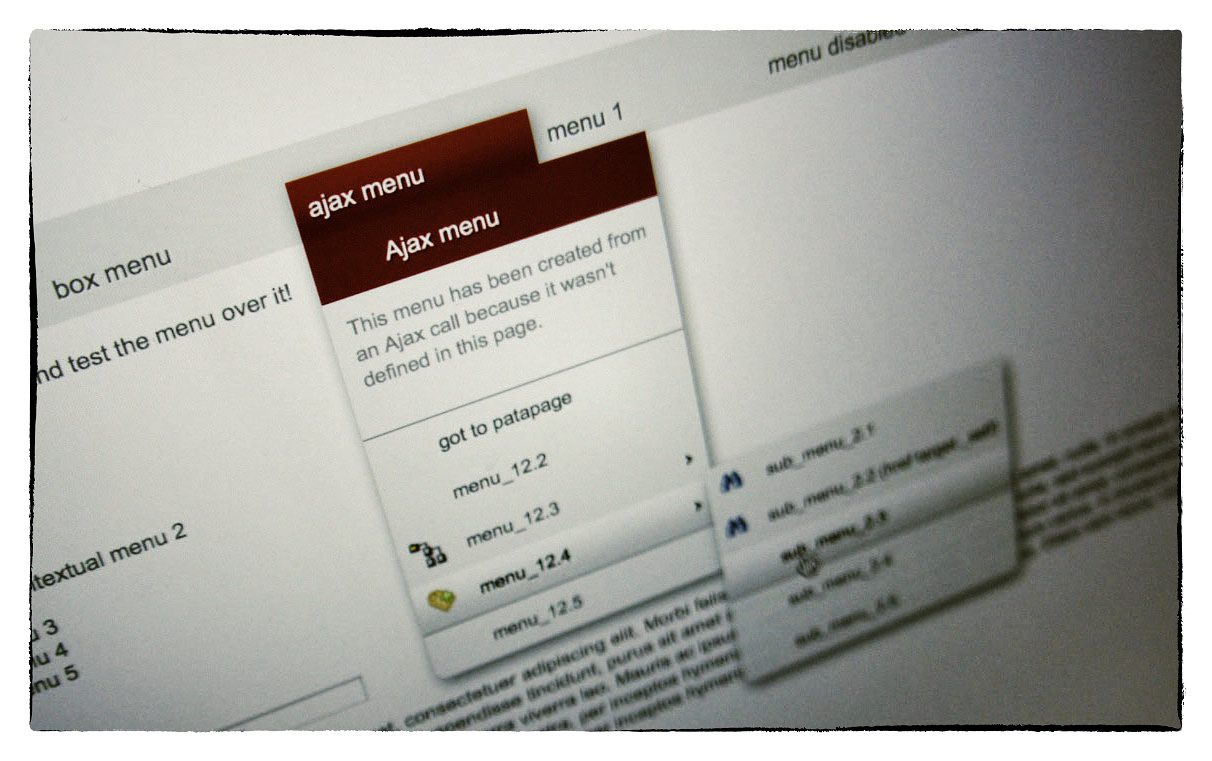
This is a powerful jQuery component to build easily a multilevel tree menu or a contextual menu (right click) in an intuitive way!

You can add as many submenus as you want; if your submenu or menu is not declared in the page, the component’ll get it via ajax calling the template page with the id of the menu you need (the value of  “menu” attribute) the ajax page should return a well formatted code as the example below for the menu voices code.

v. 2.8.5

What’s new in 2.8.5:

  • Added a new “boxmenu” modality to display any html into the menu.
  • Added “disabled” property to root menu; if setted to true all the voices are disabled.
  • fixed a bug that prevent any submenu to show and hide properly if an “empty” root manu was defined.
  • improved graphic
Comments
198 Responses to “jquery mb.menu”
  1. schmunk says:

    Hi,

    great component!
    I tried to use tags within a section.
    But they are also translated into menu items.

    I tried this, mbMenu.js line 291:
    this.voices= $(“#”+m).find(“a:not(.noVoice)”).clone();
    But had no luck on Firefox.

    Is there a solution for my problem?

    Best regards,
    schmunk

    • Hi shmunk,
      actually the menu is generated by all the a voices inside the div you define as “mbmenu”; you could try with: this.voices= $(”#”+m).find(”a”).not(".noVoice").clone(); but this will not create the element at all in the menu…
      Maybe the right way could be define another DOM element as menuvoice… for example: this.voices= $(”#”+m).find(”div”).clone();; in that way you can put whatever you want inside…
      Bye,
      Matteo

      • schmunk says:

        Thanks for your help, but I had no luck, neither with not() nor (“div”) :/
        Nevermind, I’ll use javascript for some links.

        Btw: Mbmenu is not XHTML compliant, right?

      • Hi schmunk,
        it should work also with XHTML declaration…

      • schmunk says:

        Thanks, my fault.

        Another issue: I can not open links in new tabs by just cmd-click.
        Only right-click “Open in new tab …” works. On OSX 10.5, Safari 4 and FF 3.5

      • Hi Schmunk,
        This is due to the fact that all the links, even the a href one, are managed as on click event script, loosing the href attribute. that’s why the cmd key doesn’t work.
        That could be considered a bug; I’ll fix it for next release.
        Bye,
        Matteo

      • schmunk says:

        That would be very nice! Btw: Do you have a “Donate”-Button?

  2. Senol Sonek says:

    Hi Matt,

    Is it possible to use on-mouse images for the main menu items instead of single images for on/off situation? Maybe via css by sliding each and every button as background?

  3. Shaun says:

    I just found your mb-_menu and its amazing! I’m having some trouble with menuVoice though, every time i add a new div with the id menu_2, menu_3, etc.. I change it in the index.html file but when i pushlish it. When i roll over it types the text from the menuVoices page? .. I’m confused. Does the same in your demo too. bug?

    • Hi Shaun,
      maybe I should see the code you are writing to understand your problem; but I can explain how should it work:
      A) You need the root voices elements where you specify for each which menu they should open in that whay: <td class="rootVoice {menu: 'menu_1'}" >menu 1</td> where the menu parameter value is the ID of the DIV containing the menu voices.
      B) You need a DIV for each menu voices block with a unique ID setted and a class "mbmenu":
      <div id="menu_1" class="mbmenu">
      <a rel="title" class="{action: 'document.title=(\'menu_2.1\')', img: 'icon_13.png'}">menu_2.1 TITLE</a>
      <a class="{action: 'document.title=(\'menu_2.2\')'}">menu_2.2</a>
      <a class="{menu: 'sub_menu_1', img: 'icon_14.png'}">menu_2.3</a>
      <a class="{menu: 'sub_menu_2', img: '24-tag-add.png'}">menu_2.4</a>
      <a rel="separator"> </a>
      <a class="{action: 'document.title=(\'menu_2.4\')'}">menu_2.5</a>
      </div>

      C) The IDs must be unique! and this is important.
      D) if the component doesn’t find the ID specified in the root voice definition than it’ll try to call via Ajax the page specified in the “template” parameter passing the ID as menuId on the request (if you have a dynamic environment you can have a page that build each menu based on the ID).
      E) you need to invoke the function to initialize your menu customizing all the parameters needed.
      That’s all.

      if you have problems you can publish somewhere your page so that I can test and understand what’s wrong.
      Hope this can help you,
      Matteo

      • Shaun says:

        Ah ok, the class “class=”mbmenu” was missing in menuVoices. It’s missing in the demo files. Confused the hell out of me. Might want to update the demo files just in case others get confused too.

        Cheers mate.

  4. Mike says:

    Hi Matteo, can mb.menu be used to create a mega menu like found here: http://www.ea.com/ ?

    Mike

  5. Eric says:

    Great plugin, thanks!

    I’m trying to get the “selected” state to stay active when on the page of the current link of the rootVoice.
    When the page first loads it’s fine, but if I mouse over it(I have nOnClick:false) and mouse-out, the selected state is removed.

    Here is what I have:
    menu 1

    thanks

    • Hi Eric,
      I’m not really sure what is your issue;
      if you whant to set a specific voice to select when you get into the page there’s no solution at the moment becose the selected class is added dinamically to the container of the row by the component once it builds the menu cotainer.
      I keep it as an issue for next release.
      Bye,
      Mateo

  6. Roman says:

    Hello,
    I have found a bug, menu is very slow when the code page html is big (for example large table on the page)
    it uses 100% of CPU with any movement of the mouse on the page’s space (not the menu itself)

    If you need a sample send me an e-mail and I will send you a file

    • Hi Roman,
      send me the file at matteo[at]open-lab.com.
      Bye
      Matteo

    • Hi Roman,
      I think this depends to the fact that my mb.menu build a table for each single menu line; this is not a problem if in your page you don’t have a huge amount of data otherways it get slower.
      The slow down behavior is when you roll over a submenu voice with a submenu referral (when it open a neu submenu); so if you set the param “submenuHoverIntent” of the init function to “200″, the submenu will not open just rolling over the voice and this speedUp the feeling:

      submenuHoverIntent:200,

      I’ll take this as ISSUE for next release.
      Thnx,
      Matteo

      • kambiz tavakoli says:

        Hi Matteo,

        there is a ‘*’ selector in the mb_bringToFront,
        since the ‘zIndex’ is almost an issue I replaced the code(see below) and
        it becomes a lot faster in huge content pages.

        mb_bringToFront: function(){
        var zi=10;
        $(‘div’).each(function() {
        if($(this).css(“position”)==”absolute” || $(this).css(“position”)==”fixed” ){
        var cur = parseInt($(this).css(‘zIndex’));
        if(cur > zi){
        zi += cur;
        }
        }
        });

        $(this).css(‘zIndex’,zi);
        }

        bye
        kambiz

      • Hi Kambix,
        your solution is surely faster and lighter, but zindex could be applied even to other HTML elements; the mb_bringtofront function accept also a parameter to define which element should be influenced and this would enlight the recursion in the dom.

        Bye,
        Matteo

      • kambiz tavakoli says:

        “parseInt” is under FireFox also expensive and not all “div” tags have set “zIndex”,
        so an enhanced fix would be:

        mb_bringToFront: function(){
        var zi=10;
        $(‘div’).each(function() {
        if($(this).css(“position”)==”absolute” || $(this).css(“position”)==”fixed” ){
        var zIndex = $(this).css(‘zIndex’);
        if(zIndex){
        var cur = parseInt(zIndex);
        if(cur > zi){
        zi += cur;
        }
        }
        }
        });

        $(this).css(‘zIndex’,zi);
        }

    • Sergey Vostretsov says:

      Hi!
      I watched menu with js-profiler in IE 8. There is an expression in buildMbMenu() that uses CPU hard:

      $(opener.menuContainer).find(“#” + m + “_” + i)

      Just store this in local variable and then replace in all cases like this:

      var menuLine = $(opener.menuContainer).find(“#” + m + “_” + i);

      menuLine.find(“.voice a”).wrap(“”);
      menuLine.find(“.menuArrow”).addClass(“subMenuOpener”);
      menuLine.css({ cursor: “default” });

      This easy replacement reduces execution time of buildMbMenu twice!

      • Hi sergey,
        Thanks very much for your contribution!
        this bugfix will be included in next release with a mention to your solution.
        Bye,
        Matteo

  7. Dave says:

    Hi Guys,

    thanks for your great job. I just tried to embed this mbmenu component into my JQuery Sliding Content demo webpage(REF: http://cssglobe.com/post/4004/easy-slider-15-the-easiest-jquery-plugin-for-sliding), I cannot make them work together, it seems the JQuery.js from the Slidding demo is pretty different with the JQuery.min.js from the mbmenu demo. Any idea? thanks.
    Dave

    • Hi Dave,
      jquery.mb.menu use the latest version of jQuery code (1.3.2) and Easy Slider jQuery Plugin uses instead the 1.2.3 version;
      you should try to include the latest and see if the slider still works, otherwise you can’t use both together.
      Bye,
      Matteo

      • Dave says:

        Unfortunately, I tried both ways, still could not get them working together. yes, I reckon this issue comes from the difference between the js files, what a shame. anyway I will try to jump on JQuery Sliding Demo webpage and to see whether they already get the latest jquery.js invovled. thanks for your reply.

        Dave

      • Did you take a look at mine mb.scrollable component? it works almost as the sliding one…

        jquery.mb.scrollable

        Bye,
        Matteo

      • Dave says:

        Sorry, I lied. finally i tried it again. and it works, amazing. still dont know why it didnt work :) maybe it is my fault. :) anyway it works. Cheers

        Dave

  8. Patrick says:

    Hi Matteo,

    first of all I wanted to thank you for this great menu-plugin! I tried many of them and i can say, that it is the best of all. I have a small question regarding the red field when you click onto the menu. Is it possible to change this color? I’ve looked everywhere, but unfortunately, I was unnable to find this piece of code. It would be great, if you could tell me where I can find it.

    Thx in advance,
    Patrick

    • Hi Patrick,
      you can find the answer here (jQueryExchange),
      bye,
      Matteo

  9. Togi says:

    Hi,

    Is there a way to add menus at run time?

    Basicly what I want to do is, when the menu drops, there is an input box. User enters a url, and when the user hits a submit button on the same menu, the menu displays the new link.

    Togi

    • Hi Togi,
      no, there’s no way at the moment to add a menuline on the fly; you can change on the fly any link to submenu or menu by replacing via js function the menu attribute of a certain line but not the content of an opened menu.

      I’ll get this as ISSUe for next release.
      Bye,
      Matteo

    • Togi says:

      Just additional info: I am using the latest version of mbmenu

  10. Togi says:

    Hi Matteo,

    Our page has a menu that is positioned all the way to the top right corner of the page, and the menu container opens when the user hovers over it. Time to time, when I hover over one and than hover to the next one, a section of the latter one displays outside of the page. This happens both in IE7 and Firefox 3.5. Have you seen this behaviour before? And any suggestions?

    Togi

  11. Douglas says:

    I’ve just implemented MB Gallery for a photoblog with at least 150 thumbnails. Firefox on a Mac is taking a long time to load JQuery.

    Any help?

    • Hi Douglas,
      I think that 150 thumbs is a big number… This kind of numbers should be managed somehow different…
      I’m working on getting it faster on load but I think that in your case Thumbs should be loaded with a paging system that I don’t have jet…
      Bye,
      Matteo

  12. Bryan Davis says:

    Hi, do you have any suggestions on how to round the corner of menus in Internet Explorer using your menu system? Thanks.

    • I Bryan,
      IE doesn’t support CSS border-radius property, so your issue could be solved working hardly on CSS… <my suggestion is to easly do that for all other browsers and let IE displays just what it can.
      Bye,
      Matteo

      • schmunk says:

        Hi,
        I haven’t implemented it, but I remember an IE-safe rounded corner solution a few years ago.
        It went like adding let’s say three or tags at the (top and) bottom of your container. The bottom would look like this:

        Should draw a rounded border at the bottom …

        Best regards,
        schmunk

      • schmunk says:

        Sorry, the tags are gone …

        [p style="height: 1px; margin: 0 1px"][/p]
        [p style="height: 1px; margin: 0 2px"][/p]
        [p style="height: 1px; margin: 0 4px"][/p]

        for sure the p-tags should have the same bg-color like your container.

      • Hi Schmunk,
        There are several ways to obtain round corners in IE; the problem is that doing it on the jquery.mb.menu component would hardly complicate the menu constructor introducing too many elements in the DOM and slowing down the events. The simplest way is the one adopted by all the other browsers, doing it via CSS!
        If I have just a container drawn statically on the page than I can accept works aroud, but not on complex dynamically drown javascript objects.
        Bye,
        Matteo

  13. Peter Lane says:

    Hi Matteo,

    Great plugin, but I am trying to deal with a long list of menu items in one menu.

    Is it possible to get the list to us a scrollbar if it is to go outside the viewport?

    • Hi Peter,
      No, at the moment there’s no pagination methods for menu lines; I get it as future issue to implement.
      Thnx,
      Matteo

  14. Tracy Dryden says:

    The link on the jQuery project page to download version 2.7.2 links to changelog.txt instead of the javascript file!

  15. Tom Nygen says:

    Hi Matteo,
    Great menu. Just a quick question. For contextual menu, I can find the element that fires the menu. How can I find the element that fire the regular left click menu. I have about 200 thumbnails using the same menu and would like to detect the thumbnail that pops up the menu.
    Thanks.
    tom

  16. Funciona mejor con el siguiente ajuste de display en css (display:block;):

    .menuContainer .selected td a{
    color:#000;
    text-shadow:#fff 2px 2px 1px;
    display:block;
    }

    • Thnx Jose, I’ll try your solution.

  17. Quentin says:

    How does the ‘additionalData’ work – using the demo.html file, I have changed menuVoices.html to menuVoices.php, and can see menuId in the POST vars, but nothing else (As far as I can see, “pippo=1″ should also be there.

    Thanks

    • Quentin says:

      Duh – my mistake – pippo=1 is only defined for the horizontal menu, not the vertical one.

  18. Zero says:

    Opera doesn’t seem to show custom content within the drop down? What am I doing wrong?

    • Hi Zero,
      this is a known bug but not solved jet.
      Hope to find a solution soon.
      Bye,
      Matteo

  19. Joao Clerigo says:

    Hello,

    I’ve recentle updated from a 2.old version.
    I’m noticing that now, to go to a menu option I have to click right on top of any letter. Clicking anywhere else in that menu option does not send us to that option. This is quite anoying since diferent options have diferent text width, and we have to click right on top of that word… any sugestion?

  20. Vivek says:

    Hi,

    I’m implementing the menus, but I have a framed layout and the menus are not being displayed over the frame, so the options are getting lost, how do I over come this issue?

    Regards,
    Vivek

    • Hi Vivek,

      Frames are different pages in a DOM structure; that’s why you can’t have menus over them.
      You should use IFRAMEs to obtain what you are looking for; in this case the iframe is an element of the same page and a menu drown on the TOP window will overlay it.
      Bye,
      Matteo

      • Vivek says:

        @Matteo

        I tried to put it in a iFrame and it still does not work, do I have to change any piece of code. Here is what I’m trying to do…

        Dashboard

        Main Content

      • Vivek says:

        [CODE]

        Main Content

        [/CODE]

      • Vivek says:

        __
        __
        __
        __ Main Content
        __

      • Hi Vivek,
        Unfortunately your code has not been printed in your posts;
        Maybe I wasn’t clear:

        On a frame set page each frame is a stand alone page and it’s not possible to show elements invoked from a frame over the top of another frame.
        The only solution is to have a main page where you build your menu and a set of iframes where you have your content. In this whay the menu can stay over the iframes because all the elements are owned by the same page.
        Hope this can clarify beter; it’s just HTML basic concept…
        Bye,
        Matteo

      • Vivek says:

        Hi Matteo,

        But if I design the pages like that, then on each page I would have to add the iFrame.

        I’m actually using it on a Struts project and since I would be changing only the body, it would be a more code :( .

        Any other suggestions?

        Cheers,
        Vivek

  21. Matt says:

    There is NO LINK TO DOWNLOAD THE FILES. I repeat, even on the jQuery project page there is no way to download 2.7.2. The Download link on the jquery project page links to the README file, not to the zip package. The only way I could get it was to download the example, which has all kinds of other stuff I don’t need. Please fix. Thank you.

    • Hi Matt,
      the link is working perfectly and you can find it on the mb.menu page on this blog:
      http://pupunzi.open-lab.com/mb-jquery-components/mb-_menu/.

      anyway here is the direct link: http://mbideasproject.googlecode.com/files/jquery.mb.menu.2.7.2b.zip

      Bye,
      Matteo

    • schmunk says:

      Hmmm, works for me, just used this link …

      download example:
      http://mbideasproject.googlecode.com/files/jquery.mb.menu.2.7.2b.zip

      Proof :) http://img696.yfrog.com/i/bild1sv.png/

    • Tracy Dryden says:

      He’s right, the link for version 2.7.2 on the jquery project page DOES NOT WORK! The link is to changelog.txt, not the jquery file. Did you check it?

      • Hi Tracy,
        it’s true, the jquery project remand to my blog for the download… and that’s what I want, becouse otherwise I have too many entry point to manage.
        So, I don’t think this is a problem.

        Bye,
        Matteo

  22. Maxi says:

    Dear Matteo,

    your jquery plugin are really great, but I don’t see any legal license. I am wondering could I use your plugin in my development. please advice.

    Thank you very much

    • Hi Maxi,
      all my components are under GPL – MIT license; You are free to use them in your development; just leave a mention to me on the code.
      Bye,
      Matteo

      • Maxi says:

        good to know! thank you again.

  23. Manuel Arroz says:

    How can I disable a menu item, by javasecript selector?

    Any suggestions?

    By Manuel Arroz

  24. eni9ma says:

    Great control but doesn’t work nicely in Chrome

    • It’s working perfectly in Chrome…
      The only problem it has is that if you are working locally on your computer, Chrome doesn’t make the Ajax calls… but once on the remote server there’s no problems.
      Bye,
      Matteo

  25. Mike says:

    Is there a way to make the menu items have multiple in a row?

    For instance, have the dropdown menu (horizontal) like so:

    Menu 1 Menu 2 Menu 3
    |
    Menu Item 1 | Menu Item 2 | Menu Item 3
    Menu Item 4 | Menu Item 5 | Menu Item 6

    • Hi Mike,
      I’m working on a new functionality of the menu called box-menu that should fit your requirement;
      if you want you can dounload a pre release of mb.menu 2.8.5 here: http://github.com/pupunzi/jquery.mb.menu/downloads. (2.8.5rc5)
      If you use it let me know of any bug.
      Bye,
      Matteo

  26. Sergio Fiallo says:

    Hi im using our mb.menu and i love it.

    thx a lot for the effort and the share.

    i have a problem in Google Chrome 5.x beta. the menu appears to be transparent. but i click near it and it works.

    if this ain’t enough info pls contact me…

    thx a lot…

    • Hi Sergio,
      I just downloaded Chrome 5.0.375.29 beta to test mb.menu and I had no problems…
      I tested it on a Mac… but I can’t beleave there are differences between Chrome for Mac or PC…
      Bye,
      Matteo

      • Sergio Fiallo says:

        Well im using Linux Mint. i have no problems in firefox. nut its weird illl recheck an let you know thx a lot for the quick reply.

  27. schmunk says:

    Hi Matteo,

    I am using mbmenu with jQuery UI icons, see http://tweetphoto.com/21324956
    A native jQueryUI icons support would be a very cool feature I think, because the icons can be customized very easily, see http://jqueryui.com/themeroller/

    At the moment I had to do a few hacks, because these icons are applied only by CSS classes and are not available as separate images.

    Best regards,
    schmunk

  28. BECK Frédéric says:

    Hi,

    i’m using your mbmenu and i think i found a little bug at lines 601 and 462 in mbMenu.js .
    The script tries to unbind all the click events in the document (including other events handlers) and it would be better to be able to unbind only the click events from your plugin.

    Best regards,
    BECK Frédéric

    • Hi Beck,
      this bug has been fixed on the latest release candidate but not yet published; if you need this fix right now you can download the 2.8.5rc from: http://github.com/pupunzi/jquery.mb.menu/downloads.
      Let me know if you find other issue,
      Bye
      Matteo

      • schmunk says:

        Great! That fixes a bug that I had with jQuery UI dialog.
        After hovering the menu I wasn’t able to open the dialog.

        But I have a small issue with 2.8.5, when I want to access a second-level sub-menu, the opened menu jumps to the upper left corner (0,0).

      • Hi Schmunk,
        I can’t replicate your behaviour on my environment…
        Do you have a public access to your page?

  29. Sergio Fiallo says:

    Hi… Matteo i have been working with this component and it hapens that it doesnt work in IE8 dont know why.

    the page is in dev stage:

    http://corpo.hostjvsdesing.net/

    if im doing somthing wrong pls let me know.

  30. Max says:

    Sorry for terrible english

    this is simple code. plz try to open it in IE7

    ;
    ;

    mbMenu

    ;
    ;
    ;
    ;

    $(function()
    {
    $(“.myMenu”).buildMenu({
    template:”",
    additionalData:”",
    menuWidth:150,
    openOnRight:false,
    menuSelector: “.menuContainer”,
    iconPath:”ico/”,
    hasImages:false,
    fadeInTime:100,
    fadeOutTime:300,
    adjustLeft:2,
    minZindex:”auto”,
    adjustTop:10,
    opacity:.95,
    shadow:true,
    openOnClick:false,
    closeOnMouseOut:true,
    closeAfter:500
    });
    });

    submenu 1

    Submenu 1:
    submenu 11

    Long Text block :
    ;

    as you see the width of textBlock not good on screen
    IE6,IE8,FF,OPERA doin this well, but IE7 make wrong.
    is it possible to make right textblock width in IE7?

    THX

    • Max says:

      no code in comment (

      plz set menuWidth:150
      and add submenu rel=text whith img 300px width

      and try to open it in IE7 – the width of submenu will be 150px not 300px and img are not fully visible
      other browthers well even IE6

      is it posible to correct width for IE7?

  31. ravi says:

    Hi
    i have try it with my project but it does not work with “href” please let me know if you have this with the href feature

    Thanks

    • Hi Ravi,
      What do you mean by not working with href?
      bye
      Matteo

  32. Fred says:

    Hy!!

    In first, congratulation for this work!

    I’ve a problem, i use this menu in a application with bing maps 3D and the sub menu is displayed under the map!

    Have you a solution?

    Thanks

    • Hi Fred,
      you can fix your problem adding a paramenter to your 3D maps object: <param name=”wmode” value=”transparent”/>
      and an attribute to the embed element: wmode=”transparent”.
      This will let your embed object to behave as all the other elements on the page, respecting the z-index.
      Bye,
      Matteo

      • Fred says:

        This param is good for a flash object but for 3d map object it is not provide. That is why I posted here to see if there was a solution from the menu itself.

        Bye

      • Hi Fred,
        going around the web I found this post talking of your problem:
        http://forums.silverlight.net/forums/p/16731/55689.aspx

        Hope this can help you,
        Matteo

  33. hi… look Matteo… i have a problem with your new menu… it doesnt work in internet explorer 8
    pls check the site….

    http://www.corpoleonxiii.org/ and pls answer me the last time i post you didnt answer..

    • Hi Sergio,
      As it’s working on the demo file I think the problem could be found on the fact you are validating the page as XHTML and IE doesn’t really support it. I’ve never tried it with an xhtml file…
      Try using a simple HTML 5 doctype…
      Let me know,
      Matteo

      • thx a lot i will try it…didnt knew that of IE.

  34. Abhinay says:

    Hey MB,
    Awesome work.
    I hav a problem..
    the links that my sub menu are pointing to are included in diff levels of the file structure..
    the menu is constantly at the left…
    the problem is.. the icons accompanyng the submenu item aren’t getting loaded.
    is there some way of giving a global link to the folder containing the icons ??

    if u dint quite understand my problem..
    check out these links.

    http://www.axisvnit.com/home.php ——- all icons loaded
    http://www.axisvnit.com/cypher/ ——– icons not present
    http://www.axisvnit.com/mofun/ —- icons present (because i included a folder of the icons in the mofun folder!

    • Hi Abhinay,
      there’s a parameter on the init function to set the path of the icon folder: iconPath.
      If the page you are pointing to is in a lower level as for example second and third example, you should probabli set the param as: iconPath:”../ico/”

      Bye,
      Matteo

  35. ali says:

    hi mr.matteo
    i cant customize right to left menu. can you help me?
    Im persian.

  36. Abhinay says:

    HI matteo,

    In the submenu, only the text is clickable.. not the entire element in the divs for sub menus.. I mean if the user wishes to go to the page.. he has to click exactly on the text.. This is kind of irritating.. Is there any way to make the entire hyperlink element clickable.. . i wish to keep the same menu.. Can you tell me what changes are required for it?

    • Hi Abinhay,
      This behavior doen’t happen in my demo; all the line is clickable and it works fine; did you change the css file somhow?
      Bye,
      Matteo

  37. Abhinay says:

    Hi Matteo,

    No i have not made any specific changes in the css. I’m not using your new version of box menu.. I’m using the last version.. In that demo.. The entire element in the submenu was not clickable.. only the text was clickable.. In your new box menu demo the entire area is clickable… Can you tell me how?

  38. peter says:

    Awesome menu.

    I do have one question, is there some way to automatically show one menu on page load? For instance, on page load I want Menu1 to be open to first level (as if I put my mouse over the top level of menu1).

    I can’t figure out how I can show a menu on load versus on mouseover or click.

    Is it possible?

    • Hi Peter,
      You can do it by triggering the mouseover or a click event on the “menu 1″ opener label once the page is loaded and the menu has been initialized.
      1. add an ID to the menu 1 opener
      2 after the mbmenu() init function add: $(“#[yourLabelID]“).mouseover() or $(“#[yourLabelID]“).click() if yor menu are opened by a click event.

      Hope this can help you,
      Matteo

  39. Nate says:

    I am working on a site using mb.menu. I want to create a menu that has a transparent background. I tried the opacity option in mb.menu but it seems to make the entire menu transparent (text, background, etc) I tried adding the following to the .menuContainer in my menu css file:
    filter:alpha(opacity=50);
    -moz-opacity:0.5;
    -khtml-opacity: 0.5;
    opacity: 0.5;

    but it doesn’t do anything. Any help?

    • The only solution you can adopt, if you don’t whant text to be affected by opacity, you have to set a semitransparent .png as background class of .menuContainer instead of a color.
      Bye,
      Matteo

  40. James Noon says:

    Hi, I like the look of your jquery tree menu and am looking for a new solution for my sites.

    However your demo does not appear to work in IE7 or Firefox, please can you send me the latest working demo link?

    Thanks, james

    • Hi James,
      I don’t know what’s going wrong for you but the component is working fine in IE7/8, FF, Chrome, Safari, Opera … And it has been tested by thousand of users…

      let me know,
      Matteo

  41. James Noon says:

    Hi Matteo, sorry it was my error, just assumes they were on mouse over, not onclick! Sorted, thanks, James

  42. kambiz says:

    Hi Matteo,

    awesome work!

    Can I have images also in “rootVoice” items?

    kambiz

    • Hi Kambiz,
      you can manage rootvoices as you want as you would normally do.
      Bye
      Matteo

  43. Ben Marshall says:

    Hi Matteo.

    Great work on this plug-in. I am trying to use mbMenu for the top nav bar on my site but I am getting errors in IE8. I am using the following JQuery scrips:


    The menu works fine for me in FF and Chrome, but in IE I keep getting the following Javascript error:

    'events' is null or not an object

    The error is at line 113 in jquery-1.4.2.min.js.

    Another problem I have is that the boxmenu I am using disappears onMouseout from the rootVoice in IE, but stays visible just fine in FF and Chrome. I can provide the CSS and HTML if needed.

    Any help you can provide would be greatly appreciated.

  44. Dian Peshev says:

    Perfect work Matteo. Love it. So easy for manage and with great opportunities.
    Please can help my with this issue:
    When sub menu is opens at the right side and there is no place for it, it’s opens to the left, but when text is longer it extends over root menu. Is there any way to avoid this.

  45. Cadi says:

    Hi,
    This is a very good Job.

    Maybe the best way is using “List Tag” as Table.
    It’s very easy to make and better for the design.

    Tchouss, from France.

  46. Larry Carrington says:

    Hi Matteo,

    I am trying out mbMenu (2.8.5) to use on a number of web sites that I maintain. It looks quite nice but I have some questions:

    1. Is there a way to trigger a context menu by doing a double click? Since Opera does not allow right click, I would like to have the same menu triggered by a double click so that Opera users can use them.
    2. How can I keep the container from printing when I print the page? Most of our pages have a Print option as one of the context menu selections. There are other items on the page that I hide (via css) when printing. When I use the window.print() from the menu, the context menu shows up on the print.
    3. I am not using the metadata plugin. Everything works except “disable”. How do I let mbMenu know that the menu item is disabled if I am not using the metadata plugin? I have tried specifying “disable”. The menu item shows normal and still functions in Firefox; in IE the text looks disabled but I can still click on it and it functions.
    4. Is there a way to indicate that a particular menu item (or the title) does not have an image? I have been using a completely transparent image so that there is no box in IE.

    Larry Carrington

    • Hi Larry,

      1. You have to change the mbmenu.js at line: 180 adding:
      var evt= $.browser.opera?"dblclick":"contextmenu";
      just before:
      $(cm).bind("contextmenu","mousedown",function(event){
      and replace “contextmenu” with evt:
      $(cm).bind(evt,"mousedown",function(event){

      2. you can set a css for @media print hiding the .menuContainer elements: .menuContainer{display:none}

      3. the attribute you have to define is: isDisable

      4. just remove the img attribute from the a tag.

      Bye,
      Matteo

      • Larry Carrington says:

        Hi Matteo,

        Thank you fro the quick response.

        1. Your suggestion worked great for the right click/double click. I then took it further and bound the event function to both the double click and right click for all browsers–some of our old pages used double click so now users can now do either. I also downloaded the latest Opera (10.60). And Opera now supports right click!

        2. I already had:

        @media print {
        .menuContainer {display: none;}
        }

        The menu does not print when I do a ctrl+P. But when I do a window.print() as the action in the menu, it does print. It seems that while the menu is being displayed, it will print. I was thinking that I could try having the menu item call a function; in the function I could close the menu and then do the print. But I don’t know how to close the menu from another function. I hope that I can solve this because I would really like to switch to mbMenu but the Print menu item is critical to us.

        3. Adding isDisable=1 worked great.

        4. Removing the img from the tag did not work. I still get a box displayed in IE 7 and IE 8. It works fine in other browsers. I will just use my blank image.

        Larry

      • for the #4 if you don’t specify any image it’ll look for a “blank.gif” image in the same folder of other icons.

        Yes, you can call a function that closes the menu and than print your page:

        function closeAndPrint(){
        $.fn.removeMbMenu($.mbMenu.options.actualMenuOpener);
        window.print();
        }

        Bye,
        Matteo

  47. Alex says:

    Excellent!

  48. Marcos says:

    Hi Matteo!!!

    Is it possible 2 or more columns options?

    Depending on the quantity of options (20 or more), the last one’s goes out of screen. If there was a parameter for the maximum lines, they could be placed in columns.

    After some tests, I could see the menu position automatically changes, moving it up to try to fit in the screen. It is a great enhancement.

    Also, I’ve tried smaller font sizes. But it was not enough.

    Thanks
    Marcos

    • Marcos says:

      I tried to hack Matteo’s code, but I don’t know javascript that much.

      Could you anybody help?

  49. Ragnus says:

    Hi Matteo,

    thank you for your wonderful menu.

    I got two topics i want to ask for:
    a)
    I am using your menu for a list of up to 50 elements. Firefox, Chrome and other browsers can handle this in less than a second except for IE 7 (needs up to 10 seconds to parse). Each menu has only one menu level (no sub menus) and less than 10 entries.
    Are there any chances that the IE can handle your menu structure in a time less than a second?

    b)
    I load a menu via your Ajax functionality which works fine. The application needs to do some things before sending the generated menu so it takes around 5 seconds for the asynchronous server round trip. Is there a way to show a “please wait” div or something else while waiting for the ajax response in addition to block the mouse pointer click ability? I tried to register call back functions in the jquery-ajax system but they didn’t fire when your menu makes the ajax call.

    Thanx for your help

    • Hi Ragnus,
      A) IE has several problems on rendering pages and I don’t have a solution yet for your problem… I can suggest you to orgaize your menus to have less voices per menu…
      B) I’ve never had such problems on the uses I have. It loads menus in some milliseconds, not seconds… However a generic .ajaxStart() and .ajaxComplete() should work for you: http://api.jquery.com/category/ajax/

      Bye,
      Matteo

  50. peyman says:

    Hello.
    It supports me Rtl?

    • No, I’m sorry…

  51. Hi Matteo,

    I have run into a problem using mbMenu. When I use mbMenu (context menu) on a page, I can no longer select text, clear contents of a text box, etc. with the mouse. I took out my changes for double click (I just downloaded the original again) to see if that was the problem. It was not. Have you seen this problem before? Do you have any idea what might be causing this?

    I am using jQuery 1.4.2 (I also tried it with 1.3.2) and mbMenu 2.8.5.

    My menus typically are defined like this:

    $(document).buildContextualMenu({adjustLeft: 0,
    adjustTop: 0,
    closeOnMouseOut: true,
    fadeInTime: 100,
    fadeOutTime: 100,
    hasImages: true,
    hoverIntent: 0,
    iconPath: ‘../images/’,
    menuSelector: ‘.ContextMenu’,
    menuWidth: 100,
    onContextualMenu: function (o, e) {},
    opacity: .85,
    overflow: 2,
    shadow: true,
    submenuHoverIntent: 0,
    template: ‘../common/PageMenu.htm’});

    Larry Carrington

  52. luc says:

    Hello,
    it seems that there is a problem with your site and safari on mac os x.

    as i am testing your mbmenu on differents browser, i was unable to navigate to your demo page for mbmenu :
    can’t reach http://pupunzi.com/#mb.components/mb._menu/menu.html in safari, while it is possible with firefox and Chrome.

    Ever heard of that before?

    Also, checking the dev tool of safari, it seems that a loop of XHR request is rununing without ending…

    Steel thanks for your work
    Luc

  53. Hi Luc,
    Did you try to clean your cache browser?
    I can reach the mb.menu page with Safari…
    Bye,
    Matteo

  54. luc says:

    oups !
    thanks,
    it works now
    :)
    Luc

  55. luc says:

    Hello,
    i have made a test on IE7 PC, firefox mac/pc, Chrome mac/pc and safari mac/pc.

    it seems that the param menuWidth:value does not work in chrome and safari.

    I’ve seen a comment in your demo css file :
    /*
    The menu container style must be set via the options paramiter
    within the function call due to a Safari bug interpreting css on the fly…
    */

    Does it have something to do width this?

    Is this a bug ? and if not, do you have any idea about what i’m doing wrong in my tests :

    http://wip.ha-lala.com/mb-menu/stock_menu.html

    thanks
    Luc

  56. luc says:

    Well Matteo, thanks A LOT again for your work and your fast answers.
    Luc

  57. Hi Luc,
    it’s a bug I’ve fixed but not jet made a public release;
    Here is the link to the release candidate: http://github.com/pupunzi/jquery.mb.menu/zipball/2.8.5rc5.
    Use this to solve your issue.
    Bye,
    Matteo

  58. Abhinay says:

    Hi Matteo,
    I am unable to style the text in the td of the sub menu item in vertical menu.. can you tell me how to do that ?

    I thought it should be possible with

    .mbmenu a{
    font-weight:bold;
    }

    in menu1.css in your demo… but it’s not changing the look of the text!
    Please help

  59. Hi,
    if you open the css file you’ll find where I’m styling the line voice; you can change the text working on: .menuContainer td a{} and around it.
    Bye,
    Matteo

  60. Abhinay says:

    Hi Matteo,
    Can you help with my problem? Of making the entire a element clickable please?
    It is very necessary for me as having to click exactly on the text is posing inconvenience problems in my site and i am unable to figure out how to work around that!

  61. Hi Abhinay,
    as I wrote you, if you try my demo you’ll see that all the line is clickable as you need; this behavior is provided by the script itself by adding an onclick event to all the line propagating the event.
    I don’t know what’s going wrong in your case and how you are initializing the component; anyway you should download the latest version and test it to verify if you have the same problem.
    Bye,
    Matteo

Trackbacks
Check out what others are saying...
  1. [...] go to the component page for the latest release [...]

  2. [...] | mbMenu [...]

  3. [...] get it on the component page! Possibly related posts: (automatically generated)jQuery (mb)Menu 2.7 (New!)ASP.NET 2.0 Menu – MenuItemClick not posting back/firing eventBuild a Cross-browser Dropdown Navigation Menu [...]

  4. [...] jquery mb.menu [...]

  5. [...] jquery mb.menu [...]

  6. [...] jquery mb.menu [...]

  7. [...] jquery mb.menu [...]

  8. [...] 插件地址:http://pupunzi.open-lab.com/mb-jquery-components/mb-_menu/ [...]

  9. [...] jquery mb.menu [...]

  10. [...] jquery mb.menu [...]

  11. [...] 就是最好的选项,以下插件是09年最好的 jQuery 导航插件。jquery mb.menu Horizontal Scroll Menu with jQuery AutoSprites 表单和表格 在 Web [...]

  12. [...] 就是最好的选项,以下插件是09年最好的 jQuery 导航插件。 jquery mb.menu Horizontal Scroll Menu with jQuery AutoSprites 表单和表格 在 Web [...]

  13. [...] 就是最好的选项,以下插件是09年最好的 jQuery 导航插件。 jquery mb.menu Horizontal Scroll Menu with jQuery AutoSprites 表单和表格 在 Web [...]

  14. [...] jquery mb.menu [...]

  15. [...] jquery mb.menu [...]

  16. [...] 就是最好的选项,以下插件是09年最好的 jQuery 导航插件。 jquery mb.menu Horizontal Scroll Menu with jQuery AutoSprites 表单和表格 在 Web [...]

  17. [...] 就是最好的选项,以下插件是09年最好的 jQuery 导航插件。 jquery mb.menu Horizontal Scroll Menu with jQuery AutoSprites 表单和表格 在 Web [...]

  18. [...] 就是最好的选项,以下插件是09年最好的 jQuery 导航插件。 jquery mb.menu Horizontal Scroll Menu with jQuery AutoSprites 表单和表格 在 Web [...]

  19. [...] 就是最好的选项,以下插件是09年最好的 jQuery 导航插件。 jquery mb.menu Horizontal Scroll Menu with jQuery AutoSprites 表单和表格 在 Web [...]

  20. [...] jquery mb.menu [...]

  21. [...] jquery mb.menu [...]

  22. [...] 就是最好的选项,以下插件是09年最好的 jQuery 导航插件。 jquery mb.menu Horizontal Scroll Menu with jQuery AutoSprites 表单和表格 在 Web [...]

  23. [...] need to create a more engaging nav, jQuery is your best bet. Here are a few of the best from ‘09.jquery mb.menuHorizontal Scroll Menu with jQuery This isn’t a plugin, but I had to include it since it is such a [...]

  24. [...] 就是最好的选项,以下插件是09年最好的 jQuery 导航插件。 jquery mb.menu Horizontal Scroll Menu with jQuery AutoSprites 表单和表格 在 Web [...]

  25. [...] jquery mb.menu [...]

  26. [...] jquery mb.menu [...]

  27. [...] jquery mb.menu [...]

  28. [...] need to create a more engaging nav, jQuery is your best bet. Here are a few of the best from ‘09.jquery mb.menuHorizontal Scroll Menu with jQuery This isn’t a plugin, but I had to include it since it is such a [...]

  29. [...] jquery mb.menu [...]

  30. [...] jquery mb.menu [...]

  31. [...] jquery mb.menu [...]

  32. [...] 就是最好的选项,以下插件是09年最好的 jQuery 导航插件。 jquery mb.menu Horizontal Scroll Menu with jQuery AutoSprites 表单和表格 在 Web [...]

  33. [...] 就是最好的选项,以下插件是09年最好的 jQuery 导航插件。jquery mb.menuHorizontal Scroll Menu with jQueryAutoSprites表单和表格在 Web [...]

  34. [...] jquery mb.menu [...]

  35. [...] jquery mb.menu [...]

  36. [...] jquery mb.menu [...]

  37. [...] jquery mb.menu [...]

  38. [...] jquery mb.menu [...]

  39. [...] jquery mb.menu [...]

  40. Social comments and analytics for this post…

    This post was mentioned on Twitter by pupunzi: #jquery #mbmenu: published jquery.mb.menu 2.7.2 release with some bugfix: http://bit.ly/1zzNE2...

  41. [...] eklentisiCoda-Slider 2.0Image GalleriesGalleriajQuery Panel GalleryslideViewerSupersizedNavigationjquery mb.menuHorizontal Scroll Menu with jQuery AutoSpritesForms and TablesPassword StrengthPassword Strength [...]

  42. [...] jquery mb.menu [...]

  43. [...] jquery mb.menu is another very powerful component for easy creation of jQuery multilevel tree menu or context menu (right mouse button). [...]

  44. [...] jquery mb.menu is an additional really absolute member for easy origination of jQuery multilevel tree menu or context menu (right rodent button). [...]

  45. [...] jquery mb.menu [...]

  46. [...] jquery mb.menu [...]

  47. [...] jquery mb.menu is another very powerful component for easy creation of jQuery multilevel tree menu or context menu (right mouse button). [...]

  48. [...] jquery mb.menu [...]

  49. [...] jquery mb.menu is another very powerful component for easy creation of jQuery multilevel tree menu or context menu (right mouse button). [...]

  50. [...] jquery mb.menu is another very powerful component for easy creation of jQuery multilevel tree menu or context menu (right mouse button). [...]

  51. [...] jquery mb.menu is another very powerful component for easy creation of jQuery multilevel tree menu or context menu (right mouse button). [...]

  52. [...] 就是最好的选项,以下插件是09年最好的 jQuery 导航插件。 jquery mb.menu Horizontal Scroll Menu with jQuery AutoSprites 表单和表格 在 Web [...]

  53. [...] 就是最好的选项,以下插件是09年最好的 jQuery 导航插件。 jquery mb.menu Horizontal Scroll Menu with jQuery AutoSprites 表单和表格 在 Web [...]

  54. [...] Demo | Website [...]

  55. [...] jquery mb.menu is another very powerful component for easy creation of jQuery multilevel tree menu or context menu (right mouse button). [...]

  56. [...] jquery mb.menu [...]

  57. [...] 10) jQuery mb.menu [...]

  58. [...] 就是最好的选项,以下插件是09年最好的 jQuery 导航插件。 jquery mb.menu Horizontal Scroll Menu with jQuery  AutoSprites 表单和表格 在 Web [...]

  59. [...] http://pupunzi.open-lab.com/mb-jquery-components/mb-_menu/ [...]

  60. [...] jquery mb.menu [...]

  61. [...] jquery mb.menu is another very powerful component for easy creation of jQuery multilevel tree menu or context menu (right mouse button). [...]

  62. [...] 9. jQuery mb.menu [...]

  63. [...] jquery mb.menu – This is a powerful jQuery component to build easily a multilevel tree menu or a contextual [...]

  64. [...] MB.Menu Un altro plugin per realizzare menu ad albero e/o contestuali da tasto destro. Condividi tweetmeme_style = [...]

  65. [...] jquery mb.menu [...]

  66. [...] http://pupunzi.open-lab.com/mb-jquery-c … /mb-_menu/ 2 katmanlı hoş bir jQuery navigasyon menü [...]


Leave a Reply

Your email address will not be published. Required fields are marked *

*

You may use these HTML tags and attributes: <a href="" title=""> <abbr title=""> <acronym title=""> <b> <blockquote cite=""> <cite> <code> <pre> <del datetime=""> <em> <i> <q cite=""> <strike> <strong>