jQuery (mb)Tabset 1.8
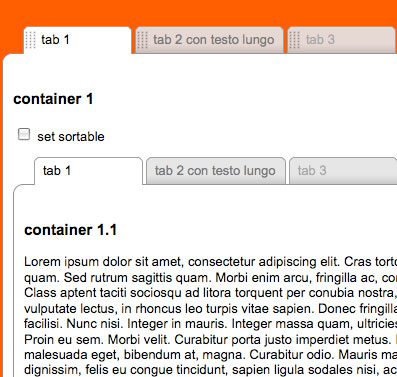
keep your tabs ordered!
A useful component that let you build a tabbed interface really easily; ad you can even sort your tabs as you want!
demo page:
http://www.open-lab.com/mb.ideas/index.html#mbTabset
download page:
http://mbideasproject.googlecode.com/files/jquery.mbTabset.1.9.zip
jQuery project page:
http://plugins.jquery.com/project/mbTabset
Releases:
1.8 (New!)
minor bugfix:
Now the Ajax content is call just if the tab is the one visible or if you click on it.
1.7
Major bugfix:
- Fixed a bug that prevent to send ajaxData with the ajax call option.
1.6
Major issues:
- added the possibility to choose the startup tab :
if you need to start with a different tab than the first just add a “sel” class to the a attrubute of your tab:
class=”tab sel {content:’cont_1_2′}”
1.5
Major issues:
- added the possibility to load ajax content.
You now can pass other two params:- ajaxContent, containing the url of your ajax page
- ajaxData, containing the params to pass
- even if your tab content is called via ajax you have to specify the “content” param with the ID, needed to build the container for the ajax conent
I had to chang the html code to simplify the tabset constructor:
- the param called “container” now is “content“
- now it’s not anymore needed the wrapper div of each tabset contents with class “mbTabsetContainer”
- the tab contents can be written everywhere in the page
1.0
first release.
Dependencies:
ui.core.js
ui.sortable.js
optional:
jquery.metadata.js
How does it works:
here is the js call:
1 2 3 4 5 6 | $("#tabset1").buildMbTabset({ sortable:true, position:"left", start:function(){}, stop:function(){} }); |
here is the code for each tabset:
1 2 3 | <div class="tabset" id="tabset1"> <a id="a" class="tab {content:'cont_1'}">tab 1</a> <a id="b" class="tab { |
1 | content |
1 2 | :'cont_2', ajaxContent:'yourAjaxPage.jsp', ajaxData:'a=1&b=2&...'}" >tab 2 con testo lungo</a> <a id="c" class="tab disabled { |
1 | content |
1 2 | :'cont_3'}">tab 3</a> <a id="d" class="tab { |
1 | content |
1 2 | :'cont_4'}" >tab 4</a> </div> |
here is the code for each tabContent:
1 2 3 4 5 6 7 8 | <div style="padding:10px" id="cont_1"> <h3>container 2</h3> </div> <div style="padding:10px" id="cont_2"> <h3>container 2</h3> </div> <div style="padding:10px" id="cont_3"> <h3>container 3</h3></div> <div style="padding:10px" id="cont_4"> <h3>container 4</h3></div> |
Params
- sortable: (boolean) define if the tabs are sortable or not
- position: (“left” or “right”) define the tabset position
- start: (function) a callBack function on start sort
- stop: (function) a callBack function on stop sort
- to set a tab disable just add “disabled” to the tab class
- to load tab content via ajax just add: class=”tab sel {content:’cont_1_2′, ajaxContent:’your ajax page url’, ajaxData: ‘data you want to send’}”
to store the new position of the tabs there’s a variable
1 | $.mbTabset.mbTabsetArray |
that returns an array with new tab position each time a sortable action is completed; this variable is cross tabset so the best is to store on stop event via ajax. You can also use the UI method via:
1 | $(<strong>your tabset id</strong>).sortable("toArray") |
or
1 | $(<strong>your tabset id</strong>).sortable("serialize"). |
You can also switch a tabset between sortable or not by invoking:
1 | $( |
1 | <strong>your tabset id</strong> |
1 | <strong> </strong>).setSortableMbTabset() |
to set sortable
or
1 | $( |
1 | <strong>your tabset id</strong> |
1 | ).clearSortableMbTabset(); |
to destroy sortable


