jQuery (mb)Tabset 1.8
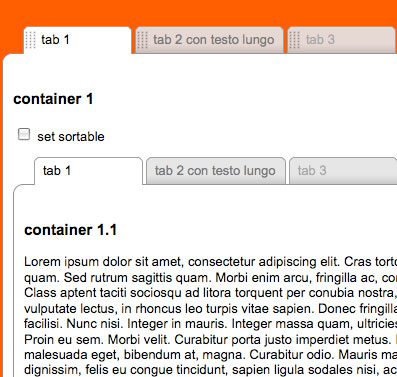
keep your tabs ordered!
A useful component that let you build a tabbed interface really easily; ad you can even sort your tabs as you want!
demo page:
http://www.open-lab.com/mb.ideas/index.html#mbTabset
download page:
http://mbideasproject.googlecode.com/files/jquery.mbTabset.1.9.zip
jQuery project page:
http://plugins.jquery.com/project/mbTabset
Releases:
1.8 (New!)
minor bugfix:
Now the Ajax content is call just if the tab is the one visible or if you click on it.
1.7
Major bugfix:
- Fixed a bug that prevent to send ajaxData with the ajax call option.
1.6
Major issues:
- added the possibility to choose the startup tab :
if you need to start with a different tab than the first just add a “sel” class to the a attrubute of your tab:
class=”tab sel {content:’cont_1_2′}”
1.5
Major issues:
- added the possibility to load ajax content.
You now can pass other two params:- ajaxContent, containing the url of your ajax page
- ajaxData, containing the params to pass
- even if your tab content is called via ajax you have to specify the “content” param with the ID, needed to build the container for the ajax conent
I had to chang the html code to simplify the tabset constructor:
- the param called “container” now is “content“
- now it’s not anymore needed the wrapper div of each tabset contents with class “mbTabsetContainer”
- the tab contents can be written everywhere in the page
1.0
first release.
Dependencies:
ui.core.js
ui.sortable.js
optional:
jquery.metadata.js
How does it works:
here is the js call:
1 2 3 4 5 6 | $("#tabset1").buildMbTabset({ sortable:true, position:"left", start:function(){}, stop:function(){} }); |
here is the code for each tabset:
1 2 3 | <div class="tabset" id="tabset1"> <a id="a" class="tab {content:'cont_1'}">tab 1</a> <a id="b" class="tab { |
1 | content |
1 2 | :'cont_2', ajaxContent:'yourAjaxPage.jsp', ajaxData:'a=1&b=2&...'}" >tab 2 con testo lungo</a> <a id="c" class="tab disabled { |
1 | content |
1 2 | :'cont_3'}">tab 3</a> <a id="d" class="tab { |
1 | content |
1 2 | :'cont_4'}" >tab 4</a> </div> |
here is the code for each tabContent:
1 2 3 4 5 6 7 8 | <div style="padding:10px" id="cont_1"> <h3>container 2</h3> </div> <div style="padding:10px" id="cont_2"> <h3>container 2</h3> </div> <div style="padding:10px" id="cont_3"> <h3>container 3</h3></div> <div style="padding:10px" id="cont_4"> <h3>container 4</h3></div> |
Params
- sortable: (boolean) define if the tabs are sortable or not
- position: (“left” or “right”) define the tabset position
- start: (function) a callBack function on start sort
- stop: (function) a callBack function on stop sort
- to set a tab disable just add “disabled” to the tab class
- to load tab content via ajax just add: class=”tab sel {content:’cont_1_2′, ajaxContent:’your ajax page url’, ajaxData: ‘data you want to send’}”
to store the new position of the tabs there’s a variable
1 | $.mbTabset.mbTabsetArray |
that returns an array with new tab position each time a sortable action is completed; this variable is cross tabset so the best is to store on stop event via ajax. You can also use the UI method via:
1 | $(<strong>your tabset id</strong>).sortable("toArray") |
or
1 | $(<strong>your tabset id</strong>).sortable("serialize"). |
You can also switch a tabset between sortable or not by invoking:
1 | $( |
1 | <strong>your tabset id</strong> |
1 | <strong> </strong>).setSortableMbTabset() |
to set sortable
or
1 | $( |
1 | <strong>your tabset id</strong> |
1 | ).clearSortableMbTabset(); |
to destroy sortable


Hi Swathi,
can’t understand what do you mean…
do you have a public page where to see the issue?
Bye,
Matteo
Hi ,
I have s:file upload tag in my jsp.and one sx:autocompleter tag.
if i change the element in sx:autocompleter the ajax to work.
But the s:file tag is preventing not to work ajax properly.
Can you give me some idea.Pls…..
Im trying this for past one week…..
Thanks in advance.
If you disable sorting, so the tabs do not be sorted – do you need to have ui.sortable.js as part of the jscript includes? Since I do not want sort, I am wondering if I can make the jscript more compact by not including it.
Thanks,
Kenneth
I got it to disable and enable at runtime, the only problem I’m having when I enable it is that it draws and extra container below the original…otherwise, it works…I was hoping there would be a simple solution, but I guess not…
First can I add to the congratulations! Looks great and really easy to get something up and running. I have two small issues which I hope you can help with. I am building an app which has a main menu of tabs.
1. Each tab calls a separate php page. Within that page, users can update, sort, select, etc. which requires a post of the page itself. If I implement ajax call as you have done in the demo, it updates every time I select the tab, but if I try and post it brings up the page over my main page. If I implement as non-ajax with a div and an iframe within the div, then the page itself works fine within the iframe, but does not refresh when I re-select the tab. Any thoughts?
2. Is there anyway to prevent clicking another tab until the user has selected either save or cancel on the tab they are on? Otherwise I can see people filling in the form and then navigating away without saving.
Sorry it’s so long, but wanted to give as much as I can since I can’t show it to you directly.
Once again, many thanks for your work, and I hope the answer is easy!
Cheers
Ross Holland
to insert jscript or css in smarty -php just use the tag {literal}{/literal} like this
css
{literal}
TD {border: none; font-size: 8pt}
{/literal}
or js(jquery)
{literal}
{/literal}
Sorry but I don’t know how Smarty works…
code in tabset, in , in SMARTY don’t work.
How to put in SMARTY?
Hi Ken,
you are right, actually thers no callback function for tab selection…
to solve your problem you can modify mb.tabset.js:
add after line 65:
add after line 90:
change line 93:
on your page you can now add as metadata the function you need:
Hope this is clear,
Bye,
matteo
Hi Matteo,
Nice looking set of tabs. Simple to implement. I have a question. Is there an event that fires or a way to register a callback as the user switches tabs? I have 5 tabs with forms on each and I would like to set the focus() to the first form field input on the tab as the user switch to it.
Ken
[…] Posted by hoirul07 in JQUERY. Leave a Comment tekanan demi tekanan datang dan memaksa untuk mencoba seni design, setiap tampilan yang aku buat selalu terlihat kurang bagus dimata client. hingga akhirnya lihat plugin JQuery Mtab jquery mtabs […]
Hi Matteo,
I have had a small win with this issue although it may not be the answer for all.
Line 541 & 542 of the jquery-1.4.2.js was causing my problem. This seems to end up with some type of Postback in some lower level js I did not have access to. In the time honoured “trial & error” debugging methodology I decided to comment out:
and it worked (for me). I have had no resulting issues with this in the last few days.
Maybe somebody else could put there finger on why this works for me.
And yes I used the IE 8 Developer tool to narrow this down.
I hope this may help somebody else
Glen
Hi Glen,
Can you be more specific with the javascript error?
can you inspect the code with the Developer Tool of IE8?
That could be helpful to understand the error type and if it depends by the Ajax or maybe by some HTML code that get broken by the Ajax call…
Bye
Matteo
Hi Matteo,
Great plugin! It is great to be able to deliver a tab set such as this on my intranet page.
But I am having a problem with Ajax content or I believe it is ajax. And it is on IE8…
Each one of my tabs refers to other pages through ajax but as soon as I go to another tab I get the error:
” ‘theform.elements.length’ is Null or not an object”.
If I ignore the error and go back and forth through the tabs I eventually get an error box stating:
SysFader:iexplorer.exe – App;ication Error
The instruction at “an address” referenced memory at “that address”. The memory could not be “written”.
Funny enough (or not funny) I have tried it using FF and there is no problem. But I need to have it working in I.E..
Would you have any suggestions?
cheers
Glen
Hi Tom,
there are two methods to preload contents in your tab:
1. you have $.fn.mb_changeContent();; this method set to the tab the url and tha DATA you need to load on it, but it doesn’t load the content.
2. than $.fn.mb_drawAjaxContent() ; this method load the content specified into the tab without showing it; so, once you click on the tab the content is already loaded.
So you can call them sequencially for all your Ajax tabs to obtain your issue:
Hope this helps you,
bye
Matteo
Thanks for the great jQuery plugins!
I wonder if there is a way to specify that the tabs are pre-loaded one after another? Pre-loading would help to give users the perception that my application is fast. In the application, users will look at the tabs in an order. While they are looking at the first tab, the following tabs are pre-loaded, so that tab switching is instantly.
It’ worked 😀
Thanks Matteo. It works fine now.
It seems it’s some kind of limitation on webhosting provider side.
Cheers
Rick
Hi rick,
This could be a server problem, anyway you can change the send method from POST to GET at line 279 of mbMenu.js.
Bye,
Matteo
Hi all,
I’ve got the same problem. Ajax content is not loading.
It runs fine when testing on the machine.
Once i upload on the server ajax contents are not loaded.
Using Fiddler got to this:
>405 Method Not Allowed
>Method Not Allowed
>The requested method POST is not allowed for the URL
Any help?
this is ridiculous! good job!
great plugin, works well on all browser.
thank you
great work
F.
Great Erik,
happy to make you happier 🙂
bye
Matteo
Hi
Just wanted to tell you that I used mbTabset for http://www.easypolls.net
Thanks for the plug-in! It looks so much better after I switched from the standard jQuery tabs.
Cheers
I am doing that … did not help.
I think it is something else.
Hi Harsh,
instead of writing:
var ajaxUrl1=”http://www-scf.usc.edu/~hsheth/myWebsite/hsnetworks.html”;
try:
var ajaxUrl1=”hsnetworks.html”;
that should work…
Another think I notice is that you are including jQuery 1.2.6 and you should include the 1.3.2 version instead for the UI components…
bye,
Matteo
My URL is relative. I just cannot see the ajax content. It is always empty.
Please check whenever possible.
Thanks a ton Matteo. And yes, enjoy your holidays.
Hi Harsh,
What kind of error do you get?
I’m in holiday now and I’ve my computer broken so I can’t debug; did you try with a relative url instad of an absolute one?
I’ll take a look at your cond as soon as I’ll have my computer back.
Bye,
Matteo
I am facing problem that when I run my file locally, just by opening the html file with ie or ff , ajax works fine, it fails to load.
Here is the link.
http://www-scf.usc.edu/~hsheth/myWebsite/hsother.html
trust me it works if u download all the files locally and run it with a browser.
Sorry,
now, it’s work.
thank you very much.
peter
Sorry Matteo,
i’ve had an old file of tabset.js
I’ve updatet this.
now, it’s work.
Thank you very much.
mbtabset is great!
bye
peter
Hallo Matteo,
thank you for your answer, but it doesn’t work.
I couldn’t find the function mb_changeContent an mb_drawAjaxContent in the js source.
I think, that’s the problem.
peter
Hi Peter,
to change your tab content on the fly:
<!–if you want to change the content of a tab container just call this function:–>
<span onclick="$(‘#b’).mb_changeContent(‘content_3.html’,”);$(‘#b’).mb_drawAjaxContent();">change content</span>
<!– that cuold be set also in your ajax content –>
bye,
Matteo
http://pastebin.com/m7d715842
Hallo Matteo,
thanks for answer.
Tabset code:
Test
inside the test.html is a small picture with an description, on click on the image (or anything other) i will load a other file (test2.html) inside cont1.
i have also create a div, called cont1_1 with a new js call.
Do you understand? 🙂
Thanks
peter
Hi Peter,
How do you call the other content?
could you send me your code to better understand your issue?
bye,
Matteo
Hi Matteo,
MBTabset 1.8 is great.
I have one question:
after initialize the tabset i will load in an ajax content, a other content via ajax with a simple link
it doesn’t work
thanks for help
peter
Hi Andreas,
Sorry but I don’t understand your needs…
What do you mean by menu button?
bye,
Matteo
is there any way to link from inside cont_1 div , so a iframe opens in the content area and without having a menu button?
Hi Bryan,
all my components are under MIT license.
Bye,
Matteo
I was wondering what your license is for this code?
the link is broken from jquery. Before I implement it into a commercial site, wanted to make sure.
http://pupunzi.wordpress.com/2009/04/01/mbtabsetmbtabset/
Found the problem. IE7 and Chrome do not like line break within the class attribute. I was generating something like
TAB1
The class attribute may not have a line break, eg.
TAB1
Thanks again Matteo. mbTabset is a great jquery plugin.
Hi Matteo,
The MBTabset 1.8 is great. Thanks for making it available. My page works as expected nicely on FF, with ajax and static contents.
However, for some reason, I have problem on IE7 (Your demo code works perfectly with IE7)
On IE7 my exact same code that works in FF shows only the tabs and then all the content DIVs where they are declared. It seems that the content DIVs are not associated with the tabs, since they all show up outside of the tabs and the tabs do not have contents.
What could be the cause of this IE7 strange behavior?
Thanks.
tom
Hi Matteo,
that does the trick.
Thanks a lot
Nikola
Hi Nikola,
that’s a little bug… to solve it just add “position:relative” to the class: .mbTabset, in the css file.
Bye,
Matteo
Is there a way to remove a border line on top in IE7? IE8 and FF are working OK but in IE7 border is always visible when the tab is selected.
Thanks
Nevermind, I found it in the css folder.
Hi I was wondering if there is a way to change the overall width of the table that the content is in. If you go to the page I am trying to use it on:
http://www.bremertonstores.com/store/product1762.html
You will see what I mean. Is there a way to make it not so wide?
Thanks.
Hi Erik,
At the moment you can’t enable or disable at runtime…
I’ll implement this functionalitiy in next release,
thnx,
Matteo
Hi
This was really nice, but I was wondering: How do you disable and enable tabs in runtime?
[…] DIRECT LINK » […]
Hi Peter,
yes, that’s the disabled example.
bye,
Matteo
In both demos tab #3 does not work … Ah, I see you’ve set it to disabled.
Hi Gab,
to show a specific tab:
after initialize the tabset.
Bye,
Matteo
Hi, nice tabs ! Is possible to show a specific tab when loading the page ? IE when open your demo.html show the content of tab4 instead of tab1
Thank you
Hi Anh,
Ther’s no way at the moment to set a single ab not reorderable…
I’ll work on it…
bye,
Matteo
Hi,
First of all, thanks for your great job (^_^)
questionl:
Is there a way to fix a tab to a certain position while others are sortable?
use case:
– fixed home tab
– sortable optional tabs