Comments
70 Responses to “jQuery (mb)Tooltip 1.6! a beautiful alternative”Trackbacks
Check out what others are saying...-
[...] Tweets about WordPress Plugin as of February 10, 2009 tjefford: Best tooltip jquery plugin http://pupunzi.wordpress.com/2009/02/07/mbtooltip/ 2009-02-11 05:55:31 · Reply · View 52teas: @365motorwerks I’ve been pretty [...]
-
[...] MB Tooltip [...]
-
[...] (mb)Tooltip is a beautiful tooltip for your webpage in Mootools. Simply by placing a “title” attribute with your content as value, and then you can replace the ugly default tooltip with this smart and nice one. You can also disable and enable (mb)Tooltip at anytime. [...]
-
[...] (mb)Tooltip is a beautiful tooltip for your webpage in jQuery. Simply by placing a “title” attribute with your content as value, and then you can replace the ugly default tooltip with this smart and nice one. You can also disable and enable (mb)Tooltip at anytime. [...]
-
[...] is install the script and your title tags will instantly get prettier! See Website for more info: (mb)ToolTip April 3rd, 2009 / Digg / Del.icio.us / Stumble / Reddit / [...]
-
[...] here, you might want to subscribe to the RSS feed for updates on this topic.Powered by WP Greet Box(mb)Tooltip is a A jQuery Tooltip Alternative For Your Site, you can use this Free jQuery Tooltip for your [...]
-
[...] 4. jQuery (mb)Tooltip [...]
-
[...] 4. jQuery (mb)Tooltip [...]
-
[...] 4. jQuery (mb)Tooltip [...]
-
[...] 4-jquery (mb)tooltip [...]
-
[...] 4. jQuery (mb)Tooltip [...]
-
[...] 5. (mb)ToolTip : http://pupunzi.wordpress.com/…/mbtooltip/ [...]
-
[...] jQuery (mb)Tooltip 1.6 [...]
-
[...] jQuery (mb)Tooltip 1.6 [...]
-
[...] jQuery (mb)Tooltip 1.6 [...]
-
[...] jQuery (mb)Tooltip 1.6 [...]
-
[...] jQuery (mb)Tooltip 1.6 [...]
-
[...] 32.Container Plus [...]
-
[...] 32.Container Plus [...]
-
[...] 8. (mb)Tooltip [...]
-
[...] 8. (mb)Tooltip [...]
-
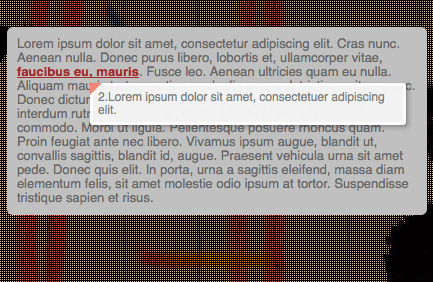
[...] (mb)Tooltip 1.6 will take your regular link “title”s and design a nicer looking tooltip from them. [...]
-
[...] 9. Replace Your Default Tooltip with Pretty (mb)Tooltip [...]
-
[...] 8. (mb)Tooltip [...]
-
[...] (mb)Tooltip 1.6 will take your regular link “title”s and design a nicer looking tooltip from them. [...]
-
[...] 9. Replace Your Default Tooltip with Pretty (mb)Tooltip [...]
-
[...] 8. (mb)Tooltip [...]
-
[...] 25. Replace Your Default Tooltip with Pretty (mb)Tooltip [...]
-
[...] 8. (mb)Tooltip [...]
-
[...] jQuery (mb)Tooltip 1.6! [...]
-
[...] jQuery (mb)Tooltip 1.6! [...]
-
[...] Container Plus [...]
-
[...] 6. (mb)Tooltip [...]
-
[...] 8. (mb)Tooltip [...]
-
[...] 25. Replace Your Default Tooltip with Pretty (mb)Tooltip [...]
-
[...] 8. (mb)Tooltip [...]
-
[...] 8. (mb)Tooltip [...]
-
[...] 8. (mb)Tooltip Beautifully made tooltip with nice transition for input fields. [...]


Hi Matteo,
can’t let the script work well with jQuery.noConflict(); , firebug always tells me that “$ is undefined”.
Hi, nice work, one of your demo pages is not loading.. javaScirpt Tree demo. browser saying page not found.
hey, one more note on the Button styles,
FF2 fails to render them correctly,
to fix this issue:
i added: to A tag
display:block; /*opera*/
display:inline-block; /*ie*/
display:-moz-inline-box; /*ff*/
else button width will go out of control in FF2 and maybe other browsers.
Hi Nilesh,
Thank a lot for your bugfix!
I’m not using FF2 anymore and I couldn’t test it.
Thnx again.
Matteo
Hi,
I was looking for a tooltip jquery plugin with an enable/disable capability, and thus was very happy to found your plugin. Anyway, I’ve found two little bugs:
1) Options shadowLeft and shadowTop are not taken into account. You may change the call to dropShadow to $(“#tooltip”).dropShadow({left: this.options.shadowLeft, top: this.options.shadowTop, blur: 3, opacity: 0.4, color:this.options.shadowColor});
2) disableTooltip and enableTooltip won’t work in IE6 (and possibly other browsers), because the tooltipEnable attribute is not a string: change attr(“tooltipEnable”,false) to attr(“tooltipEnable”,”false”) (and same thing for true). Three changes in the code.
Thank you for this plugin.
Hi Medou,
Thnx a lot for your contribute!
I’ll incude your suggestions on next release.
Bye,
Matteo
Hi, I just wanted to say that you make some of the most awesome stuff I see over on the jquery plugin page. Thank you for providing these for general consumption.
Hey MAN!
Thank you very much, very nice plugin!
Best Regards
Elman Vebs aka pompey
Hi,
I use your mbTooltip plugin for a project that I’m developing and I love it. However, I was integrating it with the ui.dialogs plugin, displaying tooltips inside the dialog itself and I found that, since dialog assign their own z-index dynamically, the tooltip will always show in the back. To fix this, I did two things. First, I added a new option in your options object named afterShow, which takes in a function. Then, at end of the buildTooltip function I added:
if(typeof(this.options.afterShow) == “function”)
this.options.afterShow(this, $(“#tooltip”));
This makes it so that if a function is assigned to the option aftershow, it runs it after the tooltip is shown.
Second, on my tooltip declaration, I add the option:
afterShow: function(i, e)
{
var z = i.closest(“.ui-dialog”).css(“z-index”) + 10;
jQuery(e).css(‘z-index’, z);
}
This ensures that the z-index is updated to always be in the front.
I did not know if you were interested in code contributions (I couldn’t find a place to contact you directly), but I figure I post it in case is helps someone.
Please feel free to contact me if you would like to see the actual file modification.
Thank you for a great plugin!
German Kalinec
Thnx German.
A more generic way to be shure the tooltip is in front of all the other elements:
jQuery.fn.mb_BringToFront= function(){var zi=10;
$('*').each(function() {
if($(this).css("position")=="absolute"){
var cur = parseInt($(this).css('zIndex'));
zi = cur > zi ? parseInt($(this).css('zIndex')) : zi;
}
});
$(this).css('zIndex',zi+=1);
};
and then add after line 102:
$(".dropShadow").mb_BringToFront();$("#tooltip").mb_BringToFront();
hi Matteo,
how to disable tooltip, any parameter to tweak, at page startup? thanks.
# Chan
Hi Chan Su,
to disable tooltip at startup add: $(document).disableTooltip()
just after initializing tooltips.
bye,
Matteo
it works great now. thanks Matteo!
ciao matteo, utile questo script. ho notato però che con ie, vicino all’angolo rosso in alto a sx c’è una piccola ombra. sai come è possibile rimuoverla?
Ciao Titti,
hai provato a inizializzarlo senza ombra?… hasShadow:false
oppue a togliere la freccina rossa: hasArrow:false (noi, nelle nostre applicazioni, lo usiamo senza freccina ed il difetto che descrivi non c’è…
ciao,
Matteo
Matteo, I keep getting the following error in Firefox (v3.0.11):
Error: setting a property that has only a getter
Source File: http://localhost/lib/js/mbTooltip.js
Line: 29
Here’s line #29: “fade:200″
In IE8, I get this error:
Message: Not implemented
Line: 16
Char: 7
Code: 0
URI: http://localhost/lib/js/mbTooltip.js
Any ideas? Love your work, by the way!
Is there a way to have line breaks in a tooltip? Also, your sample shows use of a “tooltip” attribute whereas the docs say the “title” attribute is used.
Thanks, great work.
Hi ChrisP,
for the line breaks:
just add a BR tag in your title text.
You are right,
the tooltip attribute was not W3C compliant; you have to add just the title…
I’ll correct the demo.
bye
Matteo
MB needs work, the interface is very laggy.
Hi,
what do you meen by laggy?
Why don’t you be more specific?
bye
Matteo
Good tooltips, sorry but I must say you have the worst demo page.
very thankssss!!!
very thankssss
Hello Marco,
i have found your script is not working correctly if you quickly change target.
For example: if i have 2 images side by side, both with title attributes and you change quickly from first to second, the second one will not show the tooltip. In this case you must leave and return on it to see the tooltip.
Any suggestion?
Another thing: sometimes the tooltip flickers if it’s positioned too close to the mouse cursor and you go over it
I “fixed it” temporarily just increasing the space between the tooltip and the mouse cursor.
Ciao Matteo,
Great stuff!, I love the tooltip but I am having trouble to make it live with the thickbox.
Somehow if your plugin is in place the thickbox doesn’t work at all. Any Idea?
Thanks a lot for the kind attention.
Ivan
Hi Ivanet,
If you debug your page with a developer console (like firebug in firefox or the developer tool in IE8) you can catch exactly what is the error fired by thickbox; that is needed to understand what is incompatible with the two scripts.
Bye,
Matteo
Ciao, lo script attualmente funziona andando a creare un tootltip ogni qualvolta è presente un riferimento title. Pensate sia possibile fare in modo che lo script funzioni solo se il tag title è presente in un link con una certa classe (ad esempio “info”)? In che modo? Ho fatto delle prove ma senza successo. Grazie mille
Hallo, the script at the moment works creating a tooltip everytime there is a title reference. Do you think could be possibile make work the script only for title inside a certain class link (for example “info”)? In which way? I have tried but unsuccesfully. Thanks a lot!
Ciao Alessandro,
ho notato che se viene attivata la funzione “live” (che permette di inizializzare il tooltip su elementi caricati on the fly sulla pagina, diventa impossibile (allo stato attuale) circoscrivere la funzionalitèà ad elementi specifici del DOM.
Un Workaround può essere di intervenire sul codice :
linea 37:
if (this.options.live)$("[title]").live("mouseover",function(){$(this).mbTooltip(options);});deve diventare:
if (this.options.live)$(".tuaClasse[title]").live("mouseover",function(){$(this).mbTooltip(options);});linea 38:
var ttEl=$(this).is("[title]")? $(this): $(this).find("[title]");deve diventare:
var ttEl=$(this).is(".tuaClasse[title]")? $(this): $(this).find(".tuaClasse[title]");Al più presto pubblicherò il bugfix per gestire questo caso.
Ciao,
Matteo
Grazie Matteo, ho provato il tuo suggerimento e funziona! grazie mille per il supporto e la velocità
very thenks admin
I just downloaded this nice JQuery plugin but for some reason it was displaying the tooltip at location 0,0 all the time and the anchor setting was set to “mouse”. I looked in the mbTooltip.js file and the mb_getXY function had:
$().bind(“mousemove”, function(e) { …
I changed it to include the DOM object reference document for JQuery
$(document).bind(“mousemove”, function(e) { …
Not sure why it was missing but it definitely missing in the file now available for download.
Hi Niko,
in jQuery 1.3.x $() was a shortcut for $(document). With jQuery 1.4 this shortcut has been removed. That’s why you find this bug…
I update the downloadable file; thnx
Matteo