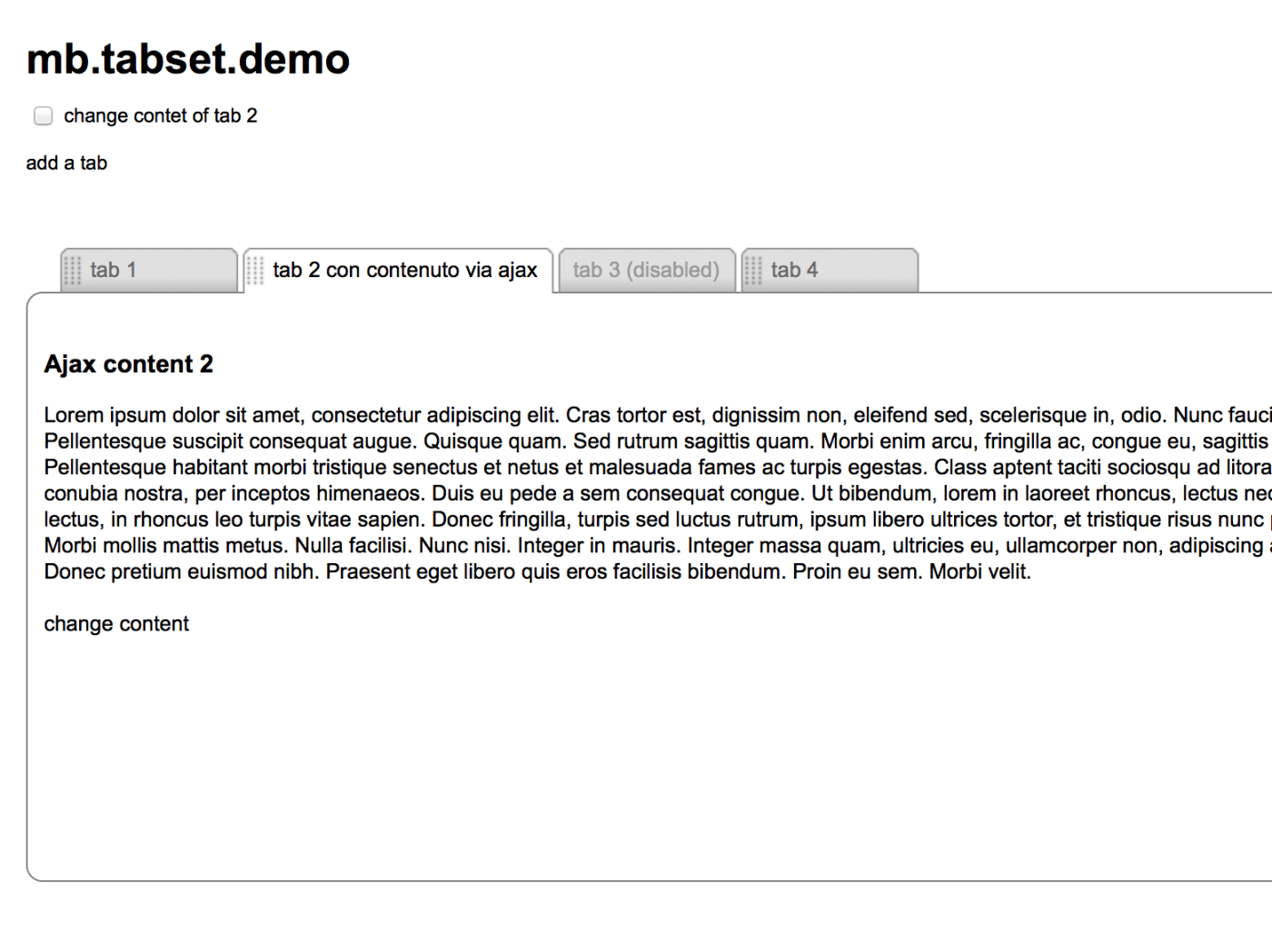
jquery mb.tabset

mbtabset1

keep your tabs ordered!

A useful component that let you build a tabbed interface really easily; ad you can even sort your tabs as you want!

demo page:

http://pupunzi.com/#mb.components/mb.tabset/tabset.html

download page:
http://mbideasproject.googlecode.com/files/jquery.mbTabset.1.9.zip

jQuery project page:
http://plugins.jquery.com/project/mbTabset

PayPal

Releases:

1.8 (New!)
minor bugfix:

Now the Ajax content is call just if the tab is the one visible or if you click on it.

Dependencies:

ui.core.js
ui.sortable.js

optional:
jquery.metadata.js

How does it works:

here is the js call:

$("#tabset1").buildMbTabset({
sortable:true,
position:"left",
start:function(){},
stop:function(){}
});

here is the code for each tabset:

<div id="tabset1">
<a id="a">tab 1</a>
<a id="b"  >tab 2 con testo lungo</a>
<a id="c">tab 3</a>
<a id="d" >tab 4</a>
</div>

here is the code for each tabContent:


<div style="padding:10px" id="cont_1">
<h3>container 2</h3> </div>
<div style="padding:10px" id="cont_2">
<h3>container 2</h3> </div>
<div style="padding:10px" id="cont_3">
<h3>container 3</h3></div>
<div style="padding:10px" id="cont_4">
<h3>container 4</h3></div>

Params

  • sortable: (boolean) define if the tabs are sortable or not
  • position: (“left” or “right”) define the tabset position
  • start: (function) a callBack function on start sort
  • stop: (function) a callBack function on stop sort
  • to set a tab disable just add “disabled” to the tab class
  • to load tab content via ajax just add: class=”tab sel {content:’cont_1_2′, ajaxContent:’your ajax page url’, ajaxData: ‘data you want to send’}”

to store the new position of the tabs there’s a variable  $.mbTabset.mbTabsetArray that returns an array with new tab position each time a sortable action is completed; this variable is cross tabset so the best is to store on stop event via ajax. You can also use the UI method via:

$(your tabset id).sortable("toArray")
or
$(your tabset id).sortable("serialize").

You can also switch a tabset between sortable or not by invoking:

$(your tabset id ).setSortableMbTabset() to set sortable
or
$(your tabset id).clearSortableMbTabset(); to destroy sortable

History:

1.7
Major bugfix:

  • Fixed a bug that prevent to send ajaxData with the ajax call option.

1.6
Major issues:

  • added the possibility to choose the startup tab :
    if you need to start with a different tab than the first just add a “sel” class to the a attrubute of your tab:
    class=”tab sel {content:’cont_1_2′}”

1.5
Major issues:

  • added the possibility to load ajax content.
    You now can pass other two params:
  • ajaxContent, containing the url of your ajax page
  • ajaxData, containing the params to pass
  • even if your tab content is called via ajax you have to specify the “content” param with the ID, needed to build the container for the ajax conent

I had to chang the html code to simplify the tabset constructor:

  • the param called “container” now is “content
  • now it’s not anymore needed the wrapper div of each tabset contents with class “mbTabsetContainer”
  • the tab contents can be written everywhere in the page

1.0
first release.

Comments
72 Responses to “jquery mb.tabset”
  1. Hi,

    first of all, you did a great job with this plugin.

    I would like to know if there is a way to make a link from another page to a tab page on a specific Tab which is not the sel one ?

    • Hi Jean-Philippe,
      I’ve no methods built in to do such things but you could build your own function:
      A. call your page adding an anchor pointing to the ID of your tab:
      http://yourSite.fr/yourPage.html#yourTabID
      B. in the page add a function that split the location.href, get the ID of the tab, open the tab:


      $(function(){
      function openTab(){
      var myTab= self.location.href.split("#")[1];
      $("#"+myTab).click();
      }
      });

      That should open the tab you required.
      Bye,
      Matteo

      • Great, it works perfectly.

        You only forget a quote in the line var myTab…, it is :
        ….split(“#”) and not split(“#)

        Thanks a lot

      • KJ says:

        Hi guys,

        I really love the simplicity of this. However, I simply can’t get the open-#tab2 to work through a link inside an include in #tab2, and then call the same tab within the href.

        This href has some more values in it to pass along as well. It’s a simple recall to the same page, but content is loaded in tabs through php includes.

        The simplicity of it, is probably my lack of skills :)

        Thanks for any answer!
        kj

  2. sebastian says:

    Hi Matteo,

    great plugin!
    Is it possible to have scrollbars just on the mbTabsetContainer pane? One on the right side and one on the bottom. This is e.g. for scrolling a pic that is 3000px wide and 3000px high. I have tried 100% height at various places, but no success.

    -Sebastian

    • Hi Sebastian,
      you can set this properties by modifying the .mbTabsetContainer CSS class: add a fixed width, a fixed height and set the overflow to “auto”.
      Bye,
      Matteo

  3. Eric Viana says:

    Hi Matteo, the link I put on Website is my problem.
    Well, I try to put one table inside a tab and if you click in my link http://www.flast.com.br/succimais.htm you will see the table out of tab. When I put the same links without a table it works, but inside a table does not…

    How can I fix this problem? Tks for support!

    • Hi Eric;
      Opening your page into an Editor it higlights some HTML errors (tables that doesn’t close; close div TAG without OPEN…) and that causes your problem…
      I’ve no time to verify where exactly are your error, but if you reformat the HTML I’m shure it will work.
      Bye,
      Matteo

  4. banny says:

    hi
    we would love to have a tutorial from u some day
    u have excellent work :)
    thnx

  5. Noah says:

    Is there any chance that we can see a tab design which only consists of single containers?

  6. George says:

    Hi

    Nice plugin. a couple of issues:

    I am using it with Oracle APEX. I tried setting one of the divisions to use an Oracle stored procedure which prints out a google map…the whole page went into an endless loop. any ideas?

    also could you provide with concrete example for the ajax web source of a tab? say I want to call a procedure thats on http://somehost:someport/apex/proc123 and this procedure takes parameters p1 and p2….how would I call it?

  7. Cory says:

    Hi Matteo, this is the same Cory from the mbContainers page. I am the guy that had the funky Ajax Routine you made a new one for!!!

    Well, anyway… I have been through 4 tab programs and none of them work with all the other javascripting I have going on… except your! :)

    QUESTION: Do you have a remove tab feature? I see the add tab, looks fine.. but I need to be able to remove a tab too. Going to make a screen where user clicks on internet-desktop icon and contents of folder opens in new tab. So remove tab would be important for complete functionality.

    Thanks Matteo!

    Cory

    • Cory says:

      NEVERMIND….. I figured it out!

      Close Pane

      • Cory says:

        -DIV- onclick=”$(‘#cont_2′).remove();$(‘#b’).remove();”>Remove -DIV-

      • Cory says:

        oops… remove causes it to make tabs scripting loose it!

        hide actually works…

        -DIV- onclick=”$(‘#cont_2′).hide();$(‘#b’).hide();”> Remove -/DIV-

      • Hi Cory,
        I’ll shortly provide a remove tab method.
        Bye,
        Matteo

      • Cory says:

        Dude, you are awesome! How do you find the time?

        FYI, when I think about it, not only does your tab-set not have any conflicts with other JavaScripts, which seams to be a known issue, but with a remove tab feature… your tabs will be the most fully functional tab-set available.

        I reported to JQuery-UI that their tabs failed in a fully loaded environment, and that it only worked when I had placed a second copy of tabs.js at the end of all JavaScript call tags, (And that if either copy of tabs was removed it also failed) my post was marked as a known problem. Even JQuery Tools tabs fails. But not MBTabs!!! :) So good work! I assume you pay attention of variable names. :)

        ——————————-
        A script I was thinking of writing myself because I can’t find it anywhere is a script that gets all of the JQuery UI Themes values and places them in variables so that you can then assign CSS values to objects directly on my custom built elements in the program. This will allow me to keep the same concept in my program where to create a custom theme all one does is….

        1) Use themeroller and create theme
        2) Download the zip file
        3) Extract the folder /css/ and upload it to the programs theme folder
        4) Re-Name the /css/ to the name you want to call/title this theme.
        5) Rename the *custom.css file to theme.css
        6) Start program and execute theme changer etc etc etc

        The reason for this is because like in your tabs program I wanted the ui-widget-content settings applied to mbTabsetContainer allowing “whatever” theme is selected to be applied to tabs without any client-side css file tweaking required.

        Have you heard of such a thing?

      • Cory says:

        EXAMPLE of what I am talking about in the above message:

        1
        2
        3
        4

        $(document).ready(function(){
        // Tab Content Area Background
        var contentBackGround = $('.ui-widget-content').css('backgroundImage');
        var contentBorderColor = $('.ui-widget-content').css('borderColor');
        var textColor = $('.ui-widget-content').css('color');

        $(".mbTabsetContainer").each(function (i) {
        $('.mbTabsetContainer').css("backgroundImage",contentBackGround);
        $('.mbTabsetContainer').css("borderColor",contentBorderColor);
        $('.mbTabsetContainer').css("color",textColor);
        });
        });

  8. Cory says:

    Oops… something happened… One little intermittent problem popped up. I have the easing plug-in and every once in a while it produces an error causing failure. Not on every load either. I am not actually using easing yet in build #9 of my program so not really an issue for me. I may not even use it at all in the end. But just thought you might want to know about it.

  9. Kai says:

    I’m also interested in the remove method – it’s a necessary method to use tabs effiziently.

    Another idea (can be handled outside, but inside would be more effective) is a setting (option) for a tabset, to define whether requested URIs will be opened in a new tab every time or only, if not already opened.
    If the URI is already opened, the contaning tab could get the focus.

    Hav a nice day.

  10. Kai says:

    Additional to my last entry:
    If you simply provide a
    return tab;
    as last line in addTab, the object – respectively a reference to – can be stored in a local variable.
    I have a menu with several entries – each of them will display data in an own tab.
    But if the content is already displayed in a tab this tab should be focussed, not be opened in another tab.

    All entries in the menu call hwp_execaction():

    var openedUriInTab = new Array();
    function hwp_execActionImg(actionName, menuLabel, imgPath){
    if (typeof openedUriInTab[actionName] != ‘undefined’){
    $(openedUriInTab[actionName]).selectMbTab();
    }else{
    openedUriInTab[actionName] = $(‘#tabset_hwp_main’).addMbTab({title:menuLabel, img_l:imgPath, ajaxContent:’index.php?hwp_method=doAction&id=’ + actionName});
    }
    }

    So …. if opend, addMbTab is called, otherwise selectMbTab.
    I think, returning ob tab could be useful for many others to in order to call selectMbTab().

    another little extension:
    extended “var tabOpt” in “addTab” to
    var tabOpt={
    id:”tab_”+$(this).find(opt.item).length+1,
    title:”newTab”,
    ajaxContent:”newAjaxContent”,
    ajaxData:”",
    img_l:”,
    img_r:”
    };

    and the $(this).append line to
    $(this).append(“” + (tabOpt.img_l != ” ? “” : ”) + tabOpt.title + (tabOpt.img_r != ” ? “” : ”) + ““);

    So you can display icons regarding to the tab content.

    • Kai says:

      Hmmm ..this is still not fully working a i thought.
      My expectation was, that the content of the tabs will be loaded when a tab is being added and not change, if you bring a tab to front.

      in the demo this behaviour is active (using checkbox “change content of box 2″.
      I use ajax option to define the content. when i click on tab b and then again on tab a, it’S content is being relaoded vie ajax request. so all forms are resettet.

      i find no option to suppress this reload – is there one ?
      If not it would be very helpful to have it.

  11. F.Saskian says:

    Hello. I think these tabs are very very good! Simple to use, minimal markup.

    Can you tell me what in the code sets the default tab to be selected when the script loads?

    Thanks.

    • Hi Saskian,
      just add “sel” as class of your default tab.
      Bye,
      Matteo

      • F.Saskian says:

        Thanks, Matteo!

        One other question: When enlarging text size 3 times in browser (standard procedure for my testing in FireFox), the tab graphics “jump” into the content area. I will investigate the CSS later today, but thought you’d like to know.

        — Fritz

  12. samih says:

    hi.

    I have problem with css (hover) property with this plug-in in IE7 it’s not working .

    i need someone help!

    • I samih,
      To let hover selector works in IE you need to specify the HTML tag to hum you are referring to.
      For example div.myClass:hover works but .myClass:hover doesn’t.
      Another cause could be the doctype declaration; IE7 in quirks mode it would never work.

      Bye,
      Matteo

  13. Guillermo Migliore says:

    Hi Matteo,
    Before all, thank for share your ideas.
    I hope you can help me. Implement your tabset in an experimental web site and I find the following problem: your tabset is inside a DIV. In some of the “panes” are forms that allow do a search. The results of those searches are sent using ajax to another DIV, called Resultados. I want to do, not achievement, is that by clicking in another tab, delete the contents of the DIV Resultados. Can you give me a tip of how to do that? Thank you very much.

    • Hi Guillermo,
      you have to ad another function to the click event of each tab of your tabset:

      Supposing that your tabset has ID “tabset1″, this is the function you have to place inside the $(function(){ }) of your page:

      $("#tabset1 a").each(function(){
      $(this).click(function(){
      $("#Resultados").empty();
      })
      });

      Bye,
      Matteo

      • Guillermo Migliore says:

        Hi Matteo,
        Thanks very much for your quick response.
        It works fine!
        Apprezzo molto il vostro aiuto e vi auguro buona fortuna (apologize for my bad Italian, but no formal knowledge inherited from my grandmother and my mother).

        Guille

  14. Guillermo Migliore says:

    Hi matteo, one more question: how do I refer to a particular tab? Let me explain: I have a tabset with 5 tabs. Each tab pane have inside a simple form with input field and a submit button. Until now the result of the query sent to a div outside the tabset, but now I want to experiment with. Append (html), sending the result to the pane of the tab active. Can you help? Thanks!

    • Hi Guillermo,
      the id of the tab contant is stored into te “content” attribute of the tab; so if you need to refer to the content of the active tab:

      var activeTab= $("#[yourTabsetID] .tab.sel");
      $("#"+activeTab.attr("content")).append(yourHTMLContent);

      Bye,
      Matteo

  15. Guillermo Migliore says:

    Thank you very much Matteo!

  16. Shoggie says:

    Hi Matteo, thank you for this wonderfull tabset plug-in!

    Did you find the time to implement a remove tab feature?

    Regads,
    Shoggie

    • Hi Shoggie,
      Not yet, sorry…
      bye
      Matteo

  17. dude says:

    Hi Matteo

    How can I adjust the spacing between individual tabs ?
    I would like to remove the space between tabs so that the tabs are closer together.

    Thanx

    • Hi dude,
      in my demo the tabs apparence is defined by background images that you can change; you can also play with the CSS file, remove background images, apply round corners… just experiment with CSS :-)
      Bye,
      Matteo

  18. Natalie K says:

    I am using tabset with two tabs and want to control content by href links onclick at top of page. when i first open the page I can switch to one of the other types of content but when i try to switch back it gives me an error and won’t change the content. It says $(“#b”).mb_changeContent is not a function. why would it work the first time and not the second?
    this is the code i’m using on the icon at top of page:

    this is code for tabs:


    Reports

    Analyzers


    <!–content 1–>

    http://main_content.html

    http://main_content_analyzer.html

    • Hi Natalie,
      I can’t read the code; the best would be a public link of the page so that I can see all the code and debug it.
      Bye,
      Matteo

      • Natalie K says:

        this is the page..
        http://www.momixperformancecenter.com:18080/pentaho/html/test.html
        use joe/password to login

      • Hi Natalie,
        I can’t understand really well wat’s going on, but what I suspect is that the first time you load the tab content from the top links some extra javascript loaded into the actual page has conflicts with my component. Be careful that you are also including jquery every time you load tab content; remember that content are inserted via ajax and that means that you are not changing the page where you already have jquery, css and so on…

        Did you try loading some other content than the tow pages you are includig to test if the problem is generated by those page content?
        Another think that can break the code is that pages you are including as content of the TAB has all the header TAGS of the HTML page; you should include just the content via ajax, not all the HTML; so try to leave only the BODY content in the page and remove HTML, HEAD, BODY tags.
        If you take a look at my examples you can see that the page I’m including are simply a part of an HTML structure.

        Let me know,
        Matteo

  19. dude says:

    Hi Matteo

    Could you clarify how to store and retrieve the new tab positions for a single tabset consisting of say 10 tabs, each time a sortable action is completed. If possible, I would like to store the new tab positions in a JavaScript array.

    Would be helpful if you had some sample code for this.

    Thanx!

    • Hi Dude,
      there is a global variable ($.mbTabset.mbTabsetArray) where are stored the sequence array of the sorted tabs IDs; you can store it in a cookie and make your own function to order your tab sequence before initialize the tabset component.
      I’ll work on a method to reorder the tabset based on a given array for the next release.

      Bye,
      Matteo

  20. dude says:

    Hi Matteo

    I love this Tabset Plugin & you did a great job with it !!

    But i’m experiencing one recurring Problem while using it..

    Every now & then while using my application, the Tabset goes totally Berserk… meaning the Tabs disappear leaving just the text in their place… it also looks like the Tabset CSS disappears & the Tabset just uses the page default… the Tabset also becomes extremely unresponsive.. .. .. .. etc.. etc…
    Essentially, I am forced to either reload the Tabset page or else close & re-open the application.

    I don’t know enough about JQuery myself to tell what is happening, but it appears like maybe the Tabset is conflicting with other JQuery Plugin(s) in the application & this is causing it to crash. But this is just my guess.

    Any ideas on what may be causing this to happen or more importantly on what I could do to prevent it ??

    Thanx!

  21. nicedice says:

    Hi – great plugin well done!
    Just have one problem that I can’t seem to fix, I’ve got an accordion (from http://www.lateralcode.com/jquery-accordion-menu/) inside one tab and it’s causing the tabsetContainer not to resize to the desired height, it just stays at the minHeight.
    Any ideas?
    Thanks in advance.
    D

    • I should see your code to get what’s wrong; do you have a public url somewhere?

      • nicedice says:

        Hi Matteo – thanks for the reply.
        It seems the tabsetContainer doesn’t like and lists – have a look here:
        http://www.chaddertonestates.com/landlord.php

        Thanks in advance for any help.
        D

      • Hi,
        the problem is generated by the float:left css property:
        .post ul, .post ol {
        clear: both;
        display: block;
        float: left;
        font-size: 14px;
        line-height: 22px;
        }
        if you don’t have a clrear both ending element the float doesn’t push; remove the float property and it should work.
        Bye,
        Matteo

      • nicedice says:

        Thanks Matteo – I’ll give it a try and report back!
        Regards,
        D

      • nicedice says:

        Hi Matteo – yep that worked, after i placed a clear div at the end of the accordion and altered the float to none it worked a treat – thanks!
        next problem i’m having is implementing the function that you outlined for the first post by jean-philippe.
        when the menu is altered to go to the anchor it does but the specific tab doesn’t open. the same link i gave earlier applies to this problem to.
        Thanks very much.
        D

      • Hi Duncan,
        simply you don’t call the function:

        $(function(){
        function openTab(){
        var myTab= self.location.href.split("#")[1];
        $("#"+myTab).click();
        }
        openTab();
        });

        You can invoke this just if the tabset has been initialized before.
        Bye,
        Matteo

      • nicedice says:

        Hi Matteo – yep got that working too! Thanks for all your help, keep up the good work.
        Regards,
        D

        Off over to raise a question on the mb.extrude section now – have a problem on that too!

  22. ziggyz says:

    how do i change tab title. i am changing content but the tab title remains..
    just wondering if you guyz have something setup already.

    • ziggyz says:

      Matteo! You have an excellent plugin here and i loving it. Can you tell me how to change the tabs titles. i am sure its something simple… please let me know.

      • Hi Ziggyz,
        the tabs titles are defined into the HTML:

        <a id="a" class="tab {content:'cont_1'}" >tab 1</a>
        

        here the title is “tab 1″
        To change it just change the HTML.
        Bye,
        Matteo

      • ziggyz says:

        Sorry.. i missed the important part.
        1/ I am adding and updating the contents of tabs. So how do I refer to a tab to change its title when i am updating its content via ajax. I can load the content just fine, but the tab title needs to be changed as well.

        2/ On Another note related to Content of Tab changed via Ajax, What is the best way to manage this, like if i am changing content of Tab to a Form that will be submitted! how OR when do i include the jquery script related to that form. Ideally i would want to add the javascript as i change the contents of tab but then should i include that script in script tag with form? or is there another way to load javascript for new content loaded via ajax. Need your suggestion on this..

      • Ok,
        I think the best way to get both your needs is to add some javascript to the content you are loading via ajax.
        Anything you have on the content loaded will be fired once placed on the page; so you can have a javascript call that changes the title of your TAB and whatever else that is related to your form directly into the fragment you are loading in the page as tab content.

        You can also change the title via the “onSel” metadata defining a callback function that will be fired once you click on the tab:

        in the HTML:

        <a id="a" class="tab {content:'cont_1', onSel:'changeTitle(\'yourTabID\',\'MyTitle\')'}" >tab 1</a>
        

        In the JS:

        <script>
        function changeTitle(tabID, text){
           $("#"+tabID).html(text);
        }
        </script>
        

        Hope this can help you.
        Matteo

      • ziggyz says:

        of-coarse! thanks Matteo,
        this helps… just getting used to jquery…

        Appreciate your help and contribution!

      • ziggyz says:

        Matteo,
        Need your input here, following is my code!

        function changeTitle(tabID, text){
        $("#"+tabID).html(text);
        }

        function changeTabContent(tabID, tabtext, tabContentUrl, tabUrlData){

        changeTitle(tabID, tabtext);
        $("#"+tabID).mb_changeContent(tabContentUrl,tabUrlData);
        $("#"+tabID).mb_drawAjaxContent();

        }

        The above script is working however i loose the tab background when i use it. so the tabs loose their look. any ideas?

  23. Gwyn says:

    Just to say – thank you for your superb work and contribution to the internet.

    Gwyn

  24. kiarash says:

    Hi Matteo
    If I want to have this ability for Telerik : RadTabStrip , what I need to do?

    • Hi kiarash,
      Sorry but I don’t know how RadTabStrip works…
      Bye,
      Matteo

  25. yashmangupta says:

    Hi,

    Excellent plugin but want to ask whether can I use this plugin for commercial purposes free of charge or is there any cost associated to it.

  26. y8 games says:

    Good. Thanks for sharing

  27. kenanagkurt says:

    can u help me about add my html web site

Trackbacks
Check out what others are saying...
  1. [...] الرابط : http://pupunzi.open-lab.com/mb-jquery-components/mb-tabset/ [...]

  2. [...] mb.tabset (jQuery) [...]

  3. [...] mb.tabset (jQuery) [...]

  4. [...] mb.tabset (jQuery) [...]

  5. [...] → Demo →Simple Tabs (jQuery) Simple Tabs → Demo →Javscript Based Tabs Pluginsmb.tabset (jQuery) mb.tabset is a useful component that lets you build a tabbed interface really quickly and easily; [...]

  6. [...] mb.tabset (jQuery) [...]

  7. [...] mb.tabset (jQuery) [...]


Leave a Reply

Fill in your details below or click an icon to log in:

Gravatar
WordPress.com Logo

You are commenting using your WordPress.com account. Log Out / Change )

Twitter picture

You are commenting using your Twitter account. Log Out / Change )

Facebook photo

You are commenting using your Facebook account. Log Out / Change )

Connecting to %s

Follow

Get every new post delivered to your Inbox.

Join 133 other followers